

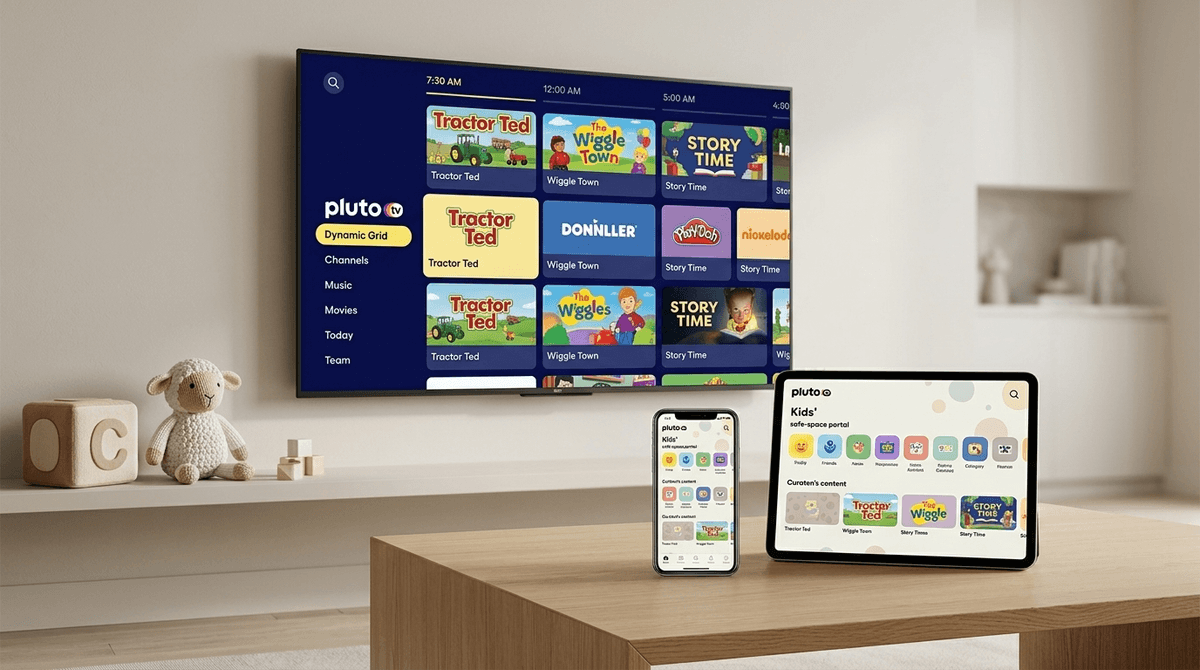
TL;DR: Pluto TV is the ultimate "I’m not paying for another subscription" hack. It’s free, legal, and looks exactly like the cable TV we grew up with. The catch? Heavy ad loads and a 2026 interface that tries very hard to keep you scrolling. If you’re using it for kids, Kids Mode is non-negotiable to avoid them accidentally stumbling into a CSI marathon.
Quick Links to Family Favorites on Pluto:
- For the Littles: Paw Patrol, Dora the Explorer, and Blue’s Clues.
- For Big Kids: SpongeBob SquarePants, The Fairly OddParents, and iCarly.
- For the "I’m Bored" Moments: LEGO City Adventures and the Garfield channel.
If you’ve managed to dodge the "FAST" (Free Ad-supported Streaming Television) trend until now, Pluto TV is the leader of the pack. Owned by Paramount, it’s basically a massive collection of "channels" that run 24/7.
Unlike Netflix or Disney+, where you spend 20 minutes deciding what to watch (the "scroll-paralysis" is real), Pluto TV just starts playing something the second you open it. It mimics the old-school channel-surfing experience. You want a channel that only plays Star Trek? They have it. A channel for 24/7 Classic Doctor Who? Yep.
In early 2026, Pluto rolled out its "Dynamic Grid" interface. It uses AI to predict what you want to "surf" based on the time of day. It’s slick, but it’s designed to keep the TV on as background noise—which is exactly how "accidental" screen time marathons start.
Kids love the "live" feel. There’s something about a show being "on" right now that feels more like an event than just clicking a thumbnail on YouTube.
For parents, the appeal is the price tag: $0.00. In an era where every streaming service is hiking prices and cracking down on password sharing, Pluto is a breath of fresh air for the family budget. Plus, because Paramount owns it, the content library is actually good. We’re talking about the heavy hitters from Nickelodeon and Nick Jr. without the $12/month Paramount+ bill.
Learn more about managing streaming budgets
If you haven't opened the app lately, the 2026 update changed the game. The "Smart Surf" feature now categorizes channels by "Vibe" rather than just genre. While this makes finding Teenage Mutant Ninja Turtles easier, it also means the app is more aggressive about suggesting content.
The new "Picture-in-Picture" browsing allows kids to keep watching a show while they scroll through other channels. It’s high-stimulation and can lead to that "zombie stare" we all try to avoid. It’s not quite "brain rot" level, but it’s definitely designed to maximize "eyes on glass."
Pluto TV’s library is massive, but it’s mostly "comfort food" TV. Here’s how to navigate the channels for your kids:
For Preschoolers (Ages 2-5)
Pluto has dedicated "Nick Jr." channels that are fantastic because they remove the "what do I watch next?" friction.
- Paw Patrol: The gold standard for this age group. It’s repetitive, safe, and teaches basic problem-solving.
- Blue’s Clues & You: Great for interactive engagement.
- Bubble Guppies: Music-heavy and educational.
For Elementary Kids (Ages 6-11)
This is where Pluto shines with the "90s and 2000s nostalgia" that we actually enjoy watching with them.
- SpongeBob SquarePants: There is a 24/7 SpongeBob channel. Use this with caution, or your living room will sound like a pineapple under the sea forever.
- The Loud House: Great for siblings to watch together as it deals with family dynamics (and chaos).
- Avatar: The Last Airbender: One of the best animated series ever made. If this is "on," it’s a win.
For Tweens and Teens (Ages 12+)
- The Legend of Korra: A bit more mature than Avatar, focusing on social themes and identity.
- Classic Sitcoms: Pluto has channels for Sister, Sister and Moesha, which are great "safe" entries into live-action shows.
Here is the "No-BS" part: The ads on Pluto TV can be annoying.
Unlike YouTube Kids, where ads are (theoretically) vetted for children, Pluto’s ads are more like traditional broadcast TV. You’re going to see commercials for insurance, fast food, and sometimes other Paramount movies that might be rated PG-13 or R.
Why "Kids Mode" is Mandatory
Pluto TV has a "Kids" section, but you need to ensure your child stays there.
- The "Kids" Tab: On the left-hand navigation, there is a dedicated Kids section. It filters the hundreds of channels down to about 30-40 safe options.
- No Account, No Control: One of the perks of Pluto is that you don't need an account. However, if you don't create one, you can't set a parental control PIN.
- The PIN: If you create a free account, you can lock the "Grown-up" channels behind a 4-digit PIN. Do this. Otherwise, your 7-year-old is three clicks away from a 24/7 Hell’s Kitchen marathon where Gordon Ramsay is definitely not using "family-friendly" language.
Check out our guide on setting up streaming parental controls
Since Pluto TV is free, it’s a great teaching tool for media literacy.
Kids today are used to "Skip Ad" buttons. Pluto doesn't have those. This is a perfect opportunity to talk about why the service is free.
- The Conversation: "We don't pay money for Pluto TV, so we 'pay' with our time by watching commercials. The companies showing the commercials want us to buy their toys or cereal."
- The "Exit" Strategy: Because Pluto is "live," kids often struggle to turn it off because "it's not over yet." Set the expectation that when the current episode ends, the TV goes off, regardless of what the next "live" show is.
Get tips on ending screen time without a meltdown
Pluto TV is a fantastic resource for intentional parents who want to cut costs without sacrificing quality content. It’s a "safe bet" as long as you take five minutes to set up the Parental Control PIN and keep the kids within the designated Kids area.
It’s not "prestige TV," and it’s certainly not ad-free, but for a rainy Saturday or a "I just need to cook dinner in peace" moment, it’s a reliable tool in the digital parenting toolbox. Just be prepared to explain what a "dial-up modem" is if they start watching the 90s-themed channels.
Next Steps:
- Download the app on your smart TV or tablet.
- Create a free account specifically to enable the Parental Control PIN.
- Explore the Kids Tab together so they know which "channels" are theirs.
- Keep an eye on the ad content to make sure the "2026 ad-targeting" isn't getting too weird for your family's values.