How to link to us
Link the exact page you drew from and credit Screenwise for the score. A source link makes your post more credible, and lets readers check the numbers.
<a href="https://screenwiseapp.com/media/the-title-slug">Title (Screenwise WISE score)</a>

[Title (Screenwise WISE score)](https://screenwiseapp.com/media/the-title-slug)
Titles live at /media/<slug>, parent guides at /guides/<slug>. Every page also lists its own ready-made citation link. Please keep scores as published and attribute them to Screenwise.
Published a post that links to us? Tell us.
Email [email protected] with the URL of your published piece and the Screenwise page you linked. We read every one, and we are likely to add good pieces as a reference on our own page, where parents reading about that title can find them. We can't promise that for every submission, but it costs you one short email.
Writing with an AI agent? Ask it to give you the link. The email is yours to send.
A live WISE badge for any title
Every title in the catalog has a badge that shows its four scores (Wholesome, Imaginative, Safe, Enriching) and links to the full review. It's a live image, so it updates when we re-score a title. Titles scoring 85 or higher carry the WISE Certified label.
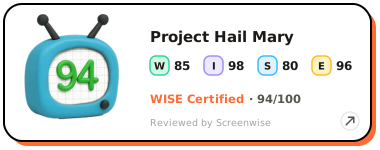
Your Own Badge
Swap the slug in the example for any /media/<slug> page. HTML:
<a href="https://screenwiseapp.com/media/project-hail-mary-movie?utm_source=wise_badge&utm_medium=badge&utm_campaign=full" target="_blank" rel="noopener" title="Project Hail Mary on Screenwise">
  <img src="https://screenwiseapp.com/wise-badge/project-hail-mary-movie/badge.svg?style=full" alt="Project Hail Mary WISE score — reviewed by Screenwise" width="380" height="150" loading="lazy" style="border:0" />
</a>
Markdown:
[](https://screenwiseapp.com/media/project-hail-mary-movie)Styles: style=full, compact, square, card. Add &theme=dark for dark backgrounds. Prefer to search and copy? Use the badge generator.
Quick answers
Can I use Screenwise WISE scores in a blog post?
Yes. WISE scores are free to use as a source. Link to the Screenwise page you used, attribute the score to Screenwise, and keep the numbers as published.
Will Screenwise link back to my post?
Likely, when it adds something for parents. Publish your piece with a link to a Screenwise page, then email [email protected] with your URL and the page you linked. We cannot promise a reference for every submission.
How do I add a WISE badge to my post?
Copy the snippet from the "Your Own Badge" section of this page, or generate one for any title at screenwiseapp.com/wise-badge. The badge is a live image that links to the full review, and it updates when we re-score.