

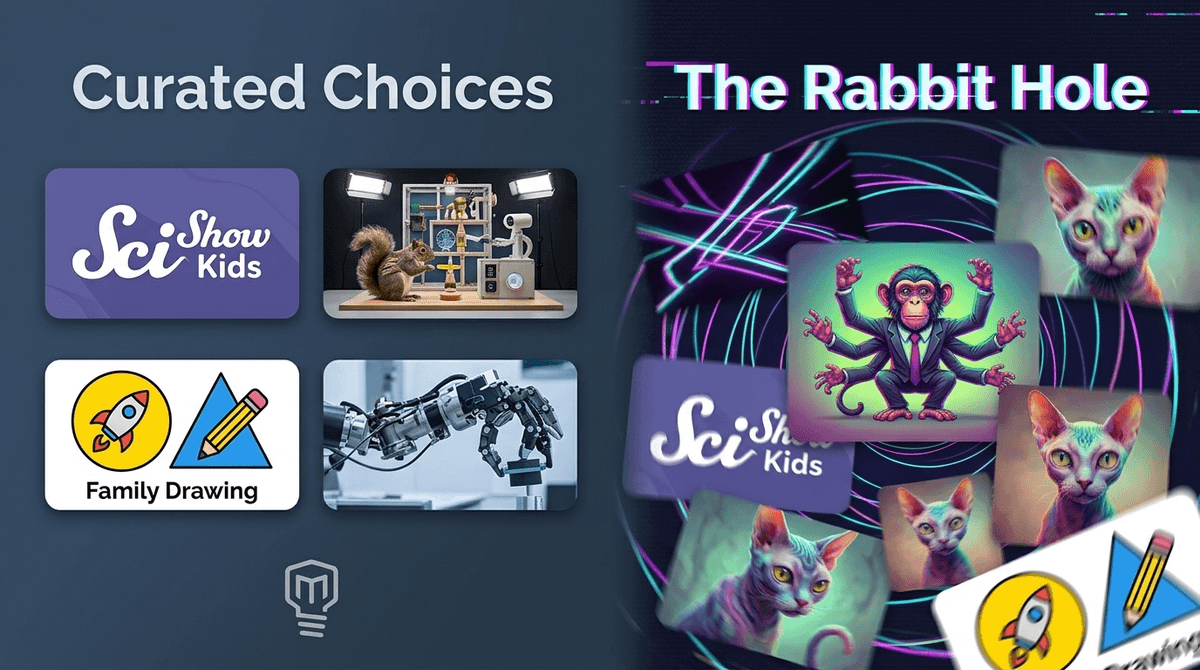
The YouTube Kids Rabbit Hole: How to Spot 'Content Slop'
TL;DR: YouTube is currently flooded with "AI Slop"—low-quality, mass-produced videos designed to hack your kid's dopamine response. If your child is in a "YouTube trance," it’s likely the algorithm, not just the content. The fix? Switch to Approved Content Only mode or move to curated platforms.
Quick links to high-quality alternatives:
- Bluey (The gold standard for family viewing)
- Storyline Online (Celebrities reading books, zero slop)
- Mark Rober (Science that’s actually exciting for ages 8+)
- Cosmic Kids Yoga (Movement-based screen time)
- Art for Kids Hub (Interactive drawing tutorials)
We've all seen it: your kid is watching a video of a realistic monkey in a helicopter made of tomatoes, or a French Bulldog driving through a candy forest while a track of canned children's laughter loops in the background. This is "Content Slop" (or "AI Slop").
In 2026, research shows that over 20% of the videos recommended to new users are AI-generated slop. These aren't stories written by people who care about child development. They are mass-produced by "hustle" channels using AI tools to farm views and ad revenue. They use "brainrot" tactics—quick cuts, neon colors, and nonsensical plots—to keep kids glued to the screen.
If you’ve ever wondered why your child seems "zombified" after twenty minutes of YouTube Kids, it’s because this content is engineered to trigger a continuous dopamine loop without ever providing a satisfying "end" to the story.
Kids love the predictability and the sensory overload. For a toddler or preschooler, the bright colors and repetitive sounds of Cocomelon or Baby Shark are comforting. But the algorithm takes that natural preference and exploits it.
The YouTube algorithm has one goal: Watch Time. It doesn't care if a video is educational or if it’s a surreal 10-minute loop of Skibidi Toilet remixes. If it keeps your kid from hitting the "back" button, the algorithm wins. This creates a "rabbit hole" effect where one harmless video leads to increasingly weird, nonsensical, and sometimes inappropriate content.
Not everything on YouTube is garbage, but you have to be able to tell the difference between a creator with a soul and an AI-driven view farm.
The Slop Hall of Fame (Avoid These)
- Bandar Apna Dost: Features a realistic monkey in absurd, often violent or hyper-masculine scenarios. It has billions of views but zero educational value.
- Pouty Frenchie: Surreal AI-generated dogs in "candy worlds." It’s pure sensory junk food.
- Super Cat League: Human-like cats in bizarre soap opera plots. It can get weirdly mature or grotesque very quickly.
- "Elsagate" style knock-offs: Any channel using famous characters (Spider-Man, Elsa, Mickey Mouse) in weird, bootleg animations.
High-Quality Creators (The "Good" Stuff)
- SciShow Kids: Real science explained by humans who actually understand pedagogy.
- Mark Rober: High-production value engineering challenges that inspire kids to build things in the real world.
- Art for Kids Hub: A dad and his kids drawing together. It’s interactive and encourages "off-screen" creativity.
- Puffin Rock: Available on Netflix but often clipped on YouTube; it’s "slow media" that won't overstimulate your child.
The way you handle YouTube should evolve as your kids grow. Here’s a rough breakdown based on community norms:
Ages 0-4: The "Curated Only" Phase
At this age, 84% of kids are watching YouTube, but their brains are still wiring their understanding of reality. AI slop can be genuinely confusing for them.
- Strategy: Don't let them browse. Use the YouTube Kids "Approved Content Only" setting. You pick the channels (like Sesame Street), and they can't see anything else.
Ages 5-8: The "Supervised Search" Phase
Kids start wanting to look up specific things—Roblox tutorials, Minecraft builds, or Lego reviews.
- Strategy: Keep the iPad in a common area. Turn off Autoplay immediately. Talk to them about why some videos look "fake" or "weird." This is the age to start building "algorithm awareness."
- Check out our guide on YouTube vs. YouTube Kids
Ages 9-12: The "Critical Thinking" Phase
By this age, 89% of kids are using regular YouTube. They are likely seeing YouTube Shorts, which is the primary delivery system for brainrot.
- Strategy: Discuss the business model. Explain that these creators make millions by keeping them watching. Help them curate a "Subscription" feed so they are making active choices rather than letting the algorithm choose for them.
YouTube has introduced some new guardrails in 2026, but they aren't foolproof:
- AI Age Estimation: YouTube is now using AI to guess if a user is under 18, regardless of the birthdate on the account. If it thinks your kid is a kid, it will limit certain types of ads and content.
- Livestream Restrictions: As of late 2024, kids under 16 cannot livestream solo. They need a parent "visibly present."
- The "Take a Break" Feature: You can set reminders in the app settings that tell your kid to stop watching after a certain amount of time. It’s a helpful "external" bad guy to blame when it’s time to turn off the screen.
When you see your kid watching something that looks like absolute brainrot, resist the urge to just snatch the tablet and yell "This is garbage!" (Even though it is).
Instead, try these questions:
- "Who made this video? Do you think it’s a real person or a computer?"
- "Why do you think the colors are so bright and the music is so loud?"
- "What was the story in that video? Did it actually have a beginning and an end?"
Helping them recognize the "slop" for what it is—low-effort junk food—is much more effective than just banning it. It turns them from passive consumers into active critics.
YouTube is a tool, but the algorithm is a slot machine. If you leave your child to "discover" content on their own, the house always wins, and the house wants your kid's attention at any cost.
The most "Screenwise" move you can make is to shift from a discovery-based model (letting the algorithm suggest) to a curation-based model (only watching what you’ve vetted). It takes more work upfront, but it stops the "just one more" power struggle before it even starts.
- Audit the History: Open your kid's YouTube or YouTube Kids app and look at the "Watch History." If you see a lot of Bandar Apna Dost or Skibidi Toilet, it's time to tighten the settings.
- Enable 'Approved Content Only': In the YouTube Kids settings, switch to this mode and add 5-10 high-quality channels.
- Try an Alternative: For a week, try using PBS Kids or Storyline Online instead of YouTube. Notice if your child’s behavior and "transition" difficulty change.
Get a personalized Screenwise guide for your child's specific age and habits