

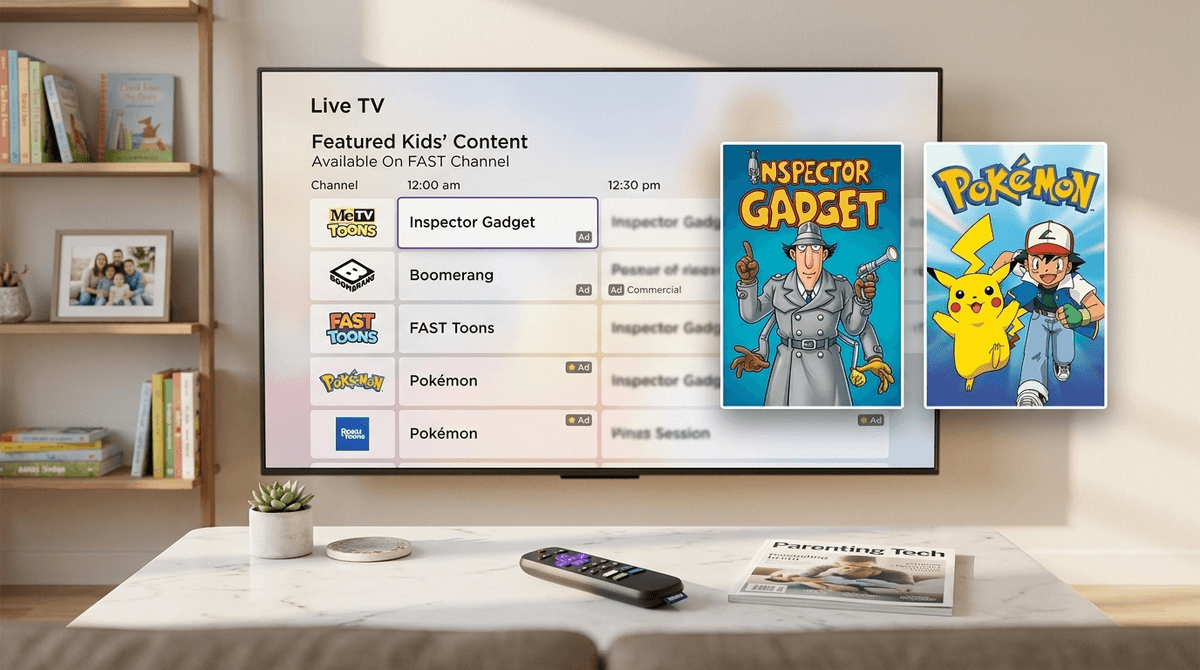
Roku’s 2026 "Free Channel Surge" is basically a massive expansion of their FAST (Free Ad-supported Streaming TV) lineup, bringing 24/7 loops of heavy hitters like Pokémon and Inspector Gadget directly to your home screen without a subscription—but you're paying for it with a heavy dose of unskippable, sometimes-sketchy ads that your kids can't bypass. It’s "free" in the sense that your credit card stays in your wallet, but your kids' attention (and your patience with repetitive commercials) is the actual currency here.
TL;DR: Roku has added dozens of new 24/7 linear channels, including dedicated feeds for Pokémon and Inspector Gadget, making it easier than ever to find "background noise" content. While these channels offer nostalgia and high-quality animation for free, they lack the ad-free safety of Disney+ or Netflix, meaning your kids will be exposed to uncurated commercials. Screenwise recommends using the "Hide Channels" feature to keep the Roku home screen from becoming a cluttered mess of "brain rot" marketing.
If you’ve turned on your Roku lately, you’ve probably noticed the "Live TV" section looking a lot more crowded. We’re currently seeing a massive shift in how streaming platforms work. After years of us paying $15.99 a month for ten different services, the industry is circling back to the 90s model: linear TV with commercials.
Roku is leading this charge by licensing massive libraries of content and turning them into "channels." Instead of picking a specific episode of Pokémon, you just tune into the Pokémon Channel, and it plays whatever is on the schedule. It’s low-friction, which is why kids love it. They don't have to scroll for twenty minutes; they just click and watch.
This is the crown jewel of the 2026 update. Roku now has a dedicated 24/7 channel that cycles through multiple generations of the show. It’s a mix of the classic Indigo League (hello, nostalgia) and the newer series.
- The Vibe: High energy, focus on friendship and strategy, but can be a bit "loud" for all-day viewing.
- The Risk: It’s a 24/7 commercial for cards, plushies, and Nintendo Switch games. If your kid is already deep into the "gotta catch 'em all" mindset, this channel will only intensify the "I want that" conversations.
Roku is leaning hard into the "Millennial Parent Nostalgia" play. They’ve added a channel dedicated entirely to the original 80s Inspector Gadget.
- The Vibe: It’s actually pretty "safe" compared to modern "brain rot" content. The pacing is slower, the stakes are low, and Penny is still the smartest person in the room.
- The Risk: Honestly, the biggest risk here is your kid telling you the animation looks "weird" or "Ohio" because they’re used to the ultra-slick 4K visuals of modern YouTube creators.
This isn't just one show; it’s a rotating door of Ninjago, LEGO City adventures, and those mini-movies they make for Star Wars and Marvel.
- The Vibe: Pure entertainment. LEGO content is surprisingly well-written and funny, even for adults.
- The Risk: Much like Pokémon, this is "Ad-tainment." Every single frame is designed to make your kid want to build a $150 set.

Here is the no-BS truth: the ads on FAST channels are not like the ads on YouTube Kids. On YouTube Kids, there are at least some guardrails. On Roku’s live channels, the ad tech is still a bit of a Wild West.
Because these channels are technically "Live TV," the commercials are often served by third-party ad networks. This means your kid could be watching a perfectly innocent episode of Paw Patrol and then get hit with a trailer for a PG-13 horror movie or a prescription drug commercial with a list of side effects longer than the episode itself.
Moreover, the repetition is mind-numbing. These channels often have a limited "ad pod," meaning your kid might see the exact same 30-second toy commercial five times in one hour. This is how "pester power" is born.
If you don't want your Roku home screen to look like a digital Times Square, you need to be proactive.
- Hide the "Live TV" Input: If your kids are young (under 8), they probably don't need access to 300+ channels of random content. You can go into Settings > TV Inputs and hide the Live TV tile entirely.
- Favorite the "Good" Stuff: If you do want them to have access to the Pokémon channel, use the "star" button on your remote to add it to a favorites list. This prevents them from wandering into the "Crime" or "Reality TV" sections of the FAST lineup.
- PIN Protect the Store: 2026 has seen a surge in "one-click" purchases. Make sure you have a PIN set for adding any new channels or making purchases.
Instead of just banning the new channels, use them as a teaching moment. Kids are smarter than we give them credit for, especially when it comes to being "sold" to.
- The "Why is it free?" talk: Ask them, "If we aren't paying for this with money, how is the company making money?" It’s a great intro to the attention economy.
- The "Vibe Check" on ads: When a loud, flashy commercial comes on, ask, "Do you think that toy is actually as cool as the commercial makes it look, or are they just using fast editing?"
- The "Linear vs. On-Demand" talk: Explain that this is how TV worked when you were a kid—you couldn't skip, and you couldn't choose the episode. It builds a little bit of "delayed gratification" muscle that Netflix has mostly atrophied.
Check out our guide on teaching media literacy to elementary kids
Q: Are the new Roku channels safe for my 7-year-old?
The content of the shows (like Pokémon or Inspector Gadget) is generally fine, but the ads are unrated and uncurated. You might see ads for scary movies or products that aren't age-appropriate during the breaks. According to Screenwise’s 2026 data, about 40% of parents report seeing "inappropriate" ads on FAST channels.
Q: How do I remove the Pokémon channel from my Roku?
You can’t "delete" it from the Live TV stream, but you can hide the entire Live TV input or use the "Edit Channel Lineup" feature in the Live TV guide to uncheck it. This will keep it from showing up when your kids are scrolling.
Q: Does the Inspector Gadget channel have the new version or the old one?
Roku’s 2026 surge focuses heavily on the original 1983 Inspector Gadget. It’s the classic version with the "Go-Go-Gadget" catchphrases we grew up with, though some modern reboots occasionally cycle through the "Kids & Family" section of the Roku Channel.
Q: Is there a way to skip commercials on these new channels?
No. Because these are "linear" channels (streaming live), there is no skip button. If you want ad-free Pokémon, you’re better off looking at a paid subscription service like Netflix or the dedicated Pokémon TV app.
Roku’s new channels are a double-edged sword. On one hand, it’s great to have access to high-quality shows like Pokémon without adding another $15 monthly bill. On the other hand, the "free" price tag comes with a loss of control over what your child sees during commercial breaks.
If you have a kid who is easily influenced by marketing or who gets sucked into "infinite scrolls," these 24/7 channels might be more trouble than they're worth. But for a rainy Saturday afternoon where you just need 20 minutes of "safe" nostalgia while you fold laundry? Inspector Gadget is a solid win.
- Audit the Guide: Spend 10 minutes scrolling through the Roku Live TV guide yourself to see the types of ads popping up in your region.
- Set a PIN: If you haven't already, go to your Roku account online and require a PIN for all purchases and channel additions.
- Check out alternatives: If the ads bother you, look into our guide to the best ad-free streaming for kids.