

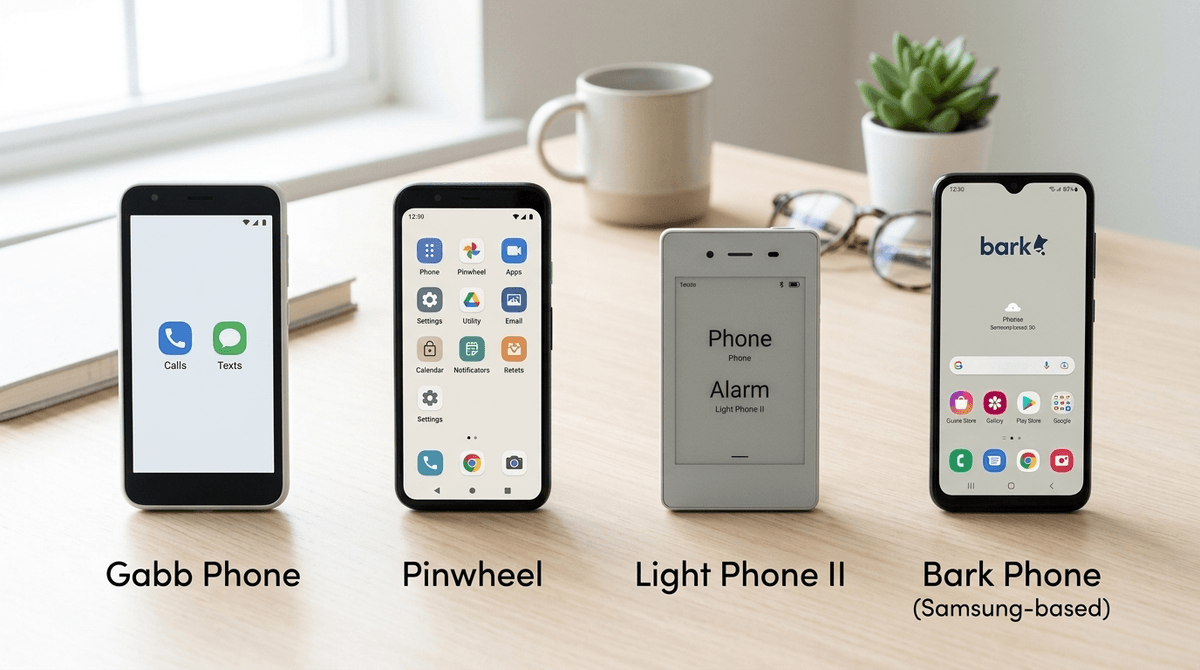
TL;DR: The Quick List
If you’re looking to give your kid a way to call you after soccer practice without opening the door to the TikTok algorithm or Snapchat streaks, you’re looking for a "minimalist" device. Here are the top picks for different ages:
- Best for Ages 8-11: Gabb Phone — No internet, no social media, no app store. Just the basics.
- Best for Ages 10-13: Pinwheel — A curated "safe" app store where you choose exactly what they can access.
- Best for Teens/Minimalists: Light Phone II — Beautiful, E-ink screen, zero distractions, looks "cool" enough for a picky teen.
- The Hybrid Choice: Bark Phone — A Samsung device with world-class monitoring built into the OS.
- The "Secret" Dumb Phone: Apple Watch with Family Setup.
Check out our full comparison of minimalist phones
We’ve all seen the headlines about the smartphone-free childhood movement. It’s easy to get caught up in the fear of what’s on the phone—the bullying, the "Ohio" memes that make no sense, or the Skibidi Toilet rabbit holes.
But the real reason to look at a dumb phone (or a "minimalist" phone) isn't just about blocking bad stuff. It’s about attention.
When we give a 10-year-old an unrestricted iPhone, we aren't just giving them a tool; we’re giving them a slot machine designed by the smartest engineers in the world to keep them scrolling. A minimalist device flips the script. It says: "This is a tool for communication and utility, not a destination for your boredom." It allows them to be bored, which is actually where creativity happens.
In 2026, "dumb phone" is a bit of a misnomer. We usually categorize these into three buckets:
- True Dumb Phones (The "Bricks"): Think the old-school Nokia 225 4G. It calls, it texts (slowly), it might have a calculator. No apps.
- Minimalist Smartphones: These look like regular phones but run a modified version of Android. They have no browser and no social media, but they might have Spotify or Google Maps.
- Locked-Down Hybrids: A regular phone that is so heavily managed by parental controls (like Bark) that it functions as a minimalist device.
Gabb is the "Old Faithful" of the kid-phone world. It looks like a smartphone, which helps with the "I don't want to look like a baby" factor, but it has no internet browser, no social media, and no app store.
- The Good: It is virtually un-hackable by a curious 11-year-old. The GPS tracking is solid.
- The "No-BS" Review: The camera is, frankly, terrible. Your kid's photos will look like they were taken with a potato. But hey, maybe that's a feature, not a bug.
- Best for: Elementary and early middle school.
Pinwheel is the "Goldilocks" choice. It’s a ruggedized smartphone where you (the parent) decide which apps from their pre-approved list are allowed. If you want them to have Messenger Kids and Duolingo but nothing else, you can do that.
- The Good: It grows with the kid. You can add more "utility" apps as they get older and show more responsibility.
- The "No-BS" Review: The hardware can feel a little cheap compared to a modern Samsung or iPhone, and the interface can occasionally be laggy.
- Best for: Kids who need specific tools for school or hobbies.
This is the "aesthetic" choice. It has a black-and-white E-ink screen (like a Kindle). It does calls, texts, and has a few "tools" like a music player and a simple map.
- The Good: It’s genuinely beautiful and feels like a premium adult device. It doesn't scream "my parents are tracking me."
- The "No-BS" Review: Texting on an E-ink screen is slow. If your kid is used to rapid-fire texting, this will frustrate them—which might be exactly what you want.
- Best for: High schoolers who are "over" social media or parents who want to lead by example.
Bark takes a standard Samsung phone and replaces the guts of the operating system with their own monitoring software.
- The Good: You can remotely lock the phone, see every text (even deleted ones), and manage screen time down to the minute.
- The "No-BS" Review: It’s a powerful tool, but it requires a lot of "parenting energy" to manage all the alerts. It’s the least "minimalist" in terms of what the kid can do, but the most "safe" in terms of what you can see.
- Best for: Kids transitioning into full smartphone use who still need "training wheels."
If you are an Apple family, don't sleep on the "Family Setup" for the Apple Watch. You can buy a GPS + Cellular watch, give it its own phone number, and your kid can call and text you from their wrist.
- Why it works: There is no web browser. There is no Instagram. It’s strapped to their body so they won't lose it at the park.
- The Downside: Battery life is mediocre, and texting on a tiny screen is a pain.
Ages 8-10: The "Emergency Only" Phase
At this age, the device should be a tool for logistics. "Text me when you're done with gymnastics." A Gabb Watch or a basic Nokia is plenty. They don't need a screen to fill their downtime; they need to learn how to exist in the world without one.
Ages 11-13: The "Utility" Phase
This is the era of the Pinwheel. They might start needing to check Google Classroom or coordinate group projects. Give them the tools, but keep the "entertainment" (YouTube, games) off the device. If they want to play Minecraft or Roblox, let them do it on a shared family tablet or console where it's visible.
Ages 14+: The "Intentional" Phase
By high school, the social pressure for an iPhone is real. If you decide to go the minimalist route here, it has to be a conversation. The Light Phone II or a Wisephone can be framed as a "productivity hack" or a way to stay focused on sports or grades.
- The "Losing" Factor: Kids lose things. A $300 Gabb Phone disappearing at the mall hurts. Consider a protective case and a "find my phone" plan.
- The Group Chat Exclusion: Most "dumb phones" handle group texts poorly. They might get messages out of order or not see images. This is the biggest complaint from kids—they feel left out of the loop.
- You Have to Model It: If you’re telling your kid they don't need a smartphone while you’re scrolling Facebook at the dinner table, it’s not going to stick. Consider a minimalist phone launcher for your own device.
When your kid says, "But everyone else has an iPhone!" (and they will), don't make it about "safety" or "evil tech." Make it about values.
Try: "We want you to have a phone so we can stay connected, but we also want you to have your brain to yourself. Smartphones are designed to take your time away from you, and we think your time is too valuable for that right now."
Read our guide on how to handle the "But everyone has one" argument
Choosing a "dumb" phone is actually a very smart move for intentional parents. It bridges the gap between the total isolation of no tech and the total immersion of a smartphone.
Start small. You can always "upgrade" to more features later, but it is nearly impossible to claw back a smartphone once you've handed it over.
- Audit your needs: Does your kid actually need a phone, or just a way to call you?
- Check coverage: Many of these minimalist phones (like Gabb or Pinwheel) run on specific networks. Make sure they work in your area.
- Set the "Tech Contract": Regardless of the device, sit down and write out the rules. No phones in the bedroom, no phones at the table.