Code.org

Code.org

Website

WISE
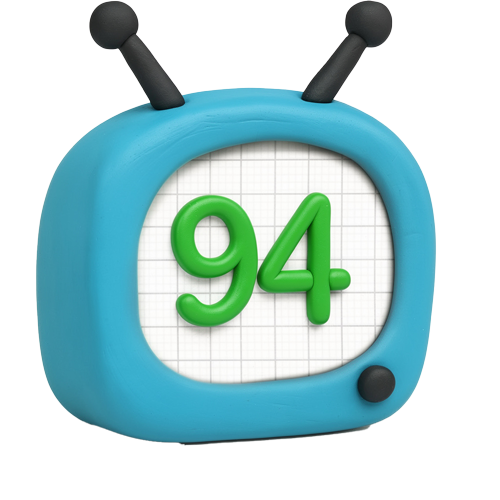
94%

WISE Score

The gold standard for turning screen time into skill time without the usual educational-app boredom.

Where to Find

Visit Code.org
Screenwise Verdict

Code.org is the rare educational resource that actually lives up to the hype. It’s not just a 'learn to code' site; it’s a logic gym. By stripping away the social toxicity found on platforms like Roblox or even the comment sections of Scratch, it creates a pure focus on building and problem-solving.

If you're looking for a way to justify 'screen time' on a rainy Saturday, this is the first place you should point them. It’s free, it’s high-quality, and it treats kids like creators rather than just targets for an algorithm.
Age Fit

While the site says 8+, their 'Pre-reader Express' courses work for kids as young as 5 or 6, and the AI modules stay challenging well into high school.

WISE Breakdown
Wholesome
92

It's built on the idea of empowerment and persistence. The tone is encouraging without being patronizing, and it celebrates the 'struggle' of debugging as a positive part of learning.

Imaginative
88

While early lessons are logic-puzzle 'recipes,' the platform eventually opens up into 'App Lab' and 'Game Lab,' where kids can build literally anything from scratch.

Safe
98

This is the gold standard for privacy. No ads, no data selling, and crucially, no social comments or unmoderated chat. It's a walled garden that actually works.

Enriching
98

It turns kids from passive consumers into creators. The addition of 'Hour of AI' ensures it stays relevant as the tech landscape shifts from simple logic to machine learning.

Parent Info
✓

Why It Might Be Great

  • Gamified logic that uses familiar characters (Minecraft, Star Wars, Frozen) to trick kids into learning complex sequencing.
  • Zero social friction because there are no comments or public profiles to manage, making it safer than Scratch for the younger set.
  • Low floor, high ceiling design that starts with simple blocks and scales up to real JavaScript and AI ethics.
  • Ad-free and nonprofit, so you aren't fighting manipulative 'buy more gems' mechanics while they're trying to learn.
⚠

What to Watch For

  • The 'School-y' Vibe: If your kid is already burnt out on classroom tech, this might feel like homework unless you frame it as game design.
  • Logic Frustration: Some of the puzzles require genuine persistence; be ready to sit nearby if your kid tends to rage-quit when a 'bug' stops their progress.

Conversation Starters

  • "What was the most annoying bug you had to fix today, and how did you finally catch it?"
  • "If you could build an app to solve one problem in our house, what would it do?"
  • "Do you think computers are actually 'smart,' or are they just really good at following our instructions?"
  • "How did it feel to see your code move the character for the first time?"

Deep Dive

Why it beats the alternatives

Most parents wonder if they should send their kids to Scratch or Code.org. Here is the No-BS take: Scratch is a social network for creators; Code.org is a structured curriculum. If your kid is younger or easily distracted by the 'clout' of getting likes and comments on their projects, start with Code.org. It provides a much cleaner, more linear path through the fundamentals without the noise of a community.

The Minecraft and Disney Hook

Code.org is brilliant at using intellectual property to get kids through the door. They have official modules for Minecraft, Star Wars, and Frozen. This isn't just cheap branding; they actually use the mechanics of those games to teach loops and conditionals. A kid who thinks they hate 'coding' will suddenly spend 45 minutes trying to get Steve to mine iron because it feels like playing the game they already love.

The AI Pivot

In 2026, teaching basic Python isn't enough. Code.org has successfully pivoted to include 'Hour of AI,' which teaches the ethics and mechanics of machine learning. It’s one of the few places where a middle-schooler can actually learn how a chatbot works instead of just using one to cheat on an essay.

How to use it at home

Don't just set them in front of it and walk away. Use the Code.org for Parents hub to see what they're doing. The best way to engage is to ask them to show you their project in the 'App Lab.' When they can explain to you why a certain button triggers a certain sound, that's when you know the logic has actually clicked.

What Parents Ask

Ask Anything

Get a personalized guide on any topic

Related Guides