

Worksheets are where curiosity goes to die. If you’re trying to help a kid actually understand a concept—whether it’s how code loops work or why geometry matters to a movie director—handing them a photocopied packet is the fastest way to make their eyes glaze over. The best educational tools don't look like school; they look like sandboxes where the kid has the shovel.
TL;DR: If you want to move your kid from passive consumption to active creation, swap the workbooks for these six open-ended sandboxes. Start with Chrome Music Lab for instant, no-login musical play, or Code Dot Org to turn their love of Minecraft or Star Wars into actual logic skills. These aren't "educational games" that trick kids into doing math; they’re tools that empower them to build something real.
The biggest hurdle for most kids is the feeling that "tech" is something that happens to them, not something they control. These two sites fix that by lowering the floor so even a kindergartner can start building.
This is coding for the pre-literate crowd. If your kid can’t read a menu yet, they can still use this. It uses color-coded blocks to snap logic together. The magic here isn't just the code; it’s the creative freedom. Kids can take photos of their own faces, record their own voices (or fart sounds, let’s be real), and make characters interact. It’s a gift from MIT and Tufts that is actually, genuinely free—no "pro" versions, no ads, no nonsense. It lands best for the 5-7 age range. Once they hit 8 or 9, they’ll likely outgrow the simplified logic and want to move up to the full version of Scratch.
If ScratchJr is the sandbox, Code Dot Org is the guided tour. It is the gold standard for a reason. They leverage brands kids already care about—Minecraft, Frozen, Star Wars—to teach the fundamentals of computer science. It feels like a game because it’s structured as a series of puzzles, but by the end, they’re thinking in algorithms.
Pro-tip: For the youngest kids (ages 4-6), they have "pre-reader" courses, but you’ll need to sit with them because the instruction blocks still require some decoding. For the 8+ crowd, they can usually fly solo until they hit a "logic wall"—those moments where the puzzle gets legitimately hard and they need to walk away for a minute to let their brain reset.
These sites don't have "levels" or "points." They are just tools that exist for the sake of exploration. This is where the deepest learning happens because the kid is following their own nose.
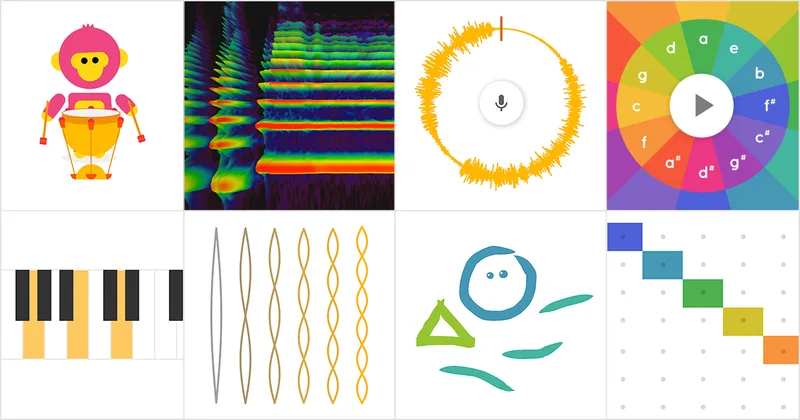
This is quite possibly the most friction-free corner of the internet. There are no accounts to create, no passwords to forget, and no ads. It’s a collection of "experiments" that turn music theory into a visual playground. The Kandinsky experiment is the fan favorite: you draw shapes on the screen, and the AI turns them into sounds. It’s a masterclass in making "boring" concepts like rhythm and harmony feel like a finger-painting session. It’s great for a 4-year-old who wants to make noise, but sophisticated enough that a teenager can use the Song Maker to build a legitimate beat.
Stop thinking of this as a map and start thinking of it as a teleporter. While the 3D imagery of their own house is the "hook" that gets kids in, the Voyager stories are the real meat. These are curated, interactive tours about everything from the Apollo moon landings to how animals migrate. It turns geography into a scavenger hunt.
Watch out for: Data usage. If they’re using this on a mobile device without Wi-Fi, it will eat your data plan for breakfast. It’s also a "real world" tool, so Street View might occasionally show a weird yard or a funny-looking person—nothing dangerous, just the reality of a planet-sized camera project.
Once a kid hits double digits, they start asking the "When am I ever going to use this?" question about schoolwork. These two sites provide the answer.
This is the ultimate antidote to math-class boredom. A partnership between Pixar and Khan Academy, it shows exactly how parabolas, weighted averages, and geometry are used to build the worlds of Toy Story and Coco. It’s concept-heavy, so don't expect a tutorial on how to use animation software. Instead, it’s about the thinking behind the art. It’s best for ages 10 and up. A 5th grader will love the behind-the-scenes videos, but they’ll need some serious math chops to get through the later interactive modules.
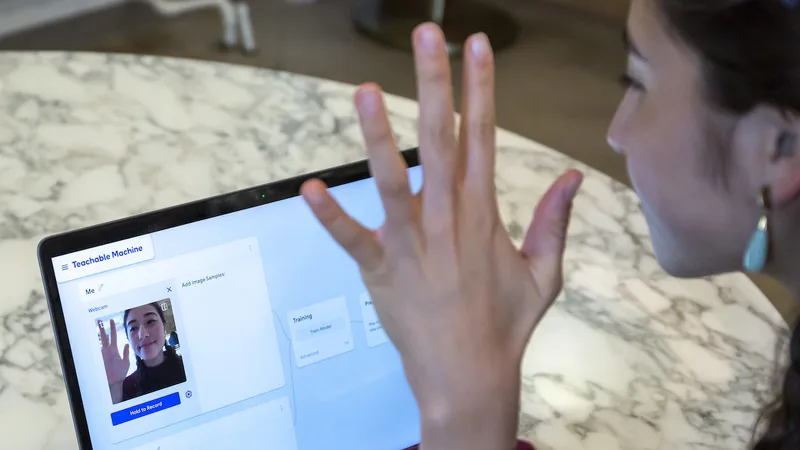
AI is everywhere, but most kids (and adults) think of it as magic. Teachable Machine demystifies the "magic" by letting kids train their own AI models using a webcam or microphone. They can teach the computer to recognize the difference between a "thumbs up" and a "thumbs down," or the sound of a dog barking vs. a person talking. It’s privacy-first—the processing happens on the device, not in the cloud—and it’s the best way to teach a kid that AI is only as smart (or as biased) as the data you give it.
The move with these sites isn't to just "assign" them like homework. The move is to treat them like a new set of LEGOs.
- Do it with them for the first 10 minutes. Especially with Teachable Machine or Code Dot Org, the "onboarding" is where kids get frustrated. Once they understand the interface, they’ll usually tell you to go away so they can work.
- Ask for a demo. Instead of asking "What did you learn?", ask "Can you show me what you made?" A kid explaining how they built a song in Chrome Music Lab is practicing verbal reasoning and sequencing without even knowing it.
- Connect it to the real world. If they’re doing the "Environmental Science" unit in Pixar in a Box, watch a Pixar movie that weekend and try to spot the things they talked about.
Q: Are these websites actually free? Yes. Every item on this list is either a non-profit project (Code Dot Org, ScratchJr) or a free tool from a major tech company (Google Earth, Teachable Machine). You won't find "buy more gems" pop-ups here.
Q: Do I need to create accounts for my kids? It depends. Chrome Music Lab and Teachable Machine require zero login. Code Dot Org is better with an account so it can save their progress, but you can use many of their "Hour of Code" tutorials without one.
Q: Is there any "stranger danger" on these sites? Generally, no. These are creation tools, not social networks. Google Earth is a window into the real world, and Code Dot Org has some community-sharing features, but they aren't chat-heavy environments like Roblox or Discord.
Q: Can my kid use these on an iPad? ScratchJr is actually better on a tablet. Chrome Music Lab and Google Earth work well in a tablet browser. Teachable Machine and Code Dot Org are much easier to use on a laptop or Chromebook with a physical keyboard and a mouse.
If a screen feels like a "passive" experience in your house, it’s probably because the kid is just watching a feed. These sites flip the script. They turn the computer into a tool, the kid into a creator, and the "learning" into something that happens because they actually wanted to solve the problem.

- For more high-quality tools, check out our best apps for kids list.
- If your kid is ready for more structured logic, see our best games for kids list.
- Trying to navigate the early years? See our digital guide for elementary school.