

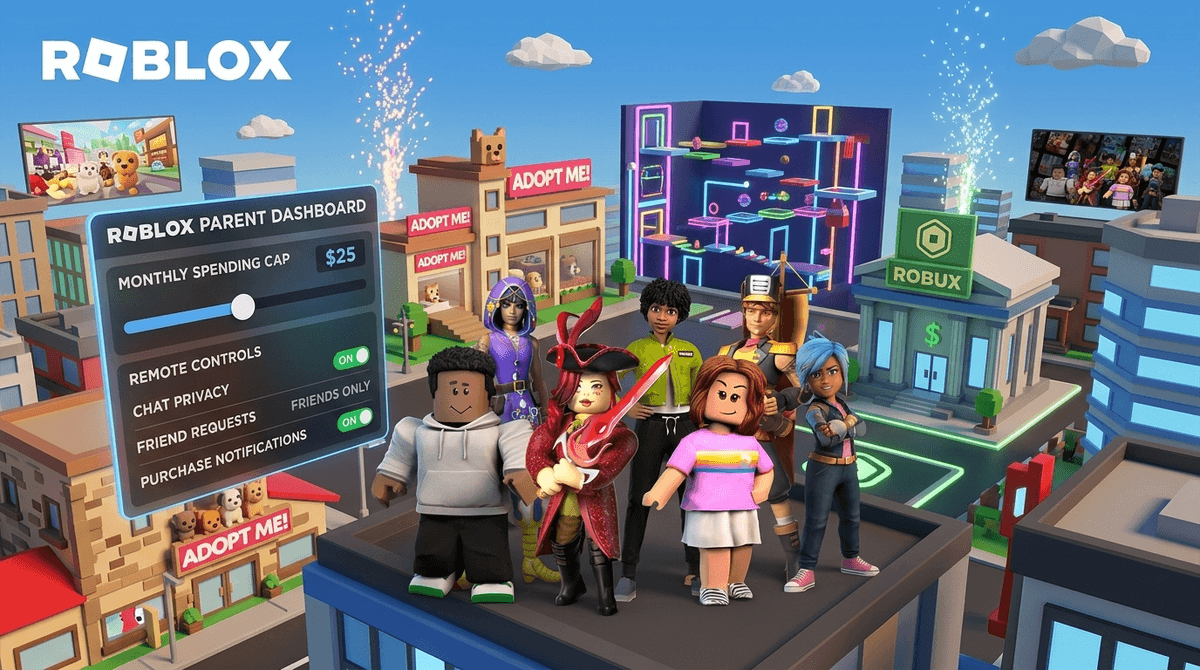
TL;DR: The 2025 Roblox Safety Refresh
- No more DMs for Under 13s: Kids under 13 can no longer send private direct messages outside of actual games.
- Remote Management: You can finally link your account to theirs and manage everything from your own phone.
- Content Labels: "Age ratings" are out; "Content Labels" (Minimal, Mild, Moderate, Restricted) are in.
- Spending Caps: You can set a hard monthly limit on Robux spending that doesn't involve you hiding your credit card.
- Quick Links: Roblox, how to set up Roblox parental controls, is Robux a scam?

If your house sounds like a constant loop of "Skibidi" references, "Ohio" jokes, and the distinct tink-tink-tink of virtual coins being spent, you’re likely living in a Roblox household. For years, Roblox has been the "Wild West" of kids' gaming—a massive, user-generated universe that felt impossible to fully secure.
But 2025 has brought the biggest safety overhaul in the platform's history. They’ve finally moved away from the "set it on the kid's iPad and hope for the best" model to a more centralized, parent-friendly system. Here is the breakdown of what actually changed and how you can use it to keep your sanity (and your bank account) intact.
At this point, Roblox isn't just a game; it’s a social ecosystem. Think of it like a digital mall where every store is a different game made by a random person. Your kid might be playing a high-intensity "obby" (obstacle course), a pet-adoption simulator like Adopt Me!, or a weirdly addictive "work" simulator.
Because everything is user-generated, the quality varies wildly. Some games are brilliant masterpieces of logic and design; others are "brain rot" cash-grabs designed to keep kids clicking for hours.
1. Remote Parental Controls (The Game Changer)
Previously, if you wanted to change your kid’s settings, you had to physically grab their device, log in as them, and navigate a clunky menu. Now, Roblox allows you to link your account to theirs.
Once linked, you can see their friend list, set spending limits, and adjust chat settings from your own device. This is a massive win for "intentional parenting" because it allows for oversight without the "helicopter" feel of hovering over their shoulder while they play.
2. The End of Private DMs for Under 13s
This is the most significant safety shift. Kids under age 13 can no longer send or receive private direct messages (DMs) outside of a specific game environment.
- Inside a game: They can still chat with people in that specific server (unless you turn it off).
- Outside a game: The "Inbox" feature is essentially dead for them. They can't receive a "Hey, what's your Discord?" message from a stranger while they're just hanging out on the home screen.
3. Content Labels Over Age Ratings
Roblox used to label games by age (e.g., "9+"). They’ve realized that age is a poor proxy for content. Now, they use "Content Labels":
- Minimal: Very low violence, no crude humor.
- Mild: Frequent "slapstick" violence (think Tom and Jerry).
- Moderate: Realistic blood, more intense action, or crude humor.
- Restricted (17+): This is for adults only and requires ID verification.
We need to have a real talk about Robux. There is a common narrative that Roblox teaches kids entrepreneurship because they can "build games and earn money."
While that's technically true for about 0.1% of the population, for the other 99.9%, Roblox is a spending machine. The 2026 update finally introduces Monthly Spending Limits. You can now set a hard cap (e.g., $10 a month) from your parent dashboard. When they hit it, they’re done. No more "accidental" $100 charges because they wanted a "Legendary Neon Unicorn."
If your kid is genuinely interested in the "making" side of things, steer them toward Roblox Studio or Scratch to learn actual logic rather than just "buying" their way to the top of a leaderboard.
Ages 6-9
At this age, Roblox should be a "walled garden."
- Chat: Set to "Off" or "Friends Only." Even with the new DM restrictions, in-game chat can still be salty.
- Content: Stick to "Minimal" or "Mild."
- Supervision: This is the "living room" phase. They play where you can see the screen.
Ages 10-12
This is the transition period where they start wanting to play with school friends.
- Chat: "Friends Only" is usually the sweet spot here. It allows them to coordinate with the kid from soccer practice without opening the door to everyone.
- Content: "Moderate" might be okay depending on your family's stance on "cartoon violence," but keep an eye on what those games actually entail.
Ages 13+
Once they hit 13, the DM restrictions lift. This is a great time to have a conversation about "digital literacy." They will see weird things. They will meet people who aren't who they say they are. The goal here isn't to block everything, but to make sure they know how to use the "Block" and "Report" buttons effectively.
Check out our guide on talking to teens about online predators
It’s easy to look at Roblox and see nothing but "brain rot" and "Skibidi" memes. But for kids, it’s a sandbox. It’s where they go to hang out when they can’t physically go to the park.
Games like Bee Swarm Simulator teach complex resource management. Obbies (obstacle courses) build spatial awareness and persistence. It’s not Minecraft (which is arguably more "educational"), but it’s a far cry from just mindlessly watching YouTube shorts.
Even with the 2026 updates, Roblox has issues:
- Condo Games: These are "pop-up" games with adult content that bypass filters for a few hours before being banned. They are rare but real.
- Scams: "Free Robux" scams are everywhere. Teach your kids that if something sounds too good to be true in Roblox, it’s a scam.
- The Grind: Many games are designed using "dark patterns"—psychological tricks to make kids feel like they have to log in every day or they’ll lose progress.
The 2025 Roblox safety update is a massive step in the right direction. It moves the burden of safety from the child to the parent's own device, which is where it should have been all along.
Is Roblox perfect? No. It’s still a chaotic, noisy, sometimes-weird corner of the internet. But with the new Remote Controls, Spending Caps, and DM Restrictions, it’s a lot easier to manage without feeling like you need a PhD in Digital Security.
- Create your own Roblox account (if you don't have one).
- Link your account to your child's via the "Parental Controls" tab in settings.
- Set a Monthly Spending Limit immediately. Even if it’s $0, it prevents surprises.
- Sit down and play with them for 20 minutes. Let them show you their favorite "obby" or their house in Brookhaven. You’ll learn more in those 20 minutes than in any manual.
See how to set up the new Roblox parent account
Want to see how your family's Roblox habits compare to your community? Take the Screenwise Survey to get your personalized Digital Wellness report.