

TL;DR: The Quick Verdict
- Choose Epic! if you have a kid aged 4-10 who needs high-octane engagement, "Read-To-Me" features, and a library that feels like a colorful toy store. It’s perfect for the "I'm bored" moments and school-aged kids who already use it in class.
- Choose Kindle Kids if you have an older reader (8-12+) who is ready for "real" novels, wants to dive into massive series like Harry Potter or Percy Jackson, and needs fewer gamified distractions.
- The budget-conscious winner: Libby. If you have a library card, this is the best kept secret in digital parenting.
Get a reading list based on your kid's interests
If you feel like your kid’s attention span has been eroded by a diet of YouTube shorts and Roblox obbys, you aren't alone. We’re all out here trying to pivot them back to literacy before they start unironically describing every meal as "Ohio" or "skibidi."
When it comes to digital reading, two giants dominate the space: Epic! and Kindle Kids (which is the umbrella for Amazon’s Kids+ subscription).
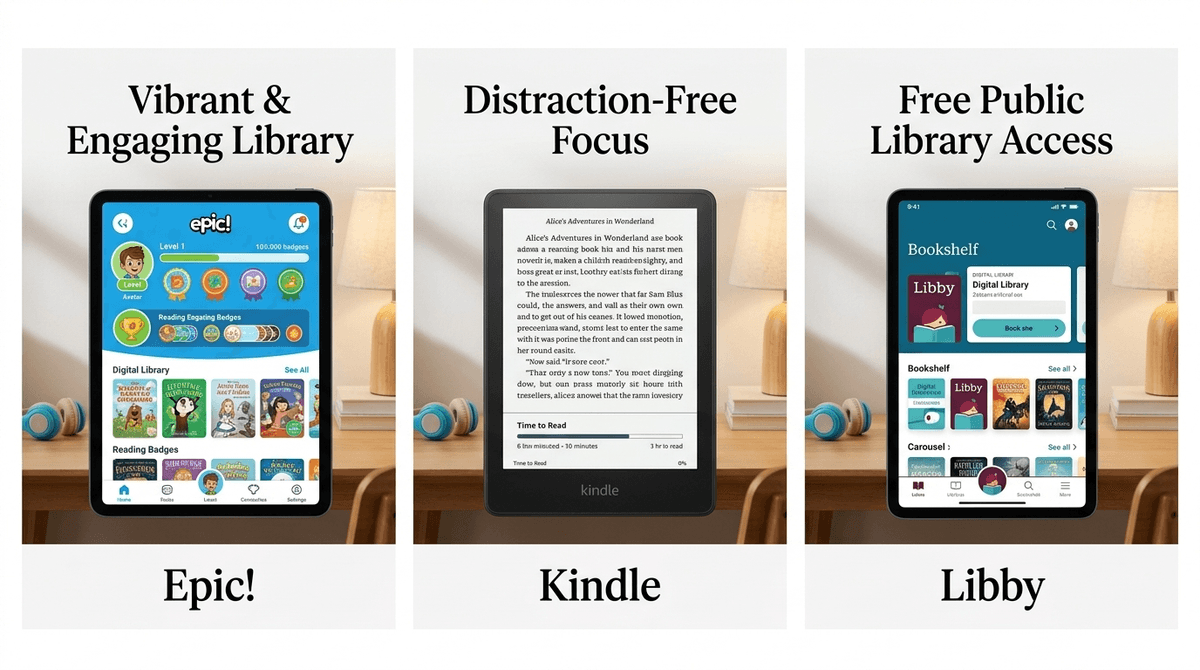
Epic! is often called the "Netflix of books." It’s a subscription service with over 40,000 titles, ranging from picture books to instructional videos. It’s flashy, it’s fun, and there’s a 90% chance your kid has already used it at school.
Kindle Kids is the digital arm of the Amazon bookstore. It’s less of a "game" and more of a library. When you buy a Kindle Kids device or subscribe to Amazon Kids+, you get access to thousands of popular books, but the interface is much closer to a traditional reading experience.
Kids love Epic! because it doesn't feel like work. It’s heavily gamified. They earn badges, they level up, and they can customize their avatars. For a kid who finds a 300-page novel intimidating, the ability to read a Dog Man comic or a National Geographic Kids article feels like a win.
The downside? It can feel a bit like "brain rot" reading. If your kid just scrolls through the pictures to get the "points" for finishing a book, are they actually reading? Parents often complain that kids treat Epic! more like a game than a literacy tool.
Kids who love Kindle Kids usually love the "grown-up" feel of it. If they have the actual Kindle e-reader, it feels like a special tech gadget that is just for books. They love the "Time to Read" feature that tells them exactly how many minutes are left in a chapter—it gives them a sense of control.
Reluctant readers might hate it because it looks like... well, a book. There are no flashy animations, no "Read-To-Me" voices that sound like a cartoon character, and no badges for clicking through pages.
What's on Epic!?
Epic! excels at the "middle-of-the-road" content. You’ll find:
- The Bad Guys
- Big Nate
- Cat Kid Comic Club
- Wings of Fire (Graphic novels)
It is heavily weighted toward picture books, early readers, and educational videos. If your kid is into Minecraft or Pokemon, there are tons of "unofficial" guides and related content that can act as a gateway drug to actual reading.
What's on Kindle Kids?
Amazon has the "Big 5" publishers in its pocket. This means you get the heavy hitters:
If your kid wants the book that everyone is talking about on the playground, it’s more likely to be on Kindle. Amazon Kids+ also includes access to apps and games if you're using a Fire tablet, which is a blessing and a curse.
Ages 4-7: The Epic! Sweet Spot
At this age, the "Read-To-Me" feature is a lifesaver. It highlights the words as they are spoken, which is great for pre-readers. The content is safe, bright, and short enough to hold their attention. You don't have to worry about them accidentally stumbling into a YA novel with "spicy" themes because the Epic! library is curated strictly for kids.
Ages 8-12: The Kindle Transition
This is the age where kids start wanting series. They want to read all 15 books in Wings of Fire. Kindle handles this better. The interface is cleaner, and the "Vocabulary Builder" (which creates flashcards for words they look up) is a genuine educational win that doesn't feel like a chore.
The Blue Light Problem
If your kid is using Epic!, they are likely on an iPad or a tablet. We know the drill: blue light before bed is a recipe for a 10:00 PM meltdown.
If you use a Kindle Paperwhite Kids device (the e-ink version), there is no blue light. It looks like paper. This is the ultimate "digital wellness" move for parents who want their kids to read in bed without frying their circadian rhythms.
Gamification: Motivation or Distraction?
Epic! uses the same dopamine loops as TikTok—badges, streaks, and levels. While this can get a reluctant reader to open the app, it can also lead to "speed-reading" (just clicking through to get the badge).
Learn more about how gamification affects the developing brain
The "Hidden" Content
Amazon Kids+ is a bit of a "walled garden," but it’s a big garden. It can include movies and games if you aren't careful with the settings. Epic! also has a "Videos" section. Some of these are great (like DIY science), but some are basically just YouTube-lite. You’ll want to check your settings to make sure they aren't just watching "toy unboxing" style videos instead of reading.
- Epic!: Usually around $10-$12 a month. They often have a "Free" version for educators, but for home use, you’re going to have to pay.
- Kindle Kids / Amazon Kids+: If you buy a Kindle Kids hardware device, you usually get a year of Kids+ for free. After that, it’s about $5/month for Prime members.
- The Free Alternative: Libby. Seriously. You can borrow ebooks and audiobooks for free from your local library and send them straight to the Kindle App. It requires a little more manual work from you, but it’s free and teaches them how a library works.
Instead of "You need to read for 20 minutes," try these conversation starters:
- For the Epic user: "I saw you earned a badge for a science book today. What was the coolest thing you learned, or was the book just a 'click-through'?"
- For the Kindle user: "I see you're 40% through The Lightning Thief. Do you think you'd survive at Camp Half-Blood, or would you be the first one eaten by a minotaur?"
- For the reluctant reader: "I found this graphic novel version of The Baby-Sitters Club. Do you want to try it on the tablet or the paper-white thing?"
If your house is a battleground over screen time and your kid thinks books are "mid," start with Epic!. It’s the gateway drug. It meets them where they are with high-interest, low-barrier content.
If you already have a reader but you're tired of tripping over stacks of paperbacks or paying $15 per book in a 20-book series, get the Kindle Kids. It’s a more sustainable, long-term tool for actual literacy.
And if you’re just overwhelmed by all of it? Delete the apps, go to the library, and grab a physical copy of The Wild Robot. Sometimes the best "digital" wellness is just an analog book.
- Check your school login: Ask your kid if they have an Epic! login from school. You might be able to use it for free during school hours to test it out.
- Audit the "Video" section: If you go with Epic!, spend 5 minutes in the settings turning off or limiting the video content.
- Download Libby: Even if you choose a paid subscription, get your library card linked to Libby today. It’s the ultimate parenting hack.
Check out our guide on the best graphic novels for reluctant readers