

TL;DR
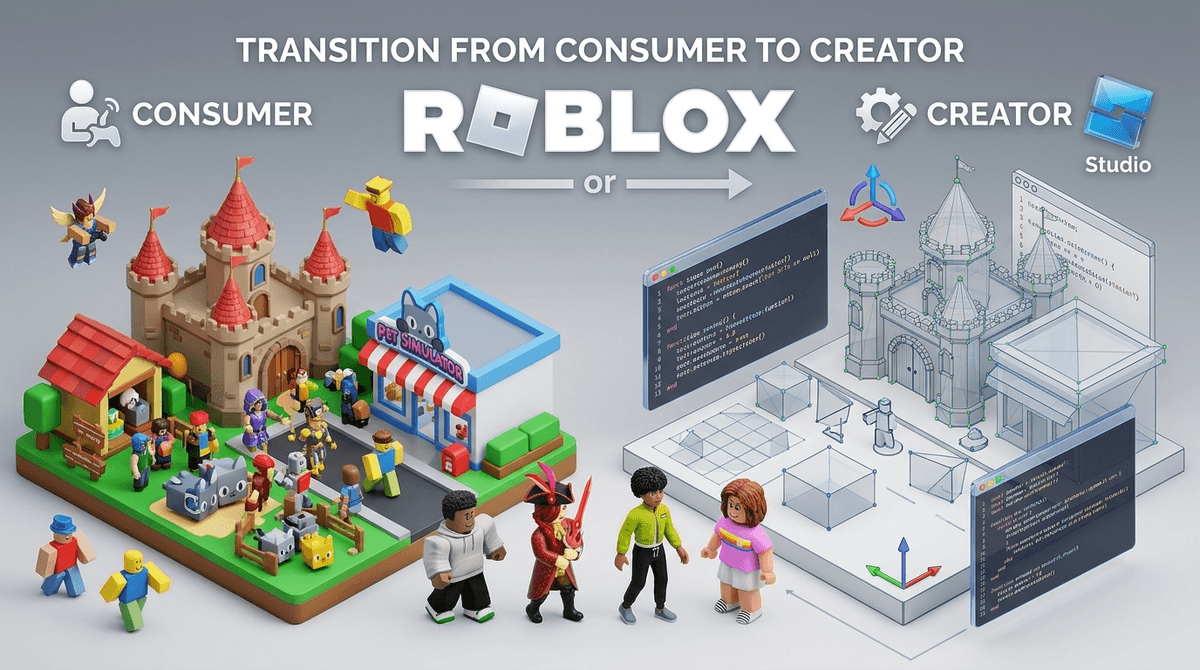
If your kid is spending eight hours a week in Roblox, they aren't just "playing a game"—they’re participating in a massive, player-driven economy. The magic happens when you move them from being a consumer to a creator using Roblox Studio. It’s the difference between eating a cake and learning how to own the bakery.
Quick Links for the Creative Pivot:
- The Engine: Roblox Studio (Ages 10+)
- The Gateway: Scratch (Ages 8-11)
- The Pro Move: Blender for 3D modeling (Ages 13+)
- The Inspiration: YouTube tutorials on Lua coding
We need to stop thinking of Roblox as a single game like Super Mario Bros. It’s more like a digital mall where every store is built by a teenager in their bedroom.
The "Creator Economy" in Roblox is a system where players use Roblox Studio to build their own experiences, clothes, and items. They can then monetize these via Robux. While most kids just want to buy a "Legendary" pet in Adopt Me!, the kids on the other side of that transaction are learning 3D environmental design, UI (user interface) layout, and Lua scripting.
Learn more about how Robux is in fact real money
I get it. You look at the screen and see a low-res character running away from a giant Skibidi Toilet and you think, "My kid's brain is melting." But the reason Roblox has a 100% grip on this generation is agency.
In Minecraft, you build a house. In Roblox, you build a business. When a kid realizes they can make a virtual hat, sell it for Robux, and then use that Robux to buy a game pass in their favorite server, they’ve just completed a crash course in digital entrepreneurship. It’s "Ohio" levels of weird, but it’s also incredibly empowering.
If you want to turn that passive screen time into something that looks like a future resume, here is the progression I recommend:
Scratch (Ages 7-10)
Before jumping into the deep end of Roblox Studio, Scratch is the gold standard. It uses "block-based" coding. It teaches the logic of "If this happens, then do that" without the frustration of typing out code and getting a syntax error because they missed a semicolon.
Roblox Studio (Ages 10-14)
This is the "Career" part of the title. This is a real-deal development environment. It uses a coding language called Lua.
- The Upside: They learn 3D space, physics, and actual text-based coding.
- The Downside: It’s a steep learning curve. Don’t expect them to build the next Brookhaven in a weekend.
Blender (Ages 12+)
If your kid is more "Artist" than "Coder," introduce them to Blender. It’s a professional-grade 3D modeling tool. High-end Roblox creators use it to make those detailed "UGC" (User Generated Content) items like custom hair and wings. It’s a skill that translates directly to industries like architecture and film.
Can kids make money on Roblox? Yes. Some make millions. Will your kid make money? Probably not.
The Roblox marketplace is incredibly crowded and, frankly, a bit exploitative. The platform takes a massive cut (around 70% in many cases) of the Robux earned. To "DevEx" (convert Robux to real USD), you have to hit a high threshold of earned Robux.
The goal shouldn't be the paycheck; it should be the portfolio. If they build a cool game, that’s a project they can show a college recruiter or a future employer. It’s the modern-day equivalent of being the kid who could fix the family VCR, but on steroids.
Roblox is rated E10+, but the safety isn't about the graphics; it's about the people.
- The "Stranger Danger" is Real: Because it's a social platform, the chat is where things get messy. Even with filters, kids find ways to talk about things they shouldn't.
- Gambling Mechanics: Many games in Roblox use "Loot Boxes" or "Gacha" mechanics. If your kid has an addictive personality, Pet Simulator 99 is basically a casino with neon cats.
- Roblox Studio Safety: Creating is generally safer than playing because they are in a private "sandbox" environment. However, once they publish a game, they are open to comments and feedback from the public.
If your kid tells you they are "grinding" for a specific item, they are essentially doing digital manual labor. This is where Roblox stops being creative and starts being a time-sink.
As an intentional parent, your job is to spot the difference:
- Creative Time: "I'm trying to figure out why my script won't make the door open when the player touches the key." (Keep going!)
- Zombie Time: "I have to click this button 5,000 times so I can get a gold sword." (Time to log off.)
Instead of asking "What are you playing?", ask:
- "Did a person build this level or did a company build it?"
- "How do you think the creator of this game makes money?"
- "If you could change one rule in this game, what would it be?"
These questions shift their perspective from "Consumer" to "Designer."
Roblox can be a bottomless pit of YouTube trends and "brain rot" memes, or it can be the most powerful educational tool in your house. The difference is Roblox Studio.
If they are going to spend the time there anyway, challenge them to build one thing—a room, a shirt, a bouncing ball—before they are allowed to spend an hour playing. You’ll quickly see if they have the spark for digital creation or if they’re just chasing the next dopamine hit.
- Download Roblox Studio on a PC or Mac (it doesn't work on iPads).
- Sit with them for 20 minutes and try to move a part (a 3D block) around the screen. You’ll realize quickly how much spatial reasoning is required.
- Set a "Creation-to-Consumption" ratio. For every 30 minutes of building, they get 30 minutes of playing.