

TL;DR
Drawing Desk is a versatile, high-quality creative suite that kids genuinely love because it makes digital art feel accessible. However, it is aggressive with its subscription model and is leaning hard into AI-generated art tools. If you want a one-and-done purchase without the "subscription fatigue," look at Procreate. If you want a solid free alternative for younger kids, check out Sketchbook or Tayasui Sketches.
Drawing Desk isn't just one app; it’s more like four mini-apps living under one roof. It’s designed to grow with a user, offering different "Desks" based on skill level:
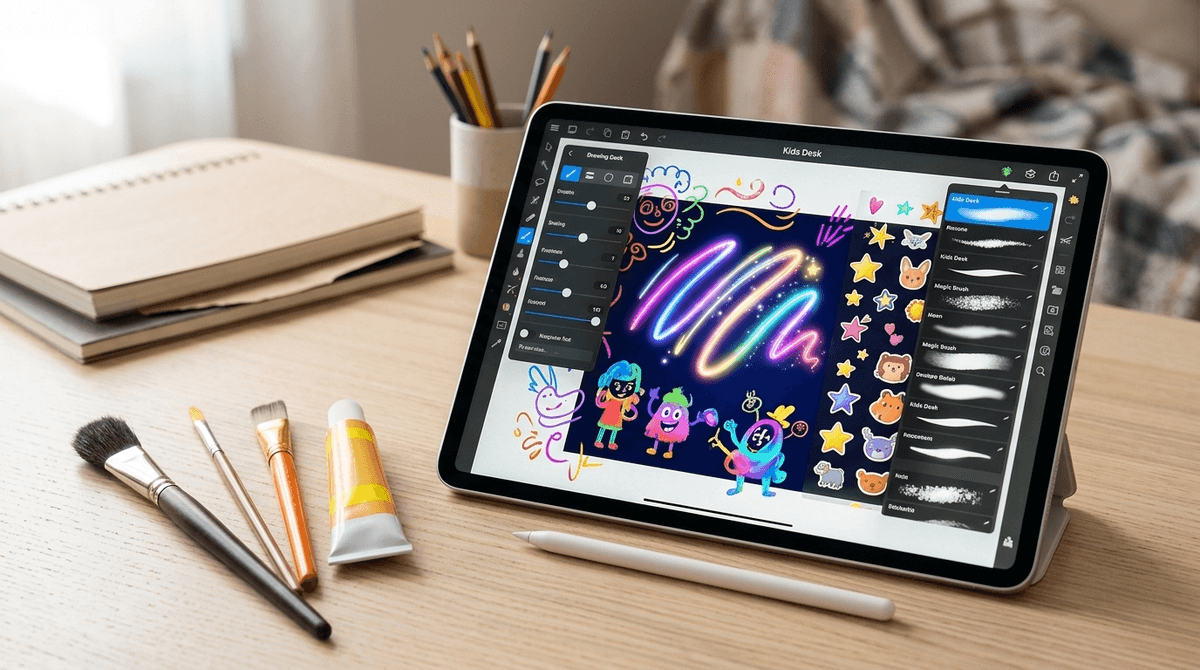
- Kids Desk: Think digital crayons, stickers, and "magic" brushes. It’s very "Skibidi Toilet" era—vibrant, noisy, and instantly gratifying.
- Sketch Desk: A step up for the middle schooler who is starting to care about line weight and shading.
- Doodle Desk: Focused on patterns and coloring-book style relaxation.
- Photo Desk: Basic photo editing and manipulation.
It’s currently one of the most popular creative apps on the App Store, often sitting right next to heavy hitters like Canva and Procreate. It’s available on iPad and iPhone, though it’s definitely an "iPad and Apple Pencil" kind of experience if you want to get the most out of it.
Digital art is the new "cool" hobby. While we might have spent our afternoons doodling on the back of a notebook, kids today are trying to emulate the speed-paint videos they see on YouTube or TikTok.
Drawing Desk hits that sweet spot because it offers immediate success. The "Kids Desk" mode has "magic" tools that make even a haphazard scribble look like a shimmering neon masterpiece. It feels "Ohio" (weird/cringe) to us sometimes when they just spam stickers, but for a 7-year-old, the ability to create something that looks "professional" in five minutes is a huge confidence booster.
Then there’s the new AI stuff. Kids are obsessed with the "Sketch to Image" feature. They draw a stick figure, type in "cool dragon," and the app spits out a high-res rendering. To them, it feels like a superpower; to us, it feels a bit like cheating, but more on that in a minute.
Here is where we need to be real: Drawing Desk is a subscription trap if you aren't careful.
The app is "free" to download, but almost everything worth doing is locked behind a "Drawing Desk Premium" paywall. We’re talking about $4.99 a week or around $40 a year. In a world where Disney+ and Netflix are already eating our lunch, adding a weekly drawing app subscription feels a bit predatory.
The app uses what we call "dark patterns"—those annoying pop-ups that appear the second you open the app, making the "X" to close the subscription offer nearly invisible. If your kid has your App Store password or FaceID enabled, you might find yourself paying for a "Pro" art suite because they just wanted a specific glitter brush.

If the subscription model makes you want to throw your iPad out the window, you have options. Here is how I’d break it down:
Procreate (Ages 10+)
This is the gold standard. It costs about $13 once. No subscriptions, no hidden fees. It is a professional-grade tool, but there are roughly a billion tutorials on YouTube that can teach a motivated 10-year-old how to use it. If your kid is serious about art, skip the "Desk" and go Pro.
Sketchbook (Ages 7+)
Formerly owned by Autodesk, this app is incredibly powerful and has a very generous free tier. The interface is clean and stays out of the way, which is great for kids who get overwhelmed by too many buttons.
Tayasui Sketches (Ages 5-12)
This is arguably the most beautiful drawing app. The tools look and feel like real markers and watercolors. It’s much more "zen" than the flashy, sticker-heavy Drawing Desk.
Scratch (Ages 8-13)
If your kid likes the "creative" part of Drawing Desk but also likes games like Roblox, Scratch allows them to draw their own characters and then actually animate them with code. It’s the ultimate "productive" screen time.
Drawing Desk has leaned heavily into Generative AI. Their "AI Canvas" allows kids to use text-to-image prompts.
As parents, we have to decide: is this "brain rot" or is it a new literacy? If a kid spends three hours "drawing" by just typing prompts into an AI, they aren't developing fine motor skills or learning about color theory. They are learning how to be a "prompt engineer."
There’s nothing inherently dangerous about it—the app has filters to prevent inappropriate images—but it does change the nature of "art time." If you want your kid to actually learn to draw, you might want to disable the AI features or steer them toward how to draw tutorials on YouTube.
The good news: Drawing Desk is relatively "safe" compared to something like Roblox or TikTok.
- No Social Feed: There is no built-in "community" where strangers can message your child or comment on their art within the app. This is a huge win.
- Data Privacy: Like most free-to-play apps, they do collect data for advertising and analytics. If you pay for the premium version, some of this tracking is mitigated, but it's still something to keep in mind.
- AI Prompts: While there are filters, no AI is 100% "safe." A clever kid can usually find a way to prompt something weird, though it’s unlikely to be truly "NSFW" given the app's strict guidelines.
If your kid is begging for the "Pro" version of Drawing Desk, use it as a teaching moment about the "Subscription Economy."
Explain that $5 a week is $260 a year. Ask them: "Would you rather have this one app for a year, or would you rather have Procreate AND a new physical sketchbook AND a set of real markers?"
It’s a great way to talk about the value of digital tools versus physical ones. You can also discuss the "AI vs. Human Art" debate. Ask them, "Do you feel more proud of the picture you spent an hour shading, or the one the AI made in five seconds?" Their answer might surprise you.
Drawing Desk is a solid, fun, and creative app that is unfortunately weighed down by a greedy subscription model.
Our recommendation: Download the free version, let them play with the "Kids Desk" tools, but do not start the free trial unless you have a calendar reminder to cancel it in 6 days. If they show a genuine interest in digital art that lasts more than a week, do yourself a favor and just buy Procreate. It’s cheaper in the long run and provides a much more professional path for their creativity.
- Check your settings: Ensure "In-App Purchases" are password-protected on your child's device.
- Explore the "Kids Desk": Sit with them for 10 minutes and see what they are actually doing. Are they drawing, or just clicking the "AI Magic" button?
- Compare: Download Sketchbook (it's free) and see if they like it just as much. If they do, you just saved yourself $40.
Check out our full guide on the best creative apps for iPads