

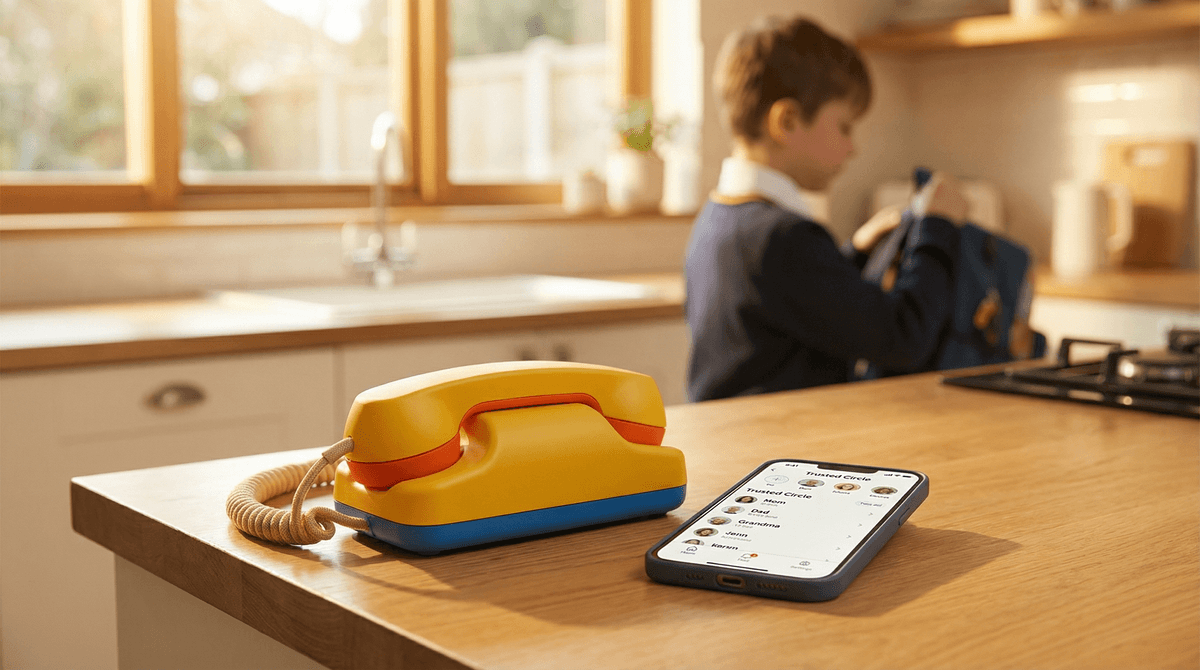
TL;DR: Tin Can is a corded home phone shaped like a tin can. It runs on your home Wi-Fi, has no screen, and calls only the numbers you approve. It costs $100. Calls to other Tin Cans and to 911 are free, and the $9.99-a-month Party Line plan adds ordinary phone numbers like Grandma's cell. It works best for kids 5 to 9, and best of all when a few friends on the street or in the class have one too.
Quick answers:
- Is it a cell phone or a walkie-talkie? Neither. It is a home phone that makes voice calls over Wi-Fi and stays in the house.
- Is there a monthly fee? Not for calls between Tin Cans. Calling ordinary numbers is $9.99 a month.
- Can strangers call it? No. Calls in and out only connect with numbers a parent approves.
- Does 911 work? Yes, on both plans, with your home address. Not in a power or internet outage.
- What age? Most users are 5 to 13, and 7 to 9 is the sweet spot.
The first time a kid asks for a phone, they usually want two things: to call a friend without borrowing yours, and to have something that is theirs. Tin Can gives them both and leaves out everything else. No screen, no texts, no apps, no feed.
It comes from three former colleagues in Seattle, Chet Kittleson, Graeme Davies and Max Blumen, and it caught on faster than anyone expected. It launched in April 2025, sold more than 100,000 phones by February 2026, and raised $12 million from Greylock.
The handset is shaped like a tin can, with the keypad on the can and a curly cord to a small base that plugs into the wall. It connects to home Wi-Fi on the 2.4 GHz band. There is no phone jack and no cellular service, so it works at home and nowhere else.
It does less than any phone you have owned:
- Voice calls, in and out, with approved numbers
- Voicemail, which a kid hears by pressing a big smiley button on the phone
- A speakerphone
- No screen (so no caller ID), no texting, no apps, no camera, no voice messages
It comes in four colors with names kids enjoy saying: Answer Me Aquamarine, Static White, Landline Lemon and Later Alligator Lilac.
There are two plans:
- Can 2 Can, free. Calls with other approved Tin Cans, plus 911.
- Party Line, $9.99 a month, first month free. Adds calls to and from ordinary phone numbers you approve: a parent's cell, a grandparent, a friend's house phone.
"Party Line" is only the plan's name. Tin Can does not do group calls or three-way calling.
So the cost depends on who your kid calls. If the friends they want to talk to have Tin Cans, you pay $100 once. If they mostly call relatives on cell phones, budget $9.99 a month.
Setup happens in the Tin Can Companion App on your phone. From there you control:
- Approved numbers. Calls in and out only connect with numbers on the list. If your kid dials a number that is not on it, the call does not go through. For a call between two Tin Cans, both families approve each other.
- Quiet hours. A schedule for each day that blocks calls in both directions. Calls go to voicemail, and 911 still works.
- Call logs, so you can see who called and when.
- 911 address. Setup asks for your home address, and dialing 933 on the Tin Can reads it back so you can check it.
The app allows one login per account, so two parents share one password.
A Tin Can with nobody to call gets boring fast. Tom's Guide's testers saw their kids lose interest after a few weeks, and reviewers keep making the same point: it is only as fun as the list of friends who have one. The families who love it tend to buy in groups: a street, a class, a set of cousins. Then the calls are free and there is always someone to ring.
Tin Can makes this easier. It discounts orders of more than one phone, and group orders of 25 or more through its Communities program get 20 to 35% off, and 10% of the sale can go to a school nonprofit.
Ages 5 to 6. A Tin Can with two or three approved numbers is a first taste of independence: calling a grandparent without help, or a parent at work. Some small fingers find the buttons stiff, so sit with them for the first few calls.
Ages 7 to 9. The sweet spot. Kids this age start having their own social lives, and a home phone lets them plan a playdate or chat after school without a screen. This is when the "friends have one too" effect matters most.
Ages 10 to 12. A Tin Can still works as a house phone, but a kid who walks to school or a friend's place alone needs something that leaves the house. That is where a kid watch like the Gabb Watch or a phone built for going outside, like Freckle, comes in. For the bigger question of when a smartphone fits, see when your kid is ready for their first smartphone.
- Wi-Fi quirks. Tin Can only joins the 2.4 GHz band. A 5 GHz-only network will not work, and routers that switch bands on their own can cause dropped calls. Wired's reviewer heard echo and lag, and The White Hatter's first test calls were rough.
- Outages. Like every Wi-Fi phone, it stops working when the power or the internet goes out, 911 included. It is a way for your kid to reach people, not the house's emergency line.
- Growing pains. On Christmas Day 2025, call volume jumped more than 100 times and the service went down. Tin Can paused billing until it was fixed.
Tin Can offers 45-day returns, which is long enough to find out whether your kid's friends will get one too.
Tin Can started the trend, and three companies now sell their own:
- Pinwheel Home: $68 or $79, free calls between Pinwheel Home phones, and a $6.99 plan for up to five outside numbers.
- Ooma MyPhone: $99.99 plus $7.99 a month to call anyone in the US, Canada and Mexico, with 911 alerts to parents. No free tier.
- Wiley Buddy: $89 plus $9.95 a month for unlimited US calls, from a small Utah startup. No free tier.
For all of them side by side, plus kid watches and first smartphones, see the guide to every new kid phone.
- Pick a spot where you can hear it. A kitchen or living room keeps calls social and keeps bedtime calls from happening.
- Approve both directions before you hand it over. A kid's first call failing because Grandma is not on the list is a fast way to lose interest.
- Practice one call together. Saying hello, saying who you are and hanging up politely are the skills most kids now skip.
- Dial 933 together. Hearing the home address read back is a good way to talk about when to call 911.
- Set quiet hours on day one. It is easier to start with a bedtime for the phone than to add one later.