

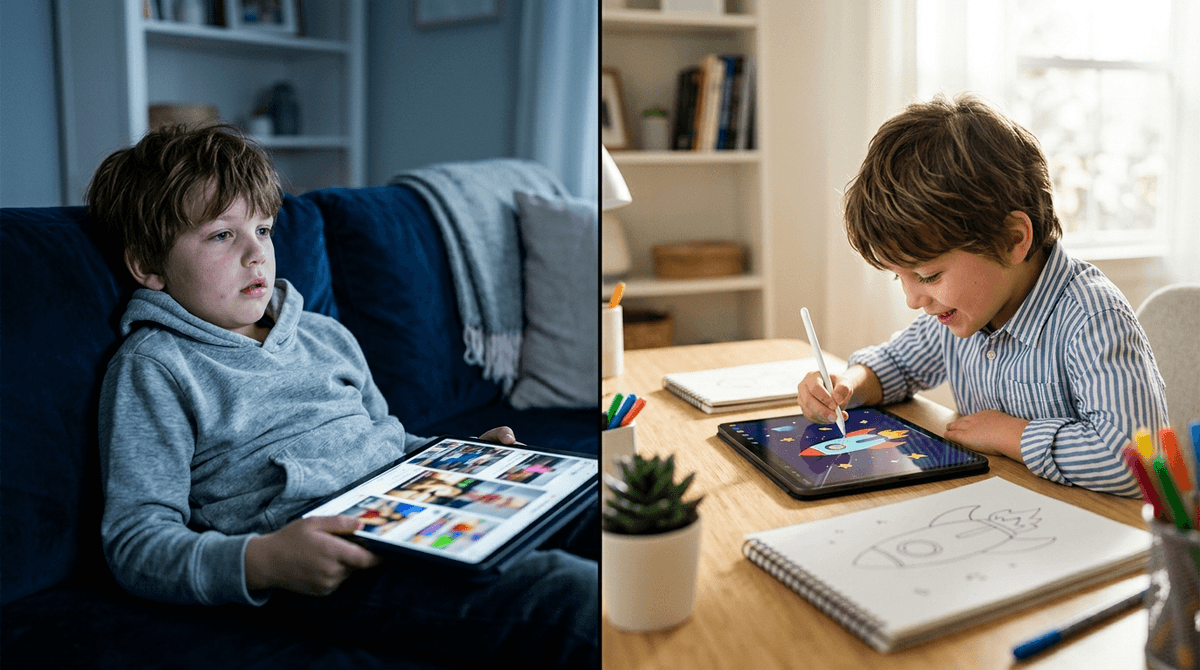
TL;DR: Not all minutes are created equal. 60 minutes of Minecraft builds spatial reasoning and logic; 60 minutes of YouTube "brain rot" shorts just fries the dopamine receptors. Stop counting the clock and start looking at the output.
Quick Links for High-Quality Active Play:
- Scratch (Coding/Creation)
- Toca Life World (Digital Dollhouse)
- Animal Crossing: New Horizons (Social/Design)
- Prodigy (Math/RPG)
- Stop Motion Studio (Creativity)
If you’ve ever felt that pit of guilt in your stomach because your kid has been on an iPad for two hours while you were trying to survive a conference call or just finish a lukewarm coffee, take a breath. The "Screen Time" metric is officially dead. It’s too blunt an instrument for the world we live in now.
In 2026, counting minutes is like counting calories without looking at whether you’re eating 500 calories of kale or 500 calories of Skittles. We need to talk about Screen Quality.
The easiest way to break this down is by looking at what your kid’s brain is doing.
Passive Screen Time is "Lean Back" media. This is the "zombie" state. Think scrolling through TikTok, watching endless unboxing videos on YouTube, or letting the Netflix autoplay run for three hours. The brain is in receiving mode. It’s not solving problems; it’s just absorbing.
Active Screen Time is "Lean Forward" media. This is when the screen is a tool, not just a window. When a kid is playing Minecraft, they are navigating 3D space, managing resources, and potentially learning basic logic through Redstone. When they use Scratch, they are literally writing code to make a cat dance. Their brain is firing on all cylinders.
Learn more about the neurobiology of active vs. passive play
Let’s look at the "Minecraft vs. YouTube" showdown. This is the classic parent dilemma.
In Minecraft, your kid is an architect. They have to decide: "Do I have enough wood to build this roof? How do I keep the Creepers out?" It’s frustrating, it’s rewarding, and it requires focus. It’s a "flow state" activity.
Now, look at YouTube—specifically the short-form "brain rot" content like Skibidi Toilet or those weird "satisfying" slime videos. The algorithm is designed to keep them clicking every 15 to 60 seconds. It’s a dopamine loop that actually shortens attention spans.
If your kid spends an hour in Minecraft, they usually come away feeling like they’ve "done" something. If they spend an hour on YouTube Shorts, they often come away irritable, "glitchy," and begging for five more minutes because they never actually reached a stopping point.
Not everything fits perfectly into "Good" or "Bad." Think of it as a spectrum.
High Quality: The Creators (Ages 6-14)
These are the gold standard. They turn the device into a laboratory or an art studio.
- Developed by MIT, this is the best way to introduce coding. It’s active, logical, and creative.
- This app turns your kid into a director. They use physical toys (LEGOs, clay) and the iPad to make movies. It’s 10% screen time, 90% physical setup.
- For the older kids (10+) who want to learn "real" coding in a way that feels like a game.
Medium Quality: The Social Gamers (Ages 8-13)
This is where things get murky.
- Is it "brain-building"? Sometimes. If they are building their own games in Roblox Studio, it’s high-quality. If they are just playing "Adopt Me" and begging you for Robux to buy a neon unicorn, it’s closer to passive consumption. It’s "active" because they are interacting with friends, but the quality depends entirely on what they are playing within the platform.
- This is basically a digital version of the board game Mafia. It requires social deduction, lying (sorry, "deception skills"), and logic. It’s active, but the chat can be a dumpster fire if not moderated.
Low Quality: The Zombies (All Ages)
- Unless they are actively editing complex videos, this is 100% passive. It is the "Ohio" of apps—weird, unpredictable, and potentially a total waste of time.
- Don't let the "Kids" label fool you. A lot of the content here is low-effort, AI-generated garbage designed to trigger clicks. If it’s Blippi, it’s fine for a distraction, but it’s not "educational" in any meaningful way compared to a book.
We have to be real: Active screen time is work. Building a complex castle in Minecraft is mentally taxing. Sometimes, kids (just like us) want to turn their brains off.
When they say something is "so Ohio" or talk about Skibidi Toilet, they are participating in a digital subculture. It’s nonsense, sure, but it’s their nonsense. The goal isn't to ban the "passive" stuff entirely—it’s to make sure it doesn’t become the whole diet.
- Ages 2-5: Focus almost entirely on "Co-viewing." If they watch Bluey, watch it with them. Talk about it. Use Khan Academy Kids for active learning. Avoid the "autoplay" trap.
- Ages 6-9: Introduce "Creation" apps. This is the prime age for Toca Life World or Minecraft. Set a "1-for-1" rule: for every 30 minutes of passive YouTube, they need to do 30 minutes of active creation or physical play.
- Ages 10-13: This is the Roblox and Fortnite era. Focus on social boundaries. Playing with real-life friends is "higher quality" than playing with strangers.
The biggest risk in "Active" play is usually the social element. Roblox and Minecraft servers can expose kids to older players or inappropriate chat. The biggest risk in "Passive" play is the algorithm. It doesn't care about your kid's mental health; it cares about watch time. It will lead them from a "Minecraft tutorial" to "scary creepypasta" in three clicks if you aren't careful.
Instead of saying "Get off your iPad," try shifting the conversation to the quality of the activity.
- "I see you're watching MrBeast again. That's fine for a bit, but after this video, let's switch to something where you're actually building something."
- "What did you actually make in Minecraft today? Show me the logic behind that door."
- "I noticed you get really grumpy after scrolling TikTok. Let's look at why that happens and maybe find a game that makes you feel better."
Stop being the "Time Police" and start being the "Quality Inspector."
If your kid spends two hours on a Saturday morning creating a digital masterpiece in Roblox Studio, that is a win. If they spend 20 minutes "doom-scrolling" through toxic comments on a random YouTube channel, that’s the real concern.
Intentional parenting isn't about restriction; it's about direction. We want to move our kids from being mere consumers of the digital world to being the architects of it.
- Do a Screen Audit: For one day, don't look at the total time. Just note down: How much was "Lean Back" (YouTube/Netflix) and how much was "Lean Forward" (Gaming/Coding/Creation)?
- Introduce One "Active" App: If your kid is stuck in a YouTube loop, introduce Scratch or Stop Motion Studio this weekend.
- Check the WISE Score: Before downloading a new game, check its Screenwise WISE score to see if it’s actually "brain-building" or just a "bank-account-drainer."