

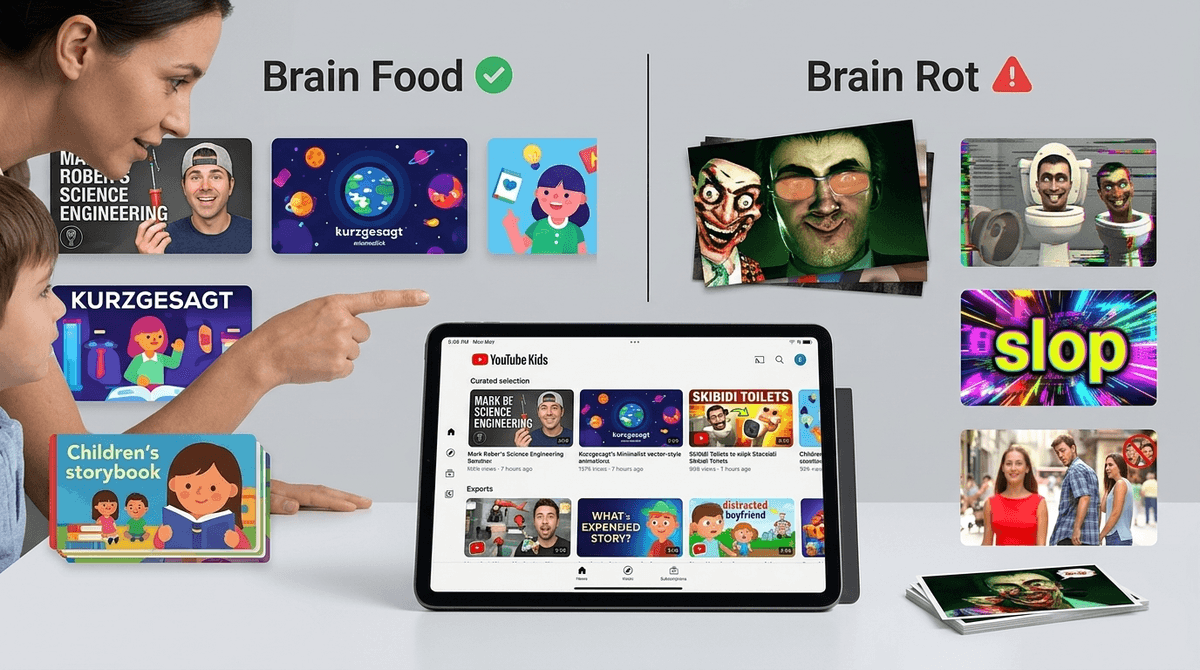
TL;DR: The "Brain Rot" Survival Guide If you’ve seen your kid staring at a screen with a glazed-over "zombie look" while a toilet with a human head sings at them, you’ve encountered "Brain Rot." It’s high-stimulation, low-substance content designed to hack a child's dopamine system.
- Red Flags: AI-generated voices, scene changes every 3 seconds, "sensory slop," and weird mashups (like Elsa in a car crash).
- Green Flags: Mark Rober, Kurzgesagt, and Storyline Online.
- Action Step: Turn off autoplay and move the YouTube app off the main home screen.
In 2026, the term "Brain Rot" has moved from a niche meme to a full-blown parenting crisis. It refers to a specific genre of content on YouTube and YouTube Kids that is surreal, repetitive, and often entirely devoid of meaning.
Think of Skibidi Toilet or the endless "Only in Ohio" memes. While some of it is harmlessly weird, a huge chunk of it is what researchers now call "AI Slop"—videos mass-produced by algorithms to farm views. A recent 2025 study found that over 20% of the videos recommended to new users are low-quality AI slop.
Kids are biologically wired for novelty. These videos use "sensory slop"—bright colors, loud sound effects, and rapid-fire editing—to trigger constant dopamine hits. It’s the digital equivalent of feeding a toddler a bag of Skittles for breakfast; it’s highly engaging in the moment, but it leaves them irritable and unable to focus once the screen turns off.
Not all YouTube content is bad, but the "slop" has distinct markers. Here is how to tell if your child's feed is turning into a content farm.
1. The Uncanny AI Voice
If the narrator sounds like a robot trying to pass as a human, it’s a red flag. These channels use AI to read scripts that are often nonsensical or factually wrong. We've seen "educational" videos where the AI voice mispronounces basic words like "banana" or "circle."
- Check for: Monotone delivery, weird pauses, or a lack of emotional inflection.
2. "Sensory Slop" & Fast Cuts
High-quality content like Bluey or Puffin Rock has a "slow" pace that allows a child's brain to process the story. Red-flag content like LooLoo Kids or certain Cocomelon clones use scene changes every 2-3 seconds.
- The "Zombie Test": If you call your child’s name and they don’t even flinch, the content is likely overstimulating their nervous system.
3. Bizarre Mashups and "Elsagate" 2.0
AI doesn't understand context. It just knows that "Spider-Man," "Frozen," and "Car Crash" are popular search terms. This leads to "Slop Channels" producing videos of beloved characters in disturbing or nonsensical situations.
- Red Flag Channels: Keep an eye out for generic names like "Super Crazy Kids" or "Yes! Neo."
4. Dark Patterns & Engagement Hacks
Watch out for "Scroll for Satan, Subscribe for Jesus" clickbait or fake "X" buttons in the corners of videos. These are designed to trick kids into interacting with the video to boost its standing in the algorithm.
The good news? YouTube is also home to some of the best educational content ever created. You just have to point the algorithm in the right direction.
Mark Rober (Ages 7+)
The gold standard for "cool" science. It’s high-energy but actually teaches engineering and critical thinking. It’s the perfect antidote to low-effort gaming videos.
Kurzgesagt – In a Nutshell (Ages 10+)
Beautifully animated, deeply researched videos about space, biology, and philosophy. It’s "fast" enough to keep their attention but "deep" enough to actually teach something.
Storyline Online (Ages 3-8)
Celebrities reading children’s books. It’s calm, literary, and a fantastic alternative to the frenetic energy of YouTube Kids nursery rhyme channels.
Art for Kids Hub (All Ages)
Instead of just watching, this channel gets them doing. It’s interactive, wholesome, and a great way to use the screen as a tool rather than a sedative.
Ages 2-5: The "No YouTube" Zone
At this age, the algorithm is the enemy. Stick to curated platforms like PBS Kids or YouTube Kids with "Approved Content Only" turned on. If you let them roam free, they will end up on a loop of AI-generated finger family songs. Check out our guide on YouTube vs. YouTube Kids
Ages 6-9: The Co-Viewing Phase
This is when they start asking for MrBeast or Minecraft streamers. Watch with them. Ask, "Why do you think he’s shouting so much?" or "Does this video feel like it’s trying to sell you something?"
Check out our guide on Mr. Beast controversies
Ages 10-13: The "Media Literacy" Phase
Teach them about "AI Slop." Show them a video with an AI voice and help them spot the glitches. When they understand they are being "hacked" by a computer for money, they often find the content a lot less "sigma" and a lot more "cringe."
The real danger of "Brain Rot" isn't just the weirdness; it's the displacement. Every hour spent in a "Skibidi" trance is an hour not spent reading, playing outside, or just being bored. Boredom is where creativity happens. "Brain Rot" is designed to ensure a child is never bored, which actually stunts their ability to self-regulate.
You don't have to ban YouTube, but you do have to curate it. The algorithm is optimized for retention, not well-being.
If your child is currently deep in the "Brain Rot" trenches, don't panic. Start by introducing "Green Flag" creators and slowly shifting their "digital diet."
- Audit the History: Spend 5 minutes looking at their YouTube watch history. If you see 50 videos that are all under 60 seconds long, you have a "Shorts" addiction problem.
- Turn Off Autoplay: This is the single most effective way to break the dopamine loop.
- Use Subscriptions, Not Home: Encourage your child to only watch videos from channels they actually subscribe to, rather than whatever the "Home" feed suggests.