

ESRB vs PEGI: Decoding Game Ratings So You Actually Know What Your Kid Is Playing
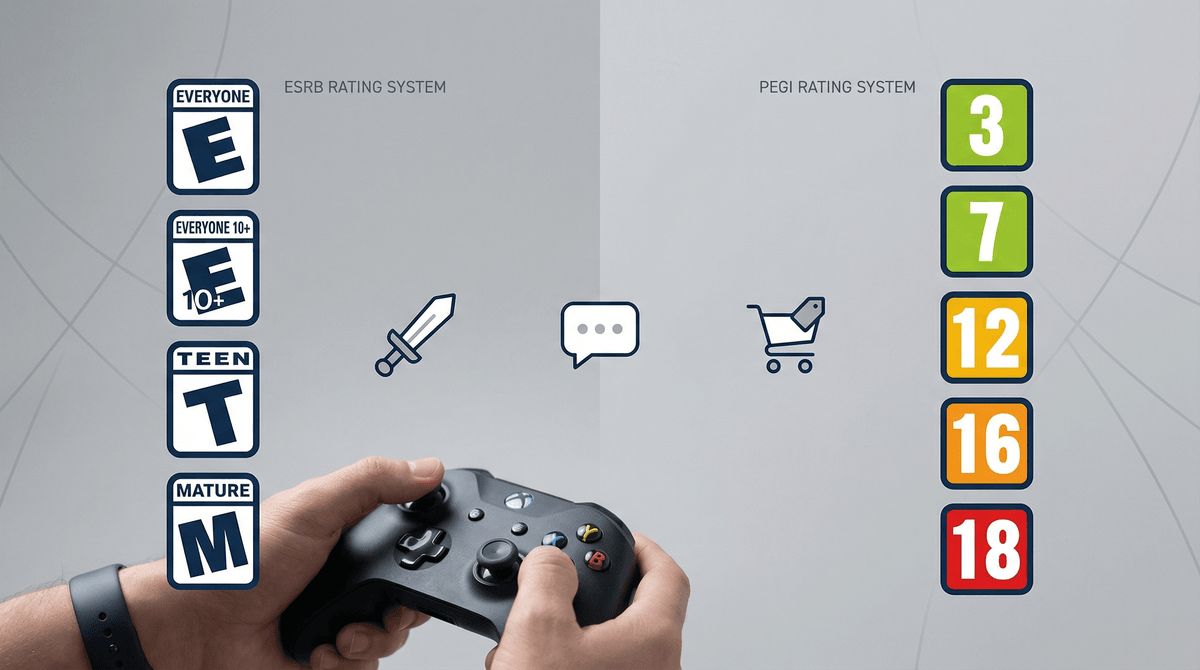
TL;DR: ESRB (the letter system: E, E10+, T, M) is used in North America, while PEGI (the number system: 3, 7, 12, 16, 18) is used in Europe and other regions. Both tell you the minimum age recommendation, but the tiny icons on the box reveal the actual content—violence levels, language, gambling mechanics, online interactions. If you're buying games for your kids, you need to understand both systems because digital storefronts mix them, and those content descriptors matter way more than the age number.
The Entertainment Software Rating Board (ESRB) rates games sold in the US, Canada, and Mexico. The Pan European Game Information (PEGI) system rates games in most of Europe and increasingly in other international markets.
If you're in North America, you're primarily dealing with ESRB. But here's where it gets messy: digital platforms like Steam, the PlayStation Store, and Xbox Live often show both ratings, or sometimes only PEGI if you're viewing content from another region. Your kid might be browsing games on their Switch and see a "PEGI 12" rating without context.
The basic age brackets:
ESRB:
- EC (Early Childhood): Ages 3+
- E (Everyone): Ages 6+
- E10+ (Everyone 10+): Ages 10+
- T (Teen): Ages 13+
- M (Mature): Ages 17+
- AO (Adults Only): Ages 18+ (extremely rare, basically means it's too intense for retail)
PEGI:
- 3: Suitable for all ages
- 7: May contain mild violence or scary scenes
- 12: May contain moderate violence, mild bad language, gambling simulation
- 16: Realistic violence, strong language, sexual content, drug use
- 18: Graphic violence, strong language, explicit sexual content, gambling with real money
On the surface, these seem roughly equivalent—ESRB's "T" maps to PEGI's "12," ESRB's "M" to PEGI's "16" or "18." But the rating philosophies differ slightly. PEGI tends to be more granular about specific content types (they're stricter about gambling mechanics, for instance), while ESRB focuses more on overall intensity and context.
The age rating is just the headline. The real information is in those little icons—the content descriptors that tell you why a game got its rating.
ESRB Content Descriptors include things like:
- Fantasy Violence (cartoony, unrealistic)
- Violence (realistic depictions)
- Blood and Gore
- Intense Violence (graphic physical conflict)
- Language (mild to strong profanity)
- Suggestive Themes or Sexual Content
- Use of Drugs/Alcohol/Tobacco
- In-Game Purchases (microtransactions, loot boxes)
- Users Interact (online play with strangers)
PEGI Content Icons include:
- Violence
- Bad Language
- Fear (scary or horror content)
- Gambling
- Sex
- Drugs
- Discrimination
- In-Game Purchases
Here's a real example: Fortnite is rated T (Teen) by ESRB and PEGI 12. The content descriptors? "Violence" and "In-Game Purchases" (ESRB) plus "Violence" and "In-Game Purchases" (PEGI).
Now compare that to Minecraft: E10+ (ESRB) and PEGI 7. Content descriptors: "Fantasy Violence" (ESRB) and "Violence" (PEGI).
Both games involve combat. But Fortnite's realistic gun mechanics and elimination-focused gameplay push it into Teen/12 territory, while Minecraft's blocky, abstract violence keeps it younger. The descriptor tells you more than the age rating alone.
Both ESRB and PEGI include warnings about online interactions, but here's the catch: they don't factor into the age rating itself.
A game could be rated E (Everyone) but include open voice chat with strangers, toxic player behavior, or exposure to inappropriate usernames and content created by other players. Roblox is a perfect example—it's rated E10+ (ESRB) and PEGI 7, but the user-generated content and social features create risks that go way beyond the base game's rating.
When you see "Users Interact" or "Online Interactions Not Rated by the ESRB," that's your cue to dig deeper. Check out our guide on Roblox parental controls or how to keep kids safe in online multiplayer games.
This is where PEGI has been more proactive than ESRB. In 2020, PEGI added a specific icon for "In-Game Purchases" that includes loot boxes, randomized rewards, and any game where you can spend real money on virtual items.
ESRB followed suit but was slower to adopt clear labeling. Now both systems flag games with microtransactions, but neither system rates the intensity of those monetization tactics. A game with optional cosmetic purchases gets the same warning as a game with aggressive, pay-to-win mechanics.
FIFA (now EA Sports FC) is rated E (Everyone) by ESRB and PEGI 3, but it contains Ultimate Team packs—essentially gambling mechanics targeting kids. The rating doesn't reflect that. Learn more about how loot boxes work and why they're controversial .
.
EC / PEGI 3 (Ages 3-5): Games like Paw Patrol: Grand Prix or Bluey: The Videogame. No violence, no scary content, no reading required. Safe for preschoolers.
E / PEGI 7 (Ages 6-9): Games like Super Mario Odyssey, Animal Crossing: New Horizons, or Kirby and the Forgotten Land. Mild cartoon violence, simple gameplay, generally wholesome.
E10+ / PEGI 12 (Ages 10-12): Games like Minecraft, Splatoon 3, or Pokémon Scarlet and Violet. More complex mechanics, mild fantasy violence, some competitive elements. This is the sweet spot for most elementary and middle schoolers.
T / PEGI 12-16 (Ages 13-15): Games like Fortnite, The Legend of Zelda: Tears of the Kingdom, or Rocket League. More realistic violence, online interactions, competitive pressure. This is where you need to start having real conversations about online behavior, screen time, and in-game spending.
M / PEGI 18 (Ages 17+):
Games like Call of Duty, Grand Theft Auto V, or The Last of Us. Graphic violence, strong language, mature themes. These are not for kids, full stop. If your 12-year-old is begging for GTA because "everyone plays it," the answer is no. Here's why GTA is genuinely not appropriate for kids.
1. Start with the age rating, then read the descriptors. Don't just look at the "T" or "12" on the box. Check what content pushed it into that category. "Fantasy Violence" is very different from "Intense Violence."
2. Watch gameplay videos. YouTube and Twitch are your friends here. Search "[game name] gameplay" and watch 10 minutes. You'll learn more from that than any rating system can tell you.
3. Check Common Sense Media or our own media pages. Sites like Common Sense Media provide detailed parent reviews. Our media pages include WISE scores and community feedback from other parents.
4. Pay attention to online features. If a game has "Users Interact" or online multiplayer, assume your kid will encounter language, behavior, or content that goes beyond the rating. Set up parental controls, enable chat restrictions, and have conversations about reporting toxic players.
5. Don't ignore your instincts. Ratings are guidelines, not gospel. If a game feels wrong for your kid—even if it's "age-appropriate"—trust that. Every kid is different. Some 10-year-olds can handle the intensity of The Legend of Zelda: Breath of the Wild, others find it overwhelming.
If you're buying physical games, you'll see the rating system for your region. But digital storefronts complicate things:
- Steam (PC gaming) often shows both ESRB and PEGI ratings, or defaults to PEGI for international titles.
- Nintendo eShop, PlayStation Store, Xbox Store show regional ratings but may display PEGI if you're viewing content from European developers.
- Mobile app stores (Apple App Store, Google Play) use their own age ratings, which don't always align with ESRB or PEGI.
If you see a PEGI rating and you're in the US, a rough conversion:
- PEGI 3 = E or EC
- PEGI 7 = E or E10+
- PEGI 12 = E10+ or T
- PEGI 16 = T or M
- PEGI 18 = M or AO
But again, check the content descriptors. A PEGI 12 game with "Bad Language" and "Fear" is different from one with "Violence" and "Gambling."
ESRB and PEGI are imperfect systems, but they're what we've got. The age rating gives you a baseline, the content descriptors give you specifics, and your own judgment fills in the gaps.
The real work isn't memorizing the difference between "T" and "PEGI 12"—it's understanding what your kid can handle, what your family values are, and how to navigate the online, monetized, socially complex world of modern gaming.
Next steps:
- Browse our guide to the best games for kids by age
- Set up parental controls on your gaming consoles—here's how to set up Nintendo Switch parental controls
- Talk to your kids about online behavior and reporting toxic players—here's a conversation starter
And remember: the rating on the box is just the beginning of the conversation, not the end of it.