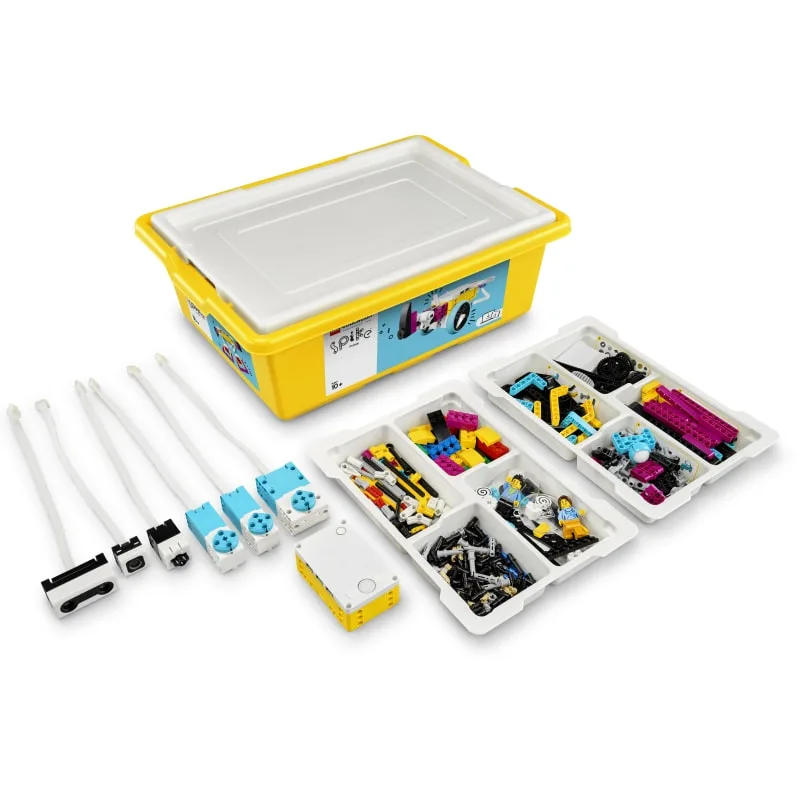
If you're looking for the antidote to 'brain rot' apps, this is it. LEGO Education Spike is one of the few pieces of tech that actually justifies its price tag by teaching real logic and mechanical engineering.
It’s not a 'set it and forget it' toy—you’ll probably need to help them troubleshoot the Bluetooth connection or the browser requirements at first—but once it's running, it's pure creative fuel. It’s safe, it’s smart, and it’s one of the best ways to get a kid interested in STEM without it feeling like 'School 2.0.'
Age Fit
Perfect for ages 6 to 14. Younger kids will thrive with 'Essential,' while middle schoolers will actually find 'Prime' challenging enough to stay engaged.
WISE Breakdown
Wholesome
95
It's LEGO. It focuses entirely on constructive problem-solving and collaboration. No snark, no violence, just building stuff that works.
Imaginative
98
This is the peak of 'low floor, high ceiling' design. Kids can build a simple fan or a complex walking robot. It invites constant tinkering and 'what if' testing.
Safe
98
The app is a privacy dream. No accounts, no personal data collection beyond an IP address for connectivity, and zero social features or ads.
Enriching
98
It bridges the gap between 'playing with blocks' and actual engineering. Teaches logic, Python, and physics in a way that doesn't feel like a lecture.
Parent Info
✓
Why It Might Be Great
Tactile learning that keeps kids off the 'infinite scroll' and into physical engineering.
Scales beautifully from simple drag-and-drop blocks to actual Python coding.
The privacy standards are gold-tier; you don't even need to make an account for your kid.
The curriculum is robust, so you aren't just left with a box of parts and a 'good luck' shrug.
⚠
What to Watch For
It’s a financial commitment; the starter kits are pricey and you'll likely want expansion sets eventually.
Hardware snobbery: the web app really only likes Google Chrome on updated machines.
The bright, 'primary school' colors might feel a bit 'babyish' to some 13-year-olds who want a sleeker look.
Conversation Starters
"Why did the robot do that instead of what you coded? Let's walk through the logic."
"If we didn't have this specific sensor, how else could we make the robot 'see' the wall?"
"What real-world machine uses a motor or sensor like this one?"