

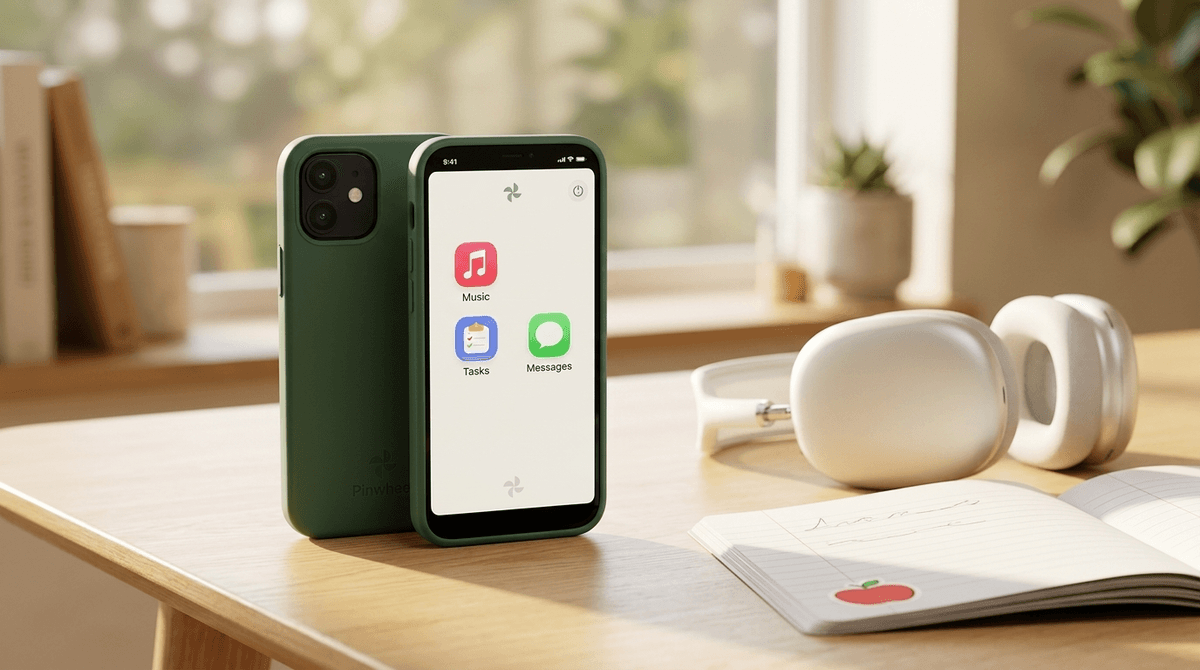
TL;DR: Pinwheel is a high-quality smartphone (Samsung or Google Pixel hardware) running a custom, parent-managed operating system. It has no web browser and no social media, but it allows for a curated list of over 1,200 "wellness" and "utility" apps. It’s the perfect middle ground for kids who are too old for a "baby" watch but not ready for the "wild west" of an iPhone.
Quick Links for the Transition:
The "should I get them a phone?" conversation is the ultimate parenting boss battle. On one hand, you want to be able to text them when soccer practice ends early. On the other hand, giving an 11-year-old an unrestricted iPhone is basically handing them a portal to every weird, dark, and "Ohio" corner of the internet.
Enter Pinwheel.
If you’ve been looking for a way to give your child the tools of modern life—GPS, music, texting, and maybe a few educational games—without the "brain rot" of endless TikTok scrolling or the anxiety of Discord servers, this is the "training wheels" smartphone you’ve been waiting for.
Pinwheel isn't just an app; it’s an entire ecosystem. When you buy a Pinwheel, you’re getting a real, name-brand smartphone (usually a Samsung Galaxy or a Google Pixel) that has been "re-skinned" with Pinwheel’s proprietary operating system.
The magic is in what’s missing:
Everything is managed by you through the Pinwheel Caregiver Portal on your own phone. You decide who they can text, what apps they can use, and exactly when the phone turns into a "dumb" brick at bedtime.
You might think a phone without YouTube would be a hard sell, but Pinwheel has a major "cool factor" advantage over competitors like Gabb.
Because Pinwheel uses standard Samsung and Pixel hardware, it doesn't look like a "kid phone." It fits in a standard case, has a high-quality camera for those inevitable 500 photos of the family dog, and feels like a piece of adult tech.
Plus, the Pinwheel App Library is actually pretty robust. Instead of a total ban on apps, Pinwheel vets every single app for safety. If an app has hidden browsers, predatory ads, or unmonitored chat, it doesn't make the cut.
The core philosophy here is "gradual release of responsibility." You can start with just the basics (Phone and SMS) and slowly add "Wellness Apps" as your child proves they can handle them.
Here are some of the heavy hitters available in the Pinwheel library that we actually recommend:
Music is a huge part of tween identity. Pinwheel allows these apps so kids can build their playlists and listen to Wow in the World without you worrying about them stumbling into the comments section of a music video.
If they’re going to be on a screen, they might as well be learning Spanish. This is a staple in the Pinwheel library because it’s gamified but productive.
Connecting the phone to your local library card is a pro-parent move. It turns the phone into an e-reader, which is the literal opposite of brain rot.
While Pinwheel blocks standard Facebook and Instagram, they do allow Messenger Kids because it gives parents total control over the contact list. It’s a great way for them to group chat with cousins or school friends in a walled garden.
Teaching a kid to navigate their own neighborhood or find their way home from a friend's house is a massive confidence booster.
1. The Scheduler
This is the "killer feature." You can create different "modes" for the day.
- School Mode: Only the apps they need for school (Calculator, Calendar) and calls to Mom/Dad are active. Everything else disappears.
- Sleep Mode: The phone effectively shuts down at 8:00 PM. No more "just five more minutes" under the covers.
- Everything Mode: Weekend access to things like Chess.com or their camera.
2. Safelist Contacts
On a standard phone, any telemarketer or "wrong number" can text your child. On Pinwheel, you can set it so only people on their "Safelist" can get through. If Grandma isn't on the list, she can't call. (Though, maybe add Grandma first.)
3. No-BS GPS Tracking
You don't need a separate subscription for Life360 (though you can use it). Pinwheel has location tracking built into the caregiver portal, so you can see if they actually made it to the library or if they're still at the park.
Ages 8-10: This is the "Safety First" stage. Use the Pinwheel Slim (usually a more budget-friendly Samsung) primarily for tracking and quick "I'm at practice" texts. Stick to utility apps like the weather, calculator, and maybe a drawing app.
Ages 11-13: The "Social Training" stage. This is when you might introduce Messenger Kids or Spotify. It’s the perfect time to talk about digital etiquette—like why we don't text in all caps or send 50 "Skibidi" stickers in a row to a group chat.
Ages 14+: By high school, many kids will start feeling the "social friction" of not having a full smartphone. Pinwheel is a great bridge, but if they’ve demonstrated they can manage their time and emotions, they might be ready to graduate to a standard phone with Screen Time controls.
Learn more about the "graduation" process from a kid phone to an iPhone
No tech is 100% "safe," and Pinwheel is honest about that. While there is no browser, kids are creative. They can still take inappropriate photos or say mean things via text message.
Pinwheel does not monitor the content of the texts (unlike Bark, which uses AI to flag concerning language). You have the ability to log into the portal and read the texts, but Pinwheel won't ping you if your child is talking about "Ohio" or something more serious.
The Screenwise Take: We actually like this. It encourages you to have a relationship-based approach to digital wellness rather than just relying on an algorithm to "spy" for you.
- The Subscription: You have to pay for the phone hardware PLUS a monthly Pinwheel service fee (usually around $15-$30 depending on your plan). This is on top of your cellular data plan.
- Carrier Flexibility: Pinwheel works with most major carriers (Verizon, T-Mobile, AT&T), but you should always double-check their compatibility list before buying a SIM card.
- The "Workaround" Factor: Because there is no browser, it is extremely difficult for a kid to bypass the restrictions. It’s significantly more secure than a standard iPhone with "Parental Controls" turned on, which most tech-savvy 12-year-olds can crack in about five minutes.
If you are an intentional parent who wants to delay the "social media onslaught" but needs the practical benefits of a smartphone, Pinwheel is the gold standard.
It respects your child’s growing need for independence by giving them a device that looks and feels "real," while respecting your need for peace of mind by removing the most addictive and dangerous parts of the internet.
It turns the phone into what it was always meant to be: a tool for communication and creativity, not a slot machine for your child's attention.
- Check the App List: Before you buy, browse the Pinwheel App Library to make sure the specific apps your child "needs" (like a specific school app) are available.
- Compare Hardware: Decide if you want the "Slim" (budget-friendly) or the "Plus" (better camera and speed).
- Set the Ground Rules: Even with a Pinwheel, you need a Family Tech Contract.
Download our template for a Family Digital Tech Contract
Read our guide on the best podcasts for tweens to listen to on their new phone