

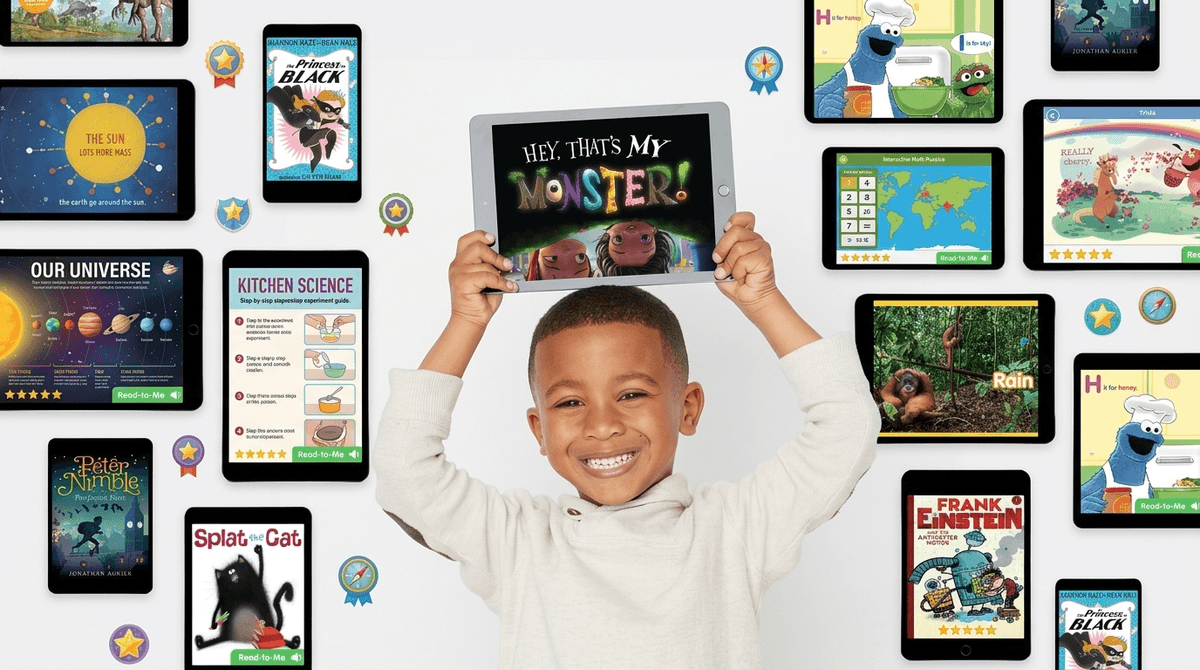
TL;DR: Epic! is essentially the "Netflix of kids' books." It’s a massive digital library that kids usually encounter first at school. It’s brilliant for getting reluctant readers to engage with graphic novels and high-interest non-fiction, but the gamification (badges, levels, streaks) can sometimes lead to "speed-clicking" rather than actual reading.
Quick Links to Fan Favorites on Epic!:
- For Graphic Novel Fans: Cat Kid Comic Club and Big Nate
- For Science Nerds: National Geographic Kids
- For Audio Lovers: The Wild Robot
- For the "I Hate Reading" Crowd: InvestiGators
If your kid is in elementary school, you’ve probably seen the bright blue Epic! icon on their school iPad or Chromebook. It’s a digital reading platform for kids age 12 and under that houses over 40,000 titles.
The business model is a "freemium" setup that can be a bit confusing for parents. At school, it’s usually free for teachers and students during school hours (7 am to 3 pm). Once the school bell rings, the "free" access typically cuts off, and that’s when you start getting the emails to upgrade to Epic Family for a monthly subscription.
It’s not just ebooks; it includes "Read-To-Me" books (where the text is highlighted as a narrator reads), audiobooks, and educational videos. Think of it as a walled garden of content where you don't have to worry about them stumbling onto a Skibidi Toilet remix while they're trying to learn about black holes.
Kids love Epic! for the same reason they love Roblox: gamification.
The platform is designed to trigger all those happy dopamine hits. Kids earn badges for finishing books, level up their profiles, and maintain "reading streaks." For a kid who struggles to sit still with a physical copy of Charlotte's Web, the digital bells and whistles can be the "hook" that actually gets them to consume a story.
However, as intentional parents, we have to keep an eye on the "clicking vs. reading" phenomenon. Because the app rewards finishing books, some kids will just swipe through a 40-page book in thirty seconds to get the badge. They aren't reading; they're "farming" experience points.
Is reading a digital comic book on a screen the same as reading a paper book?
The short answer: Yes, but with caveats.
Research generally shows that for deep comprehension and memory retention, physical books still win. There’s something about the tactile nature of a page and the lack of digital distractions that helps the brain focus.
But let’s be real—if the choice is between your kid playing Fortnite or reading Wings of Fire on a tablet, the tablet wins every time. Epic! serves as a fantastic "bridge" for kids who find physical books intimidating or boring.
The "brain rot" concern usually stems from the video section. Epic! includes a lot of "educational" videos. Some are great (like Smithsonian content), but some feel a bit like filler. If your kid is spending their "reading time" just watching DIY slime videos on the app, that’s not exactly building literacy.
If you’re going to pay for the subscription or use the limited free version at home, here are the titles that are actually worth their time.
These are the books that will get them to open the app in the first place.
- Diary of a Wimpy Kid: The gateway drug for middle-grade readers.
- Dog Man: If your kid says they hate reading, give them Dav Pilkey. It’s chaotic, funny, and surprisingly sweet.
- The Baby-Sitters Club (Graphic Novels): A great modernization of the classic series.
Epic! produces its own content. Some of it is "meh," but some is genuinely good:
- My Father’s Dragon: A classic tale that they’ve updated with great digital visuals.
- Scaredy Monster: Perfect for the Pre-K to 1st-grade crowd dealing with big feelings.
This is where Epic! really shines.
- National Geographic Kids: The photography is stunning on a high-res tablet screen.
- Who Is / Who Was Series: These biographies are huge in elementary school right now. They’re basically the "Ohio" of history—everybody knows them.
Ages 4-6: Stick to the "Read-To-Me" books. It’s great for phonics and word recognition. Just make sure they are actually looking at the words, not just the pictures.
Ages 7-9: This is the "sweet spot" for Epic!. They are old enough to navigate the interface but young enough to still be motivated by the digital badges. Focus on Graphic Novels to build confidence.
Ages 10-12: You might start to see some "Epic fatigue" here. Older kids often prefer Kindle or Libby (which connects to your local library for free) because the selection on Epic! can start to feel a bit "kiddy."
One of the best things about Epic! is that it is remarkably safe.
- No Ads: You aren't going to see ads for other games.
- No Social Interaction: There is no "chat" feature. Your kid isn't talking to strangers.
- Curated Content: Everything is vetted for age-appropriateness. You won't find the weird, dark content that sometimes slips through the cracks on YouTube Kids.
The only real "danger" is to your wallet if you forget to cancel the subscription, or the "eye strain" if they're reading in the dark under the covers.
Instead of asking "How many books did you read?", try these conversation starters to ensure they aren't just speed-clicking for badges:
- "I saw you earned a new badge today! What was the story about that helped you get it?"
- "Which is better: the 'Read-To-Me' voice or when I read to you?" (Prepare to have your feelings hurt).
- "I noticed you’ve been reading a lot of InvestiGators. What’s the funniest thing that happened to Mango and Brash?"
Epic! is a tool, not a replacement for a bookshelf. It’s a fantastic way to give your kid access to thousands of books without spending a fortune at the Scholastic Book Fair or making a daily trip to the library.
If your kid is using it to explore new interests—like moving from Minecraft to reading a book about coding—it’s a massive win. Just keep an eye on the "video rabbit hole" and make sure the digital badges are a bonus, not the only reason they're opening the app.
- Check the logs: Log into your parent dashboard once a week. Look at the "Time Spent Reading" vs. "Pages Flipped." If they "read" a 50-page book in 2 minutes, it’s time for a chat.
- Set a Video Limit: Agree that they can watch one educational video for every two books they read.
- Mix it up: Use Epic! for travel or waiting rooms, but keep physical books in the bedtime routine.
Read our guide on building a balanced "Digital Diet" for your family