

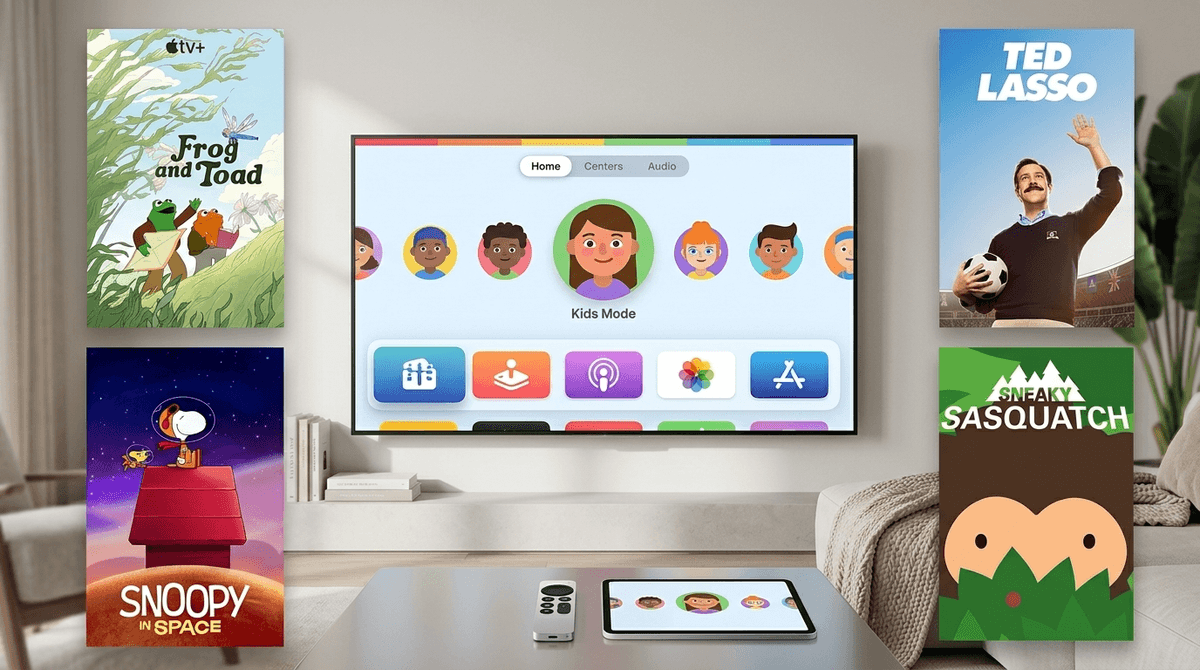
TL;DR: Apple TV has finally evolved from the "expensive hobby" into the most parent-friendly streaming box on the market. With the 2025-2026 updates to Child Profiles and the return of Ted Lasso, it’s the best way to keep "brain rot" off the big screen while maintaining a premium experience for yourself.
Quick Links:
- Best for Little Kids: Snoopy in Space
- Best for Big Kids: Wolfboy and the Everything Factory
- Best for Families: Fraggle Rock: Back to the Rock
- The Gaming Secret: Sneaky Sasquatch via Apple Arcade
For years, we’ve had to explain the difference between the Apple TV app (the thing on your smart TV), Apple TV+ (the subscription service with the shows), and the Apple TV 4K (the actual black box).
In 2026, the distinction matters more than ever. While you can get the app anywhere, the Apple TV 4K box is where the magic happens for intentional parents. Why? Because it’s the only place where you get the full suite of "Kids Mode" features that actually work. If you’re tired of your six-year-old accidentally clicking into your Severance rewatch or seeing a thumbnail for a slasher flick on Netflix, the hardware box is your best friend.
Apple finally stopped pretending that one "Up Next" queue works for a whole family. The latest tvOS updates have introduced True Child Profiles.
In the past, switching users on an Apple TV was a clunky three-step process that no child ever bothered to do. Now, with FaceID handoff from your phone or the dedicated "Kids" button on the latest Siri Remote, the entire interface transforms.
When your kid enters their profile:
- The "Up Next" queue is curated: It only shows their progress in shows like Helpsters or Camp Snoopy.
- App Access is Restricted: You can choose to hide apps like YouTube or TikTok entirely within the child’s profile, even if they are installed on the main "Adult" side.
- Time Limits that Actually Stick: If you’ve set a one-hour limit via Apple Screen Time, the box will actually dim and give a "5-minute warning" that isn't just a notification—it’s a hard stop.

Let’s be real: Netflix is a minefield of low-quality, high-stimulation "brain rot." YouTube is... well, it's YouTube.
Apple TV+ (the subscription) has taken a "quality over quantity" approach that is a breath of fresh air for parents who care about what their kids are consuming. Most of their kids' programming feels like the high-end picture books we buy at independent bookstores. It’s slower-paced, beautifully animated, and doesn't leave your kid in a dopamine-depleted zombie state after twenty minutes.
Top Picks for the Apple TV+ Subscription:
Ages 4-8. This is the gold standard. It’s educational (partnered with NASA), funny, and retains that classic Peanuts "low-fi" vibe that won't overstimulate.
Ages 3-7. If you want your kids to value friendship and the slow pace of nature, this is it. It’s essentially the visual equivalent of a warm glass of milk.
Ages 8-12. For the older kids who want adventure and sci-fi without the "edginess" of TV-MA shows. The world-building here is incredible, based on the books by Tony DiTerlizzi.
Ages 12+ (with parents). With the recent Season 4 revival, the conversations about mental health, forgiveness, and "The Richmond Way" are back. It’s the ultimate "co-viewing" show for parents and teens, though watch out for the f-bombs (Roy Kent hasn't changed).
One of the most overlooked parts of the Apple TV is Apple Arcade. For $6.99 a month, you get a library of games that have zero ads and zero in-app purchases.
In a world where Roblox is constantly trying to get your kid to spend "Robux" on a digital hat, Apple Arcade is a sanctuary. You can pair a PlayStation or Xbox controller to the Apple TV box, and suddenly you have a high-end gaming console.
Recommendations for Apple Arcade:
- Ages 6-12. This is arguably the best "first open world" game. You play as a Sasquatch living in a campsite, stealing food, and eventually getting a job, a driver's license, and running for mayor. It’s hilarious, safe, and deeply creative.
- Ages 5-10. A beautiful game about a girl visiting her grandparents on a Mediterranean island and saving the local environment. It’s the opposite of a "violent" game.
- Ages 10+. A farming sim with a magical twist. It’s a great alternative to more complex social sims and features great storytelling.
The 2026 Siri Remote has a "Find My" chip in it (thank god), but it also has a dedicated Siri button. This is a double-edged sword.
While it’s great for saying "Find Bluey," it can also be used to search for... anything. If you haven't turned on Content Restrictions in the settings, a kid can theoretically voice-search their way into content that isn't age-appropriate.
Pro-Tip: Go to Settings > General > Restrictions and set a 4-digit passcode. From here, you can restrict "Explicit" music and podcasts, and set a "maximum movie rating" (like PG or PG-13). This applies to the entire system, regardless of which app they are in.
Kids today are smart. They know that the "Apple TV" is the "safe" box and the "Smart TV" in the basement might have the "unfiltered" YouTube.
Use the Apple TV as a teaching tool for Digital Intentionality. Explain why you prefer them using the Apple TV:
- "We use this box because the games don't have ads that try to trick you."
- "We like this remote because it helps us keep track of how much time we've spent on screens."
- "The shows here are 'quality'—they're made by people who want to tell a good story, not just sell you a toy."
The Apple TV 4K isn't the cheapest streaming option—you can get a Roku stick for the price of a fancy lunch—but for a Screenwise parent, the investment is worth it. It’s about friction.
Cheap sticks make it easy for kids to find garbage content and hard for parents to stop it. Apple TV makes it easy for parents to set boundaries and easy for kids to find high-quality, beautiful media that actually enriches their brains instead of just rotting them.
If you're looking to reclaim your living room from the "Ohio" memes and the endless loop of unboxing videos, this is your hub.
- Check your hardware: If you’re still using a 2018 Apple TV, the new "Kids Mode" might be sluggish. Consider the 2025/2026 model for the better remote and faster profile switching.
- Audit your Apps: Delete the apps you don't want your kids finding (yes, even if they're "hidden" in folders) and move the Apple Arcade icon to the top row.
- Set the Passcode: Don't wait for them to stumble onto The Morning Show before you decide to lock down the ratings.
Take the Screenwise Survey to see how your family's TV habits compare to your community