

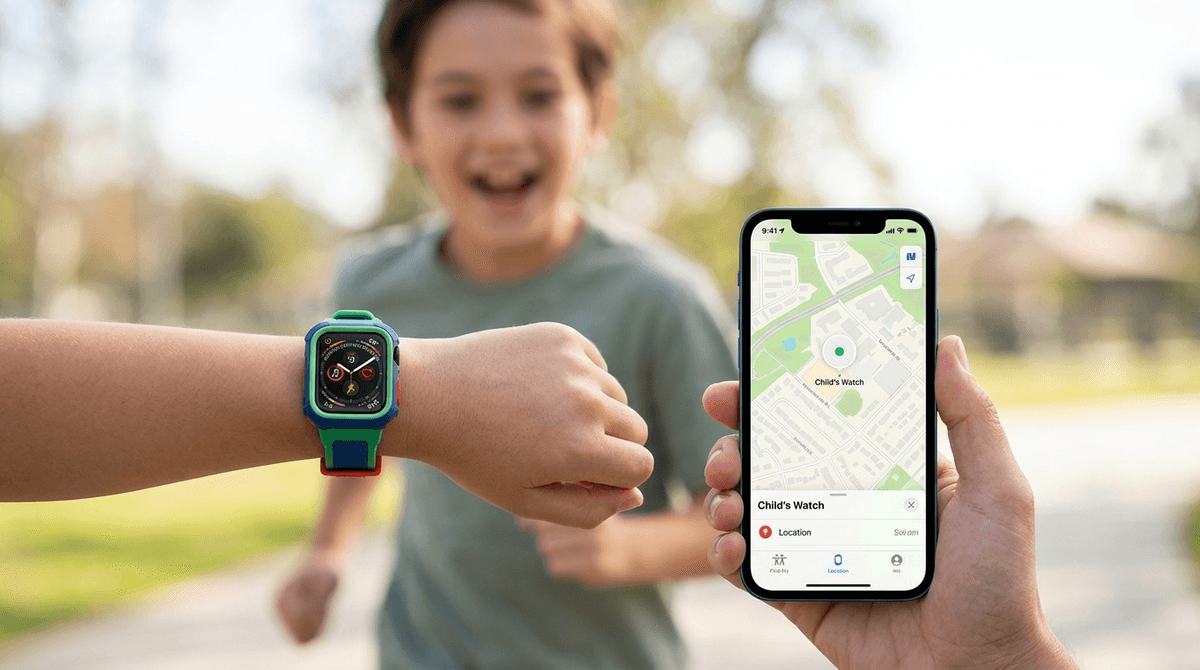
TL;DR: The Apple Watch via Family Setup is the ultimate "bridge" device. It gives your kid a way to call you when soccer practice ends early without giving them a portal to the "Ohio" side of YouTube. It’s expensive, the battery life is just okay, but it’s the best way to delay the "I need an iPhone" conversation while still saying yes to independence.
Quick Links:
We’ve all been there. Your 4th or 5th grader starts staying after school for clubs, or maybe they’re walking to a friend’s house two blocks away. Suddenly, "I’ll just see you at 5:00" feels a little too analog. You want to reach them, and they want to feel like they aren't the only person in the zip code without a screen.
Enter the Apple Watch. Specifically, the Family Setup feature.
This allows you to pair a cellular Apple Watch to your iPhone, but give it its own phone number and account. They don’t need their own iPhone to make it work. It’s essentially a "phone-lite" strapped to their wrist. It’s harder to lose than a Gabb Phone or a Bark Phone, and it doesn't come with the social media baggage that turns a perfectly normal kid into a TikTok zombie.
The pressure to get a smartphone is real. By 6th grade, roughly 40-50% of kids have a smartphone, and by 8th grade, that number jumps to nearly 80%. But here’s the no-BS truth: most of those kids aren't using those phones for "safety." They’re using them to scroll Shorts or play Roblox under their desks.
The Apple Watch changes the narrative. It’s a tool, not a toy.

If you’re worried your kid will hate it because they can’t play Fortnite on it, you might be surprised. Kids actually love the "secret agent" vibe of a watch.
This is the sleeper hit. It’s a push-to-talk feature that lets them voice-chat with approved friends or parents instantly. It’s fun, it’s tactile, and it feels way cooler than a standard phone call.
If they have Bluetooth headphones, the watch is a great standalone media player. They can listen to Wow in the World or Greeking Out while they’re riding their bike. It gives them that "digital autonomy" without the YouTube rabbit holes.
The gamification of fitness is actually pretty effective for this age group. Competing with a sibling to see who can get more "move" points is a lot healthier than competing for Snapchat streaks.
I’m not here to tell you it’s perfect. It’s not.
- Battery Life is Mid: If they are texting a lot or using GPS, that battery is going to be screaming by 7:00 PM. They have to be disciplined about charging it every night.
- The Keyboard is Tiny: Texting on a watch is a lesson in patience. They’ll mostly use voice-to-text or emojis. (Expect a lot of the "skull" emoji or "moai" emoji—don't ask, it's just what they do now).
- Cost: You need a cellular model (GPS + Cellular), and you’ll have to pay a monthly fee to your carrier (usually around $10/month). It’s an investment.
Ages 8-10 (The "Safety First" Phase)
At this age, the watch is primarily for you. You use Find My to make sure they actually made it to the library. Use the Schooltime feature to lock the watch during school hours so it’s literally just a watch. It prevents them from getting distracted by their "Activity" rings during math class.
Ages 11-13 (The "Independence" Phase)
This is where the Apple Watch really shines. They’re starting to go to the mall or the movies with friends. They can use Apple Pay (with your permission) to buy a slice of pizza. It’s a huge confidence booster for them to have a "digital wallet" and a communication tool without the risks of a full smartphone.
When you introduce the watch, don't frame it as "I don't trust you with a phone." Frame it as "This is your starter kit for digital responsibility."
The Conversation Starter: "We’re getting you this watch so you can have more freedom to go places on your own. It’s a tool for us to stay connected and for you to manage your own time. If you can show us that you can keep it charged, not use it during class, and be respectful with your texts, we’ll know you’re getting closer to being ready for a phone down the road."
The most important setting in Family Setup is the Contact List. You can set it so the kid can only receive calls and texts from people in their contacts. This effectively kills spam calls and prevents them from communicating with anyone you haven't vetted.
Also, be aware of Walkie-Talkie etiquette. It can be annoying if they’re constantly "chirping" you while you’re in a meeting. Set those boundaries early.
If you’re looking for a way to give your kid a "long leash" without letting them fall into the pit of Skibidi Toilet memes and infinite scrolling, the Apple Watch is the way to go. It solves the "safety" problem while delaying the "social media" problem.
It’s not a permanent solution—eventually, the peer pressure for a "real" phone will win—but as a training wheels device for grades 4 through 7? It’s unbeatable.
- Check your carrier: Make sure your plan supports "Apple Watch Family Setup" (most major ones do).
- Buy a rugged band: The standard silicone ones are fine, but kids are destructive. Look for something that protects the screen edges.
- Set up "Schooltime": Do this immediately. Don't let the watch be the reason they get a "no electronics" lecture from their teacher.
- Explore the Find My app: Practice using it with them so they understand that you can see where they are (and why that's a safety thing, not a "spying" thing).