

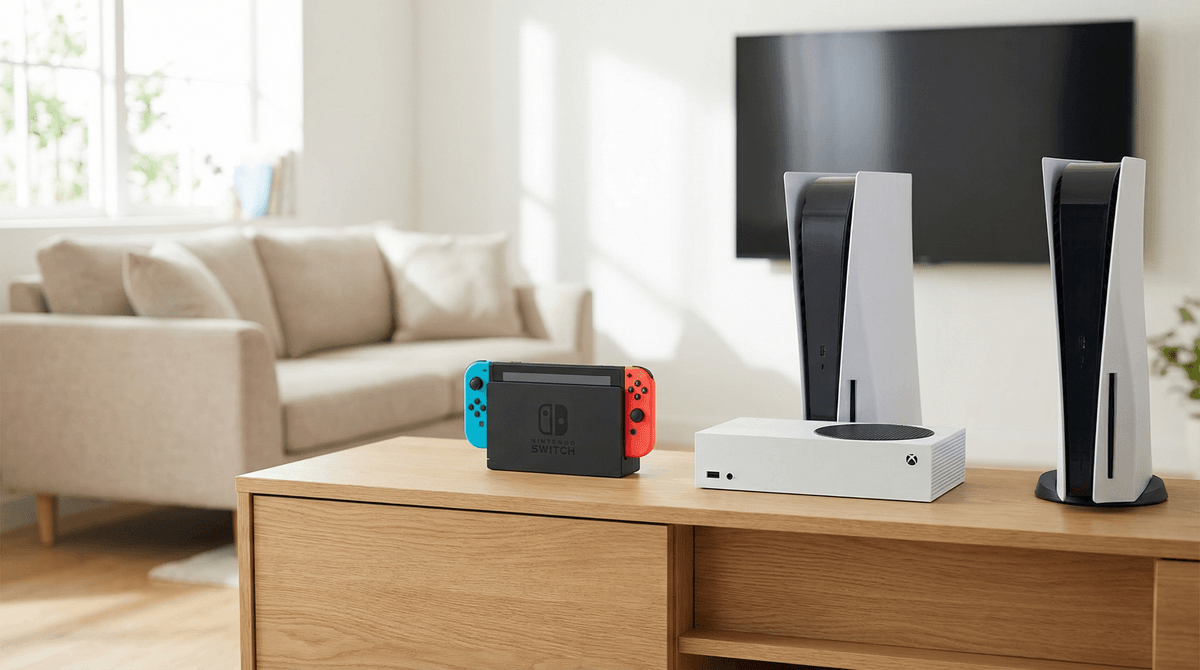
Switch, Xbox, or PlayStation: Which Console Is Right for Your Kid?
Nintendo Switch is the safest bet for most families with kids under 12. It's portable, has the best library of kid-friendly games, and the parental controls actually work. Xbox Series S is the budget-friendly choice for tweens and teens who want to play with friends online (Game Pass is genuinely incredible value). PlayStation 5 is for families with older kids who want the premium gaming experience and don't mind spending more.
If you're trying to decide between these three, here's the honest truth: your kid's friends matter more than the hardware specs. If all their friends play Fortnite on Xbox, get an Xbox. If they want to play Mario Kart and Animal Crossing, get a Switch. Gaming is social, and being on the "wrong" console can genuinely affect their ability to connect with friends.
Best for: Ages 5-14, families who want one console everyone can share, parents who care about screen time boundaries
The Switch is basically the Honda Civic of game consoles — reliable, affordable-ish, and does exactly what you need it to do. It's a hybrid console that works as both a handheld device and plugs into your TV, which is honestly genius for families. Your kid can play in the car, you can dock it for family game night, and the built-in portability means they're not always hogging the TV.
The good stuff:
- Best library of games that don't involve shooting people (Zelda, Pokemon, Splatoon, Kirby)
- Parental controls are straightforward and actually enforced
- Physical portability = natural screen time limits (battery dies after 3-5 hours)
- Local multiplayer is easy — just hand someone a Joy-Con
- Durability is... fine. The controllers drift eventually but that's fixable
The not-so-good stuff:
- Online experience is clunky compared to Xbox/PlayStation
- Graphics aren't as impressive (your 10-year-old will not care, your 14-year-old might)
- Games rarely go on sale and stay expensive forever
- Voice chat requires a separate phone app (which is actually a safety feature in disguise)
Real cost: $300 for the console, $60 per game (they hold value though — you can resell), $20/year for online play. Budget $500 first year.
Best for: Ages 10+, families on a budget who want access to tons of games, kids who play with friends online
Xbox is the value play. The Series S costs $300 and with Game Pass ($11/month), you get instant access to hundreds of games including day-one releases. That's genuinely wild value — it's like Netflix but for games, and it actually delivers.
The good stuff:
- Game Pass is legitimately the best deal in gaming (seriously, do the math)
- Best online infrastructure — parties, chat, cross-platform play all work seamlessly
- Backward compatible with older Xbox games
- Series S is small, quiet, and affordable
- Microsoft's parental controls are robust (screen time limits, spending controls, activity reports)
The not-so-good stuff:
- The game library skews older — lots of shooters and mature content
- Easier for kids to stumble into inappropriate games/communities
- Requires more active parenting around online interactions
- Series X ($500) is hard to find; Series S is less powerful but honestly fine for most kids
Real cost: Series S ($300) + Game Pass Ultimate ($132/year) = $432 first year. If you skip Game Pass, games are $60-70 each, so the math flips quickly. Most families find Game Pass essential.
Best for: Ages 12+, families willing to invest more, kids who care about graphics and exclusive games
PlayStation is the premium option. Better graphics, incredible exclusive games (Spider-Man, God of War, Horizon), and a more curated experience. But you pay for it — the console costs $500, games are $70, and there's no Game Pass equivalent that's as good.
The good stuff:
- Best exclusive games, period
- Superior graphics and performance (if you have a good TV)
- DualSense controller has cool haptic feedback
- PlayStation Plus offers a decent game library
- Generally more mature gaming community (which can be good or bad)
The not-so-good stuff:
- Most expensive option across the board
- Fewer kid-friendly exclusives compared to Switch
- Parental controls exist but are less intuitive than Xbox
- The console is huge and kind of ugly
- Still somewhat hard to find at retail price
Real cost: $500 console + $70 games + $60/year for online = you're easily spending $700+ first year. This is a real investment.
Start with these questions:
1. How old is your kid?
- Under 10: Switch, no question
- 10-12: Switch or Xbox Series S
- 13+: Any of them, depending on interests and friend group
2. What do they want to play?
This is the real question. Consoles are just boxes — the games matter. Ask your kid (or their friends' parents) what specific games they're interested in. Some games are exclusive to one console:
- Want Mario, Zelda, Pokemon, Animal Crossing? Switch only
- Want Halo, Forza? Xbox only
- Want Spider-Man, The Last of Us? PlayStation only
Most popular games (Minecraft, Fortnite, Roblox, Rocket League) are on all platforms, but performance and community size varies.
3. What are their friends playing on?
Cannot stress this enough: peer compatibility matters. If your kid's entire friend group plays on Xbox and you buy them a PlayStation, they'll be isolated from their social circle. Gaming is how many kids maintain friendships now — it's their version of talking on the phone for hours. Cross-platform play exists for some games, but it's still clunky.
4. What's your parenting style around screens?
If you want tight control: Switch (built-in portability creates natural limits, simpler online features)
If you're comfortable with more independence: Xbox (better tools for monitoring, but more to monitor)
If you're hands-off: Maybe don't get a console yet, or read our guide to setting up parental controls first
5. What's your actual budget?
Be honest about total cost of ownership:
- Budget-conscious: Xbox Series S + Game Pass ($432/year)
- Middle ground: Switch + 4-5 games ($500-600/year)
- Premium: PlayStation 5 + games ($700+/year)
All three consoles have parental controls. Xbox's are the most comprehensive, Switch's are the most user-friendly, PlayStation's are... there.
What you can actually control:
- Screen time limits (daily/weekly)
- Spending limits and purchase approval
- Who they can communicate with online
- What games they can access based on ratings
- Activity reports (what they're playing, for how long)
What you can't control:
The best parental control is still being in the room and having conversations about online behavior. The console settings are backup, not primary defense.
Gaming PCs offer more flexibility, better graphics, and access to different games (especially strategy and simulation games). But they're also:
- More expensive ($800+ for decent performance)
- Harder to set up and maintain
- Much harder to monitor and control
- A portal to the entire internet (for better and worse)
For most families with kids under 14, a console is the better choice. PCs make more sense for older teens who are into specific genres (strategy games, MMOs, modding) or who need a computer for school anyway.
For most families: Start with a Switch. It has the best library for kids, the most natural boundaries, and the lowest risk of your 8-year-old accidentally stumbling into a toxic online lobby. When they outgrow it (around 12-14), reassess based on their interests and friend group.
For tweens and teens: Xbox Series S + Game Pass is incredible value. Your kid gets access to hundreds of games for the price of one PlayStation game per month, and the online infrastructure is solid for playing with friends.
For families willing to invest: PlayStation 5 is the premium experience. Better graphics, better exclusives, but you pay for it. This makes sense if you have older kids (13+) who are serious about gaming, or if parents want to use it too.
The real answer: There's no wrong choice here. All three consoles are good. Your kid will be happy with any of them. What matters more is setting up good habits from day one — time limits, communication boundaries, and staying involved in what they're playing.
- Ask your kid what their friends play on. Seriously, start there.
- Set a realistic budget including games and online subscriptions
- Read reviews of the specific games your kid wants to play (our game guides can help)
- Set up parental controls immediately — don't wait until there's a problem
- Plan for the first multiplayer experience together so you can talk about online behavior before they're in it alone
And remember: the goal isn't to prevent gaming — it's to help your kid develop a healthy relationship with it. The console is just a tool. Your involvement is what actually matters.