

The Ultimate Guide to Connected Toys: What Parents Need to Know Before You Buy
Connected toys—smart watches, talking dolls, interactive robots—are everywhere. Before you buy one, you need to know: Does it collect data? Can strangers access it? Will it still work in two years? This guide breaks down what to look for, which toys are worth it, and how to protect your kid's privacy without becoming a total fun-killer.
Quick safety checklist:
- Check if it requires an account (and what data that collects)
- Look for toys that work offline or have strong privacy settings
- Avoid toys with cameras/mics unless you control who can access them
- Consider alternatives to screen-based toys if you're on the fence
Connected toys are any toys that use Bluetooth, WiFi, or internet connectivity to offer "interactive" features. Think:
- Smart watches for kids (like the Gabb Watch)
- Talking dolls that respond to voice commands
- Interactive robots that teach coding (like Sphero)
- Tablets designed for kids (like Amazon Fire Kids tablets)
- Gaming devices that connect online (hello, Roblox on every platform)
Some are genuinely educational and well-designed. Others are data-harvesting nightmares wrapped in cute packaging.
In 2017, the FBI issued a consumer notice warning parents about connected toys. Not to scare you, but to make you aware: these toys can collect your child's name, school, photos, voice recordings, and location data. Some have been hacked. Some sold data to third parties. Some had security so weak that strangers could talk to kids through the toy.
The scariest part? Most parents don't know what data their kid's toys are collecting because nobody reads the 47-page privacy policy written in legal gibberish.
The good news: Not all connected toys are sketchy. Some companies take privacy seriously. You just need to know what to look for.
1. Data Collection
Most connected toys require an app and account. That means you're handing over:
- Your child's name, age, and birthday
- Voice recordings (if it has a mic)
- Photos or videos (if it has a camera)
- Location data (if it has GPS)
- Behavioral data (what they play with, how long, what they say)
What to do: Before buying, Google "[toy name] privacy policy" and look for:
- What data is collected
- Whether it's sold to third parties
- How long it's stored
- Whether you can delete it
If the privacy policy is vague or doesn't exist, hard pass.
2. Weak Security
Some toys have laughably bad security. There have been cases where:
- Hackers accessed kids' photos and voice recordings
- Strangers could communicate with children through the toy
- Data breaches exposed millions of kids' accounts
What to do: Look for toys that:
- Require strong passwords (not "1234")
- Use encryption for data transmission
- Have a track record of security updates
- Don't allow open communication with strangers
3. Obsolescence
Remember Furby? Now imagine a $150 "smart" Furby that stops working when the company shuts down its servers. This is the reality of many connected toys. They become expensive paperweights when:
- The company goes out of business
- They stop supporting older models
- The app is no longer updated
What to do: Favor toys that:
- Work offline or have offline modes
- Don't require a subscription to function
- Come from established companies (not random Kickstarter projects)
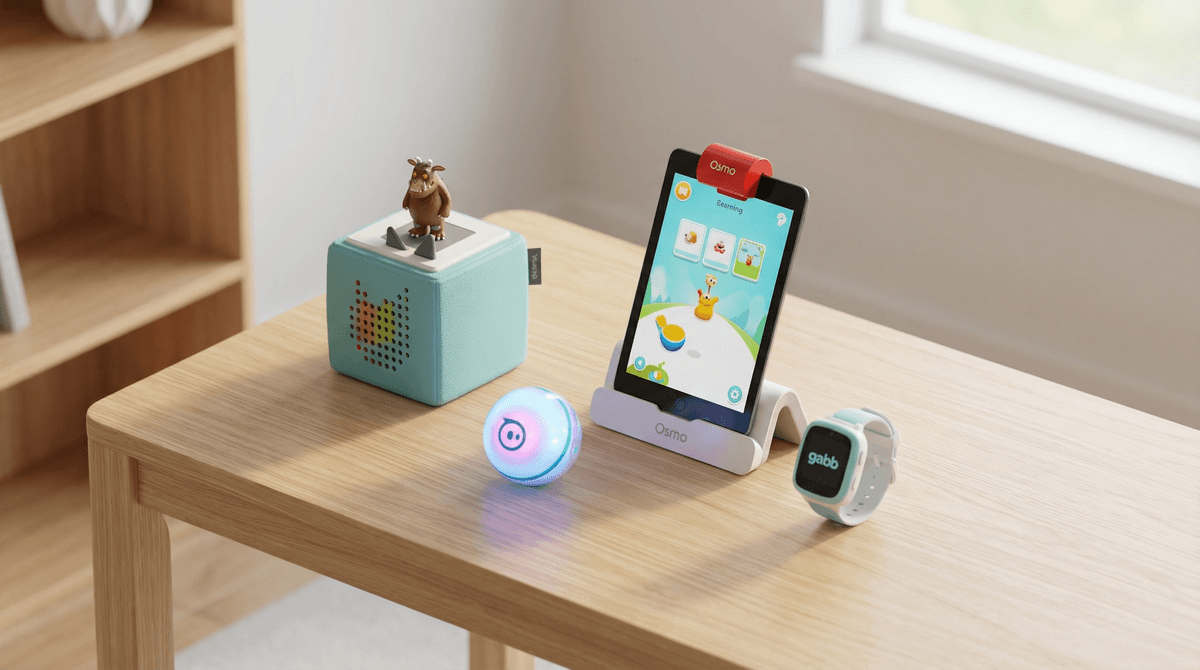
Osmo (Ages 3-12)
Osmo uses your iPad and physical game pieces to create interactive learning experiences. It teaches coding, math, spelling, and creativity—without being pure screen time. The genius part: kids manipulate real objects, and the iPad camera recognizes them.
Privacy: Osmo collects minimal data and lets you control what's shared. The app works offline for most games.
Cost: $80-$130 for starter kits, but no subscription required.
Sphero (Ages 8+)
These are programmable robots that teach real coding concepts. Kids can control them with an app, create obstacle courses, or write code to make them do tricks. It's legitimately educational and actually fun.
Privacy: Sphero doesn't require an account for basic use. Data collection is minimal and clearly disclosed.
Cost: $50-$200 depending on the model.
Toniebox (Ages 3-8)
This is a screen-free audio player for kids. You place a figurine on the box, and it plays stories, songs, or educational content. No WiFi needed after initial setup, no ads, no data harvesting.
Privacy: Minimal data collection. Works entirely offline after setup.
Cost: $100 for the box, $17 per Tonie figure.
Gabb Watch (Ages 5-12)
If you're considering a smart watch for your kid, Gabb is the least-terrible option. It has GPS, calling, and texting—but no internet browser, social media, or app store. It's designed for safety without the digital rabbit hole.
Privacy: Gabb's whole brand is built on privacy. No ads, no data selling, no third-party tracking.
Cost: $150 for the watch, $15/month for service.
Amazon Echo Dot Kids
Yes, it has parental controls. Yes, it can answer homework questions and play music. But it's still an always-listening microphone connected to Amazon's data empire. If you use it, turn off voice purchasing and review what data is being stored.
Learn more about Alexa privacy settings
VTech Toys
VTech makes a ton of connected toys for young kids—tablets, cameras, smart watches. They've also had massive data breaches that exposed millions of kids' photos and personal information. If you buy VTech, assume their security is questionable and don't upload sensitive data.
"Smart" Dolls with Microphones
Remember My Friend Cayla? She was banned in Germany for being an "illegal espionage device." Any doll with a microphone that connects to the internet should raise red flags. If it can listen, someone else might be listening too.
Ages 3-5: Stick with toys that work offline or have very limited connectivity. Toniebox is great here. Avoid anything with a camera or microphone.
Ages 6-8: Coding toys like Osmo or Sphero are excellent. If you're considering a smart watch, make sure it has zero internet access and only connects to approved contacts.
Ages 9-12: This is when kids start lobbying for Roblox, Minecraft, and their own devices. If you go this route, parental controls are non-negotiable. Check out our guides on Roblox parental controls and Minecraft safety settings.
Ages 13+: Teens will want full smart watches, gaming consoles, and social media. The focus shifts from "should they have this?" to "how do we use this responsibly?" Consider alternatives to smartphones if you're not ready for the full internet in their pocket.
-
Does it work offline? The best connected toys have offline modes so they're not useless when the WiFi goes down or the company folds.
-
What data does it collect? Read the privacy policy (or at least Google "Is [toy name] safe for kids?").
-
Can I delete the data? You should be able to delete your kid's account and all associated data whenever you want.
-
Does it require a subscription? Some toys are designed to nickel-and-dime you with monthly fees. Know what you're signing up for.
-
Is there a camera or microphone? If yes, who can access it? Can you turn it off?
-
What happens if the company shuts down? Will the toy still work, or will it become a brick?
If your kid is old enough to use a connected toy, they're old enough for a basic conversation about privacy:
"This toy connects to the internet, which means it might remember what you say or do. That's how it works. But we need to be careful about what information we share, just like we don't tell strangers our address."
For older kids (8+), you can get more specific:
"When you use this app, the company might collect data about what you play and how you use it. That's how they make money. It's not always bad, but it's important to know it's happening."
The goal isn't to make them paranoid, but to build awareness that digital toys aren't magic—they're products designed by companies with business models.
Connected toys aren't inherently evil. Some are genuinely innovative and educational. But you need to be intentional about what you bring into your home.
Before you buy:
- Research the company's privacy practices
- Check for security vulnerabilities or past breaches
- Make sure it works offline or has strong safeguards
- Consider whether a non-connected version would work just as well
And remember: the best toy is the one your kid actually plays with. A $200 coding robot gathering dust is worse than a $10 pack of LEGOs that sparks hours of creativity.
-
Check what you already own: Go through your kid's current toys and see which ones are connected. Review their privacy settings and delete any data you don't want stored.
-
Set up parental controls: If your kid uses Roblox, Minecraft, or any gaming platform, make sure you've enabled the right restrictions. Our parental controls guides walk you through it step-by-step.
-
Explore offline alternatives: Sometimes the best "connected" toy is one that connects kids to the real world. Check out our list of screen-free toys that don't suck.
-
Have the conversation: Talk to your kid about privacy, data, and why some toys need boundaries. It's never too early to start building digital literacy.
Need help figuring out if a specific toy is worth it? See if a connected toy is safe and private and we'll give you the real answer.