

TL;DR
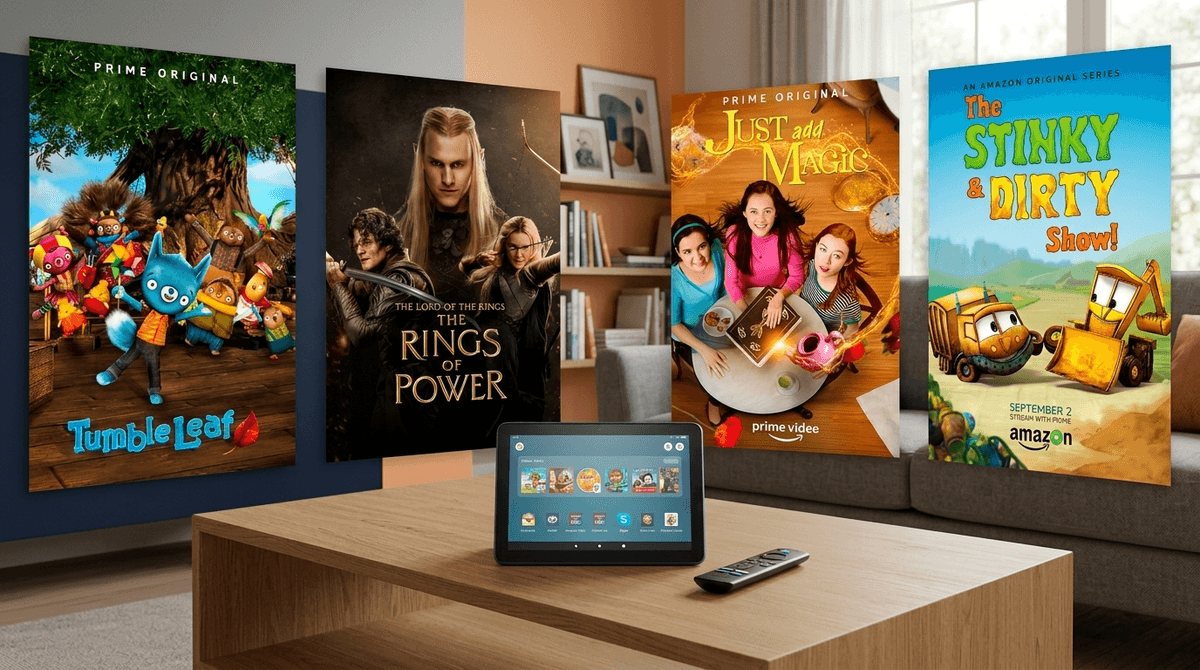
Amazon Prime is the ultimate "convenience trap." It’s a streaming service, a bookstore, a toy shop, and a gaming hub all rolled into one. While it offers some of the highest-quality kids' programming available today—like Tumble Leaf and The Rings of Power—it’s also designed to make spending money as frictionless as possible.
Quick Recommendations:
- Best for Preschoolers: Tumble Leaf (Absolute gold standard for stop-motion and curiosity).
- Best for Ages 6-11: Just Add Magic (Great mystery/fantasy without being too dark).
- Best for Teens: The Rings of Power (High-budget Tolkien epic).
- Avoid: Invincible and The Boys (These look like "superhero shows" but are hyper-violent and strictly for adults).
For most of us, Amazon Prime started as a way to get diapers delivered in 48 hours. But for our kids, it’s a digital playground consisting of three main pillars:
- Prime Video: The streaming arm. It’s a mix of "free to watch" Prime Original content and a digital storefront where you can rent or buy almost anything.
- Amazon Kids+ (formerly FreeTime): A subscription service ($5.99/mo) that provides a "walled garden" of curated books, movies, and apps.
- Amazon Kids (The Dashboard): The free parental control suite that lets you set time limits and educational goals, primarily on Amazon Fire Tablets.
Kids love Amazon Prime because it is a bottomless pit of content. If they finish a show, the algorithm immediately suggests three more. If they like a character, there’s often a "buy the toy" link right there on the interface (if you haven't locked it down).
For younger kids, the Amazon Kids+ subscription feels like a buffet. They can jump from a Minecraft guide book to an episode of Bluey to a simple racing game without ever asking for a password. It’s total autonomy, which is a kid's favorite thing and a parent's biggest headache.
Amazon has invested billions into "prestige" kids' content. Unlike some other streamers that focus on "bright colors and loud noises" (looking at you, CoComelon), Amazon’s originals often have a slower, more thoughtful pace.
For the Little Ones (Ages 2-5)
This is arguably the best show for preschoolers on any platform. It follows Fig the Fox as he discovers how things work (shadows, pulleys, reflections). It’s stop-motion, it’s gorgeous, and it doesn’t overstimulate. It’s the opposite of "brain rot."
Based on the popular books, this show focuses on problem-solving. When these two trucks run into a problem, they ask, "What if?" and try different solutions. It’s great for teaching resilience and creative thinking.
If you have a kid who loves "making things," this is a win. It’s an animated show about art and "fixing it with art," and it usually includes a live-action segment at the end showing real kids doing the craft.
For Big Kids (Ages 6-12)
Think Charmed meets The Great British Bake Off. Three friends find a magical cookbook and have to solve mysteries in their town. It’s wholesome but engaging enough that you won’t want to scroll on your phone while they watch it.
Based on the books by soccer star Alex Morgan, this is a solid "tween" drama about a girl moving to a new town and joining a struggling soccer team. It deals with teamwork, leadership, and moving-day jitters.
A modern, slightly "steampunk" take on the Wizard of Oz. It’s an action-adventure show with high production value that feels more like a movie than a standard Saturday morning cartoon.
For Teens (Ages 13+)
If your teen is into The Lord of the Rings, this is a must-watch. It’s visually stunning and generally keeps a PG-13 level of violence. It’s a great "co-watch" show for families.
Warning: This is for older teens only. It’s based on a Dungeons & Dragons campaign. While it’s animated and looks like a fun fantasy romp, it features heavy profanity and gore.
Find more teen-appropriate fantasy shows
The biggest issue with Amazon Prime isn't the content—it's the commerce. Amazon is, first and foremost, a store.
On many devices, the Prime Video interface mixes "Included with Prime" content with "Rent or Buy" content. For a kid, a shiny button that says "Watch Now" looks the same whether it costs $0 or $19.99.
Essential Steps:
- Set a Purchase PIN: This is non-negotiable. You can do this in the Prime Video settings under "Parental Controls." This ensures that even if they click "Buy," they can't finalize it without your code.
- Toggle "Free to Me": On the mobile app and some TV interfaces, there is a toggle to only show content that is included with your subscription. Teach your kids to look for the "Prime" ribbon on the corner of the thumbnail.
The "Influencer" Problem
Amazon is also a major host for "YouTube-style" content. You’ll find channels like Ryan’s World or various unboxing videos repackaged as "shows." These are often just long-form commercials for toys. If you're trying to reduce consumerism in your house, you'll want to steer them toward the "Originals" and away from the "Influencer" categories.
If you use an Amazon Fire Tablet, you’re likely using the Amazon Kids+ interface.
The Pro: It’s very safe. They can’t get to YouTube (unless you specifically allow it), and they can’t browse the open web. The Con: It’s a "quantity over quality" model. There is a lot of "filler" content—low-budget games and books that are essentially just SEO-bait for kids.
If your child is using a Fire Tablet, I recommend using the Parent Dashboard (parents.amazon.com) to "hand-select" the content. You can actually block specific titles. If you’re tired of them playing a specific "trashy" game, you can make it disappear from their profile entirely.
Amazon Prime is a great place to have the "Advertising vs. Entertainment" talk.
Next time you're browsing, point out the "Sponsored" tags or the "Customers also bought" sections. Ask your kids: "Why do you think Amazon is showing you a toy of that character right after we finished the movie?"
Helping them realize that the platform is trying to sell them something is a huge step in digital literacy. It turns them from passive consumers into active observers.
Amazon Prime offers some of the best-produced, most educational content for younger children available today. Tumble Leaf alone is worth the price of admission.
However, because the platform is built on a retail engine, it requires more "active management" than Netflix or Disney+. Without a Purchase PIN and a discerning eye on the "Influencer" content, it can quickly turn from a digital library into a digital shopping mall.
- Check your settings: Go to your Prime Video account and set up a Purchase PIN right now.
- Audit the Tablet: If your kid has a Fire Tablet, log into the Parent Dashboard and see what they've been spending time on. If it's 90% "unboxing" videos, it might be time to set some "Educational Goals" (a feature that blocks entertainment until they've spent 30 minutes reading).
- Curate a Watchlist: Sit down with your kid and "heart" or "save" shows like Just Add Magic or The Stinky & Dirty Show so they have a go-to list of high-quality options.