

TL;DR
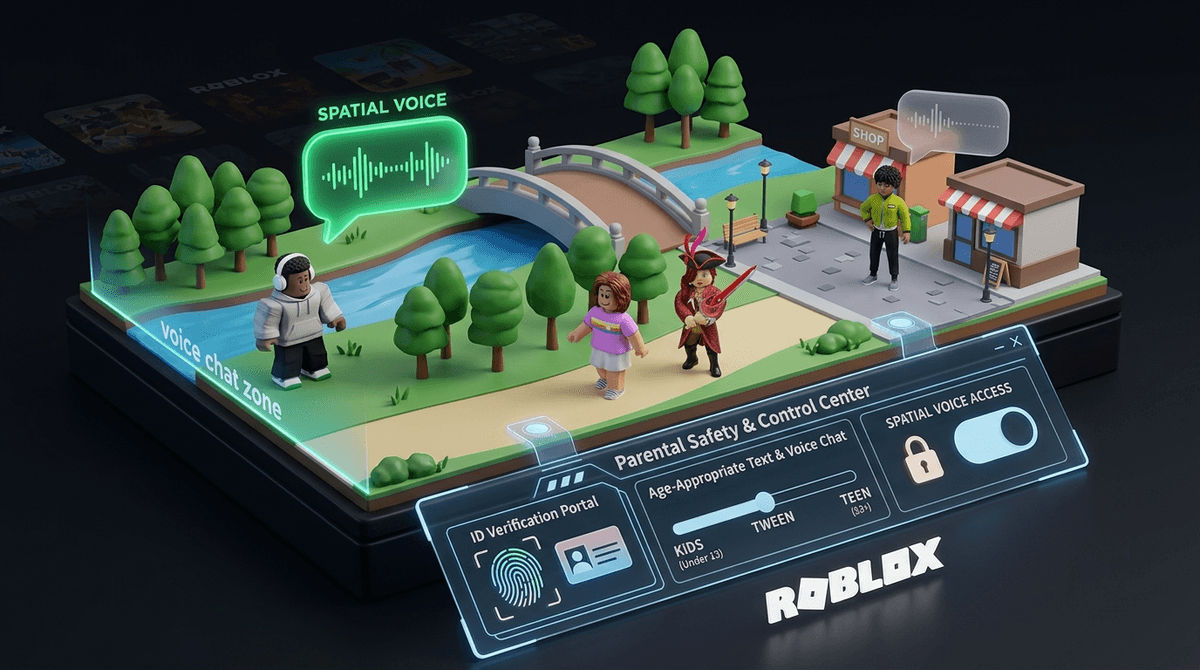
- The Age Gate: Voice chat (officially "Spatial Voice") is strictly for users 13 and older.
- Verification is Mandatory: In 2026, Roblox has tightened the screws; your child will likely need to provide a government ID or a verified phone number to access voice features.
- Spatial Audio: This means voices get louder as avatars get closer—it's immersive, but it also means "overhearing" things is part of the experience.
- The Risk: Unlike text chat, voice chat is harder to moderate in real-time, making it the "Wild West" of the platform.
- Quick Action: If you want to shut it down, head to Settings > Privacy > Communication and toggle "Enable Voice Chat" to off.
Check out our full guide on Roblox parental controls
Learn how to set up a PIN for your child's Roblox account
If your kid is asking for "Spatial Voice," they’re asking for the ability to talk to other players using their actual voice through their headset or phone mic. It’s a departure from the classic text-bubble-above-the-head era of Roblox.
The "Spatial" part is the techy bit. It mimics real life: if another player’s avatar is standing right next to your child, their voice is loud. If they walk away, the voice fades. It’s designed to make games like Adopt Me! or Brookhaven feel more like a real-world hangout.
While it sounds cool, it changes the vibe of the game from a moderated digital playground to something closer to a Discord call with thousands of strangers.
To a 10-year-old, getting voice chat is the ultimate status symbol. It’s the digital equivalent of being allowed to sit at the "big kids" table.
- Efficiency: Typing "The floor is lava, run to the Skibidi tower!" on a tablet keyboard is slow. Saying it is instant.
- Social Connection: For kids, Roblox isn't just a game; it's their social club. Voice chat makes it feel like they’re actually "hanging out" rather than just playing.
- The 13+ Factor: Because it’s restricted to older users, having it feels like a rite of passage. If their friends have "aged up" their accounts (sometimes by lying about their birthdays), your kid will feel the FOMO hard.
In the past, kids could often bypass age restrictions by just putting in a fake birth year. As of 2026, Roblox has moved toward a much stricter verification system for "high-risk" features like voice chat and the creator marketplace.
The ID Check
To enable voice chat, Roblox usually requires a photo of a government-issued ID (like a passport or learner's permit) and a "live" selfie to prove the person in the ID is the one holding the phone.
The Phone Alternative
In some regions, Roblox allows verification via a mobile phone number. However, this still usually only grants access to voice chat if the account age is set to 13+.
If your child is under 13, there is currently no "legal" way within the app's Terms of Service to enable voice chat. If they have it, they—or someone else—likely lied about their age during setup.
Ask our chatbot about the privacy risks of uploading an ID to Roblox
If you’ve decided your 13+ child is ready for this, or if you want to make sure it’s definitively turned off, here is how you navigate the maze:
1. Enabling/Disabling Voice Chat
- Log into the Roblox account.
- Go to Settings (the gear icon).
- Click on Privacy.
- Look for the Enable Voice Chat toggle.
- Note: If you don't see this option, the account hasn't been age-verified yet or the birthday on the account is set to under 13.
2. Muting and Blocking
Teach your child that they have the power. In any game that supports voice:
- They can click the Microphone icon above another player's head to mute them specifically.
- They can click the Roblox icon in the top left to see a list of all players and mute or report them from there.
3. Communication Filters
Even with voice chat on, you can restrict who can message your child or invite them to private servers. We recommend setting "Who can message me" to Friends only.
Here’s the no-BS take: Roblox voice chat moderation is not perfect.
While Roblox uses AI to monitor and "listen" for community violations (like bullying or sexual content), it is reactive, not proactive. By the time the system flags a user for saying something inappropriate, your child has already heard it.
The "Ohio" Problem (and worse)
While hearing a kid scream "Only in Ohio!" or "Rizzler!" for the 400th time is just annoying "brain rot," the real concern is predatory behavior or extreme toxicity. Voice chat allows for a level of nuance and manipulation that text chat—with its "####" hashtags for filtered words—doesn't permit.
Spatial Audio Creepiness
Because the audio is spatial, other players can "follow" your child's avatar around and whisper things. It sounds like it's coming from right behind them. For some kids, this is hilarious; for others, it’s genuinely distressing.
If your kid is "begging" for voice chat, don't just say "no" because you're scared. Use it as a transition point for digital maturity.
- The "Public Square" Analogy: Explain that Roblox voice chat is like standing in the middle of a busy park. Anyone can walk up and say anything. Is your child ready to handle a stranger saying something mean or weird?
- The "Mute First" Rule: Make it a rule that the second someone gets "weird" or "toxic," your child mutes them. No "roasting" back, no engaging. Just mute.
- The ID Conversation: If they are under 13 and asking you to lie about their age, explain why those rules exist. It’s not just about being a "mean parent"; it’s about the fact that the 13+ servers have different advertising and data collection rules that don't protect kids as well.
If your child just wants to talk to their real-life friends while playing, there are much safer ways to do it than using Roblox's native voice chat.
- FaceTime/Phone Call: The old-school way. Put the phone on speaker while they play. You know exactly who is on the other end.
- Discord: Better for older kids (13+), but it allows you to create a private server where only their invited friends can talk.
- Messenger Kids: A walled garden for younger kids to audio/video chat while they play on a separate device.
Roblox voice chat is a "big kid" feature that requires "big kid" responsibility. For most kids under 13, the risks of unmoderated, live audio from strangers far outweigh the benefits of "immersion."
If your child is 13+ and you decide to enable it, make sure you have a Parental PIN set up so they can't change the settings back the second you turn your head.
Learn how to set up a Roblox Parental PIN
Next Steps
- Check the Birthday: Verify what birth year is actually on your child's account.
- Set a PIN: If you haven't already, go to Settings > Parent Controls and enable a PIN.
- Test it out: Jump into a popular game like Natural Disaster Survival with them and see how the spatial audio actually feels. You might find it's totally fine—or you might find it's an immediate "nope."
Ask our chatbot for a script on how to tell your kid 'no' to voice chat