

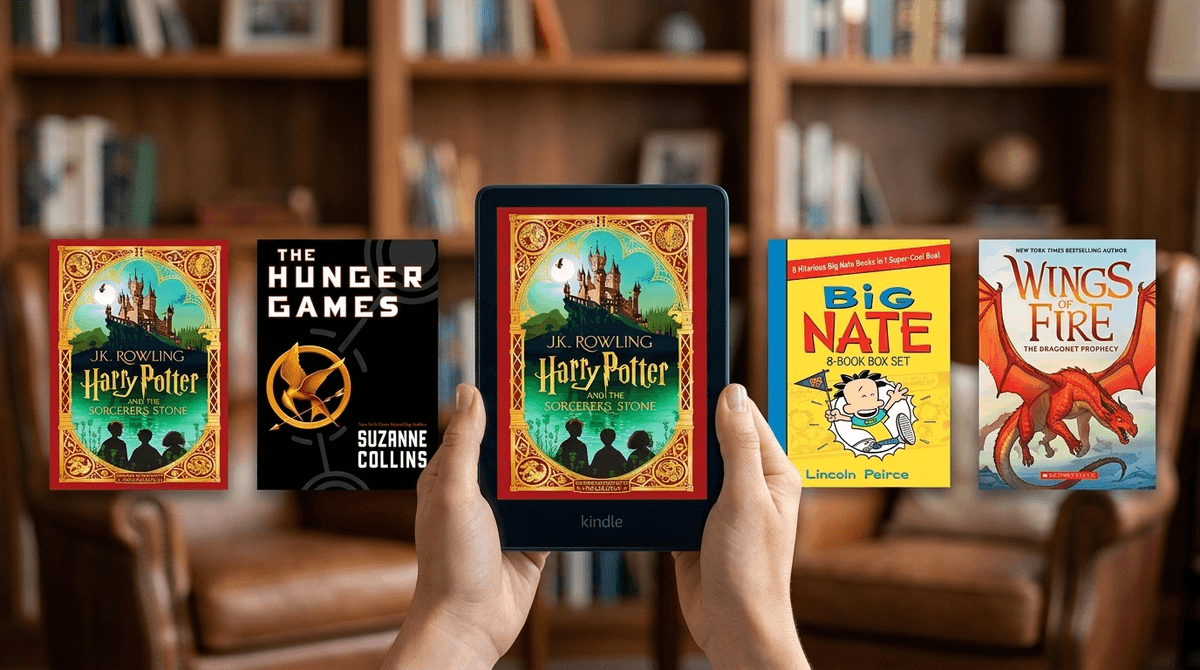
Kindle Unlimited for Kids: Digital Library or $12 Monthly Dust Collector?
TL;DR
Kindle Unlimited (KU) is a powerhouse for families with high-volume readers who devour series like Harry Potter or Warrior Cats. However, if your kid only wants the latest Dog Man or Diary of a Wimpy Kid release, you’re better off using the free Libby app or just buying the individual books.
Quick Links to KU Heavy-Hitters:
- Harry Potter series (The biggest "get" on the platform)
- Wings of Fire (Check availability, as it rotates)
- The Hunger Games
- Big Nate
Think of Kindle Unlimited as the Netflix of the Amazon book world. For about $12 a month, you get access to a massive library of over 4 million digital titles, thousands of audiobooks, and even some magazines.
Here’s the catch: Kindle Unlimited is not a "kids' service." It is a general audience subscription that happens to include a lot of children’s and YA content. This is a distinct service from Amazon Kids+, which is a curated, "walled garden" experience specifically for younger children.
We’ve all been there: your kid finds a series they love, and suddenly you’re buying a new $10 ebook every three days. If your child is in that "voracious reader" phase—where they are clearing 3-4 books a week—Kindle Unlimited can save you a fortune.
But if they are "picky readers" who only want the most popular, New York Times bestseller titles, you might find the KU library a bit... lackluster. A lot of the content on KU is self-published or from smaller imprints. Some of it is hidden gems; some of it is, frankly, the literary equivalent of "brain rot" YouTube videos.
If your kids are into these specific titles, the subscription usually pays for itself within the first month:
This is the crown jewel of KU. All seven books are usually available. Given that these books rarely go on sale, reading the whole series here saves you about $50-$70.
Great for the middle school crowd. Having the trilogy (and sometimes the prequel) available digitally is a huge plus for kids who want to dive into dystopian themes without you making a trip to the bookstore.
For the kids who aren't quite ready for full-text novels, the Big Nate series and various graphic novels often pop up on KU, making it a win for reluctant readers.
Graphic novel adaptations are expensive and kids read them in twenty minutes. Finding these on KU is a massive relief for the wallet.
This is where most parents get confused. Let’s break down the "Digital Library" landscape:
- Kindle Unlimited: Best for older kids (10+) and YA readers. Huge volume, but includes adult content (romance, thrillers) that you’ll need to manage.
- Amazon Kids+: Best for ages 3-9. It includes books, but also games, videos, and educational apps. It’s much more "locked down."
- Libby: The "Pro Parent" move. It’s free with your local library card. The only downside? You have to wait in digital "lines" for popular books, just like a physical library.
Learn more about the differences between Kindle Unlimited and Amazon Kids+
Since Kindle Unlimited isn't "just for kids," you can't just hand over a Kindle with a KU subscription and walk away—unless you want them accidentally stumbling into the "spicy" romance section (which is very prominent on KU).
- Ages 6-9: Stick to Amazon Kids+. The interface is easier, and the content is curated.
- Ages 10-13: This is the sweet spot for KU. They are starting to read longer series. Use the Kindle Household settings to share specific KU titles to their device rather than giving them full browsing access to the KU store.
- Ages 14+: KU is great for teens exploring different genres, but remind them that "Unlimited" doesn't always mean "Quality."
The Kindle Unlimited "Top Charts" are almost always dominated by adult romance novels with... suggestive covers. If your child is browsing the KU store directly on their device, they will see these.
The Fix: Don't let them browse the store. Browse on your own phone or computer, "borrow" the books, and deliver them to your child’s device.
The biggest "No-BS" realization about Kindle Unlimited is that the "big" books rotate. One month Wings of Fire is included; the next month, it’s gone, and you have to buy it. Amazon uses KU to hook readers into a series, often giving you the first 2 or 3 books for free and then charging for the rest.
Also, be aware of the "Unlimited" trap. If you cancel your subscription, all those books disappear from your device. You don't own them; you're just renting them. If your kid is the type who re-reads Harry Potter every single year, it’s actually cheaper to just buy the books.
Is it worth it?
- YES, if: Your kid reads more than two books a month, loves Harry Potter, or devours off-beat indie series and graphic novels.
- NO, if: Your kid only reads the latest "hyped" releases, prefers physical books, or if you already have a great local library system and the patience to use the Libby app.
Next Steps
- Audit the "Want" List: Ask your kid for a list of 5 books they want to read next.
- Search the KU Store: See how many of those 5 are actually on Kindle Unlimited. If it's 0 or 1, skip the sub.
- Try the Trial: Amazon almost always has a 30-day (or even 3-month) free trial. Use it over Summer Break or Winter Break when reading volume is highest, then set a calendar reminder to cancel it.
See if a specific book series is available on Kindle Unlimited