

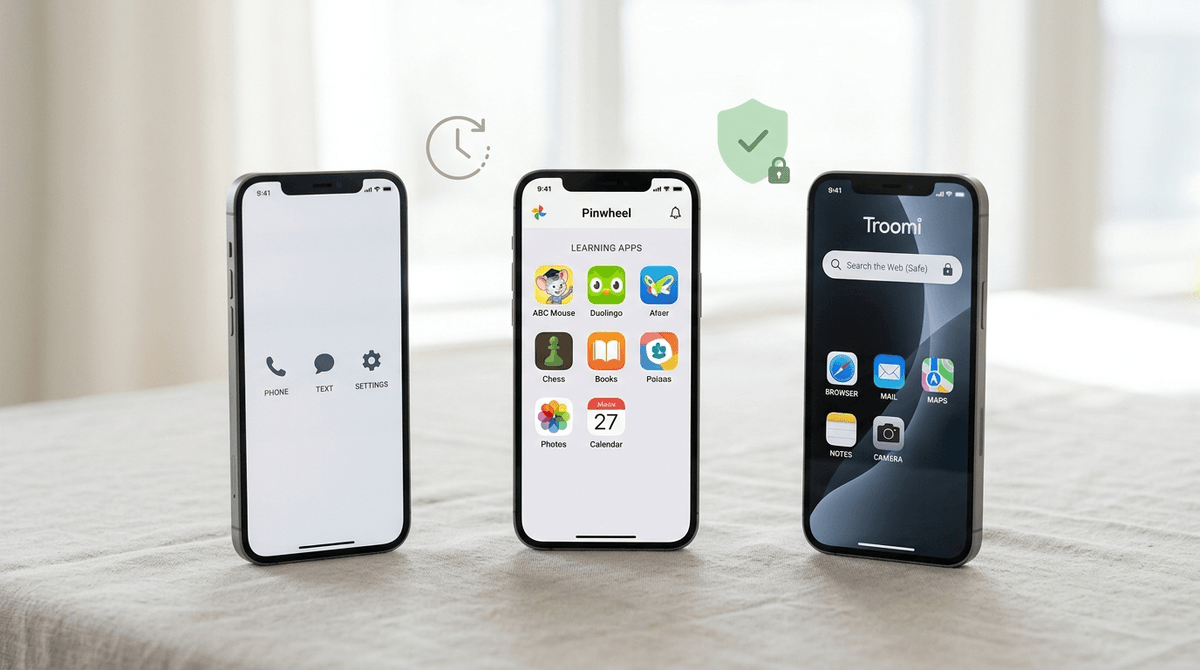
TL;DR: If you want the most "locked-down" experience with zero internet and zero apps, go with Gabb. If you want a phone that grows with your child and allows a curated list of "safe" apps like Duolingo or Spotify, Pinwheel is the winner. If you want a middle ground that uses high-quality Samsung hardware, Troomi is your best bet.
The pressure starts earlier every year. You’re at a birthday party, and suddenly half the 4th graders are huddled in a corner watching Skibidi Toilet remixes on someone’s unmonitored iPhone. You want your kid to be able to call you after soccer practice, but you aren't ready to hand them a portal to the entire dark underbelly of the internet.
Enter the "Training Wheels" phone.
These aren't just "dumb phones" or old-school flip phones (though those are making a hipster comeback). These are smartphones with the "brain rot" surgically removed. They look like real phones—so your kid doesn't feel like they’re carrying a "baby toy" that’s totally "Ohio" (which, for the uninitiated, is kid-speak for weird or cringey)—but they lack the open browsers and addictive social media algorithms that keep us parents up at night.
Here is the breakdown of the big three: Gabb, Pinwheel, and Troomi.
The Vibe: The "Zen" approach to digital parenting.
Gabb is the most restrictive of the bunch, and for many parents, that is its greatest strength. It looks like a standard smartphone, but it has no internet browser, no social media, and—this is the big one—no app store.
What’s on it?
It comes with the basics: talk, text, GPS, a camera, a calculator, and a calendar. They’ve recently added "Gabb Music," which is a kid-safe streaming service, and a few "essential" apps like a weather app and a basic drawing tool.
Why parents love it:
You don't have to manage it. There is no "curating" apps or checking logs to see if they found a workaround to get on TikTok. It is what it is. It’s the "set it and forget it" option for the 8-11 age range.
The downside:
If your kid actually needs an app for school—like Google Classroom or Canvas—they are out of luck. There is no way to add third-party apps.
The Vibe: The "Choose Your Own Adventure" of safety.
Pinwheel is a different beast entirely. Instead of locking everything down, Pinwheel provides a "Living List" of over 500 apps that their team has vetted for safety. These apps have no "loops" (ways to get to an open browser) and no predatory ad systems.
What’s on it?
Whatever you allow. You log into a parent portal on your own phone and "push" apps to your child’s device. Want them to have Spotify but not Instagram? Easy. Want them to practice Chess.com but skip Roblox? Done.
Why parents love it:
It grows with the kid. You can start with just talk and text in 5th grade, and by 7th grade, you can add Life360 or a banking app like Greenlight. It teaches them that a phone is a tool, not just a dopamine machine.
The downside:
It requires more "parent work." You have to be the gatekeeper and decide which apps are okay. Also, because it runs on a custom version of Android, some apps might be a version or two behind the latest release.
The Vibe: The "Samsung Power User" for kids.
Troomi is very similar to Pinwheel in that it offers a curated app store, but it leans heavily into its partnership with Samsung. The hardware is often a bit nicer than what you get with Gabb or Pinwheel.
What’s on it?
Troomi uses "KidSmart" apps. They have different tiers of service. The base tier is very Gabb-like (no apps, no browser). The middle tier allows for their curated app library. The top tier actually allows for a "Safe Browser" that uses AI to filter out the garbage while letting kids do research for school.
Why parents love it:
The "Safe Browser" is a unique bridge for older kids (12-14) who actually need to look things up for homework but aren't ready for the Wild West of unfiltered Google. Also, their "KidSmart" OS is very slick and feels less like a "kiddie" interface.
The downside:
The monthly subscription tiers can get a bit confusing, and you have to pay more to unlock the better features.
We see the data every day at Screenwise: the average age for a first smartphone is now around 10.3 years old. By 6th grade, nearly 80% of kids have a device. But here’s the kicker—handing a 6th grader an unmonitored iPhone is like handing them the keys to a Ferrari and a bottle of tequila.
When kids have unfettered access to YouTube, they fall down rabbit holes of "Sigma" edits and MrBeast clones that are designed by literal neuroscientists to keep them clicking. It’s not that the content is always "evil"—it’s just that it’s "brain rot." It’s low-calorie, high-stimulation content that makes real life feel boring.
Training wheels phones like Gabb, Pinwheel, and Troomi break that cycle. They allow the utility of the phone (communication, organization, music) without the addiction of the feed.
A lot of parents ask: "Can my kid play Roblox on these phones?"
- Gabb: No.
- Pinwheel: Yes, if you enable it (but they often recommend against it due to the social/chat features).
- Troomi: Yes, in the higher tiers.
Let's be real about Roblox. It’s either a brilliant platform teaching kids entrepreneurship and basic Lua coding, or it’s a digital casino designed to drain your bank account of Robux . If your kid is using a training wheels phone, you have the power to decide if they are ready for that complexity.
- Ages 8-10: Go with Gabb. They don't need apps. They need to be able to tell you that practice ended early.
- Ages 11-12: Pinwheel is the sweet spot. They start needing "utility" apps for school or hobbies, and you can drip-feed them responsibility.
- Ages 13-14: Troomi with the Safe Browser. This is the final stage before they move to a standard iPhone or Android in high school.
There is a social cost to not having an iPhone. "Blue Bubble vs. Green Bubble" bullying is real (though Apple Music and iMessage updates are making this slightly better). Your kid might get teased for having a "fake" phone.
This is where you have to be the parent. You explain that a phone is a tool, not a status symbol. You can even frame it as a "Pro" move—they have a phone that doesn't track them or sell their data.
Read our guide on how to talk to your kid about "phone envy"
You don’t have to jump straight into the deep end. If you’re feeling the pressure to get your kid a phone, but you’re terrified of what TikTok will do to their attention span, these three options are your best friends.
Parenting in 2026 is an endurance sport. Give yourself the win of not having to worry about what’s in your kid’s pocket.
- Take the Screenwise Survey: Understand your community norms. Are all the other 5th graders in your district getting iPhones, or is there a Gabb revolution happening?
- Check the App Lists: If your kid needs a specific app for their Duolingo streak or their Bark monitoring, make sure the phone you pick supports it.
- Set the Ground Rules: Regardless of the phone, establish "Phone-Free Zones" like the dinner table and bedrooms after 8 PM.