Playstation Network

Playstation Network

Website

WISE
74%

WISE Score

The digital plumbing for your kid's PS5 that, thankfully, comes with a pretty decent set of parental wrenches.

Screenwise Verdict

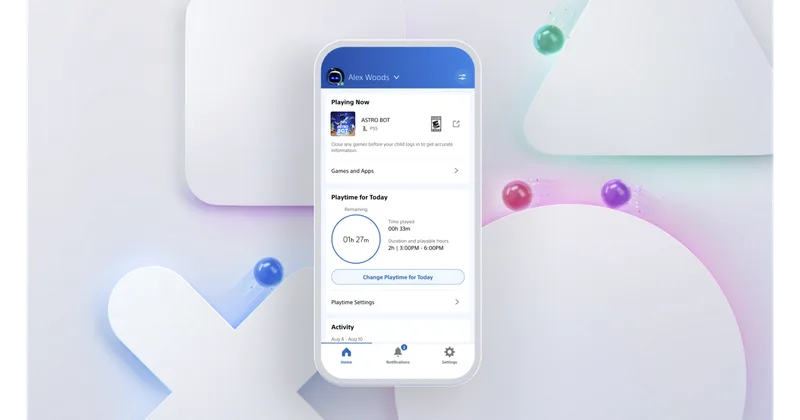
PlayStation Network is the gold standard for console management. Unlike Nintendo, which feels a bit 'walled garden' and clunky, or Xbox, which can feel like a corporate spreadsheet, PSN gives you a clean mobile app to handle the friction points of parenting a gamer.

The real win here isn't the 'blocking'—it's the transparency. You get activity reports that show you exactly what they're playing and for how long. It turns the 'get off the screen' fight into a data-driven conversation. Just make sure you set a System Restriction Passcode, or your tech-savvy ten-year-old will be playing Call of Duty on a 'Guest' account the moment you turn your back.

Age Fit

This is infrastructure for parents (18+) to manage. For the kids, the 'fit' depends entirely on the games you let them download, though the system is robust enough for kids as young as 6.

WISE Breakdown
Wholesome
75

The system is built around the 'Family Manager' concept, which puts the parent in the driver's seat. It uses the kid's real birthdate to filter out M-rated content by default, which is a solid, common-sense baseline.

Imaginative
40

It's a digital storefront and account management system. While it's the gateway to imaginative games, the platform itself is purely functional and utility-driven.

Safe
72

The tools are excellent, especially the mobile app. However, because it's a gateway to live multiplayer and unmoderated voice chat in games, the 'out of the box' safety depends entirely on the parent actually toggling the restrictions.

Enriching
60

It enables digital literacy and responsibility through the 'monthly spending limit' and 'playtime schedule' features. It's a training ground for managing a digital life.

Parent Info

Why It Might Be Great

  • Granular controls let you kill the chat but keep the games, or limit the budget without banning the store.
  • The PlayStation Family app is actually decent, letting you approve extra playtime from your phone while you're making dinner.
  • Age-gating is tied to their birth year, meaning they can't even see the trailer for a horror game if they aren't old enough.
  • Spending caps are the only thing standing between you and a $400 bill for Fortnite 'skins' and FIFA packs.

What to Watch For

  • The 'Guest Account' loophole is the classic way kids bypass your rules—if you don't lock down the ability to create new users, your time limits don't mean a thing.
  • VR age limits are real; Sony specifically says no PSVR for kids under 12 because of how it affects developing eyes and balance.
  • Communication settings are 'on' by default for older kids; you have to manually go in and set them to 'Friends Only' or 'No One' to avoid the toxic wasteland of public lobbies.

Conversation Starters

  • "What's the 'budget' for games this month, and how do we decide what's worth it?"
  • "If someone gets weird or mean in a game chat, do you know how to mute them without quitting the game?"
  • "Why do you think the console has a timer, and what should the 'five-minute warning' look like?"
  • "Is there anything you've seen in the store that looked cool but was blocked by the age filter?"

Ask Anything

Get a personalized guide on any topic