

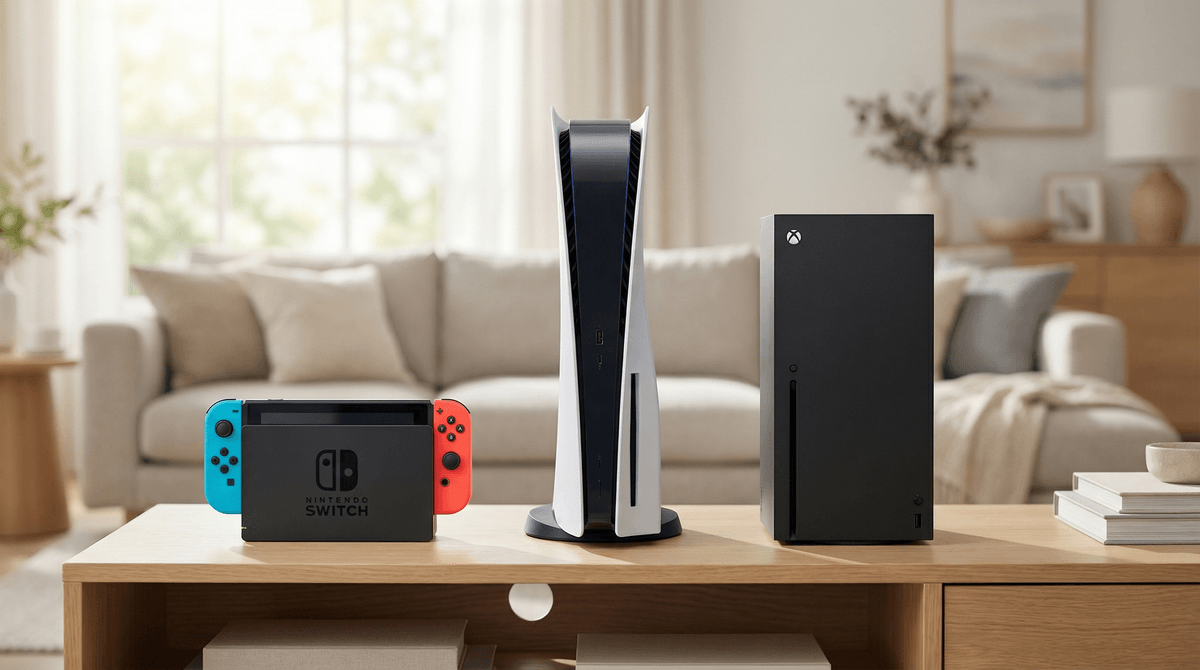
The Best Video Game Consoles for Kids in 2026
For most families: Nintendo Switch (especially the OLED model) remains the gold standard for kids—massive library of age-appropriate games, stellar parental controls, and true portability.
For teens and competitive gamers: PlayStation 5 offers the best exclusive titles and most robust online features.
For budget-conscious families: Xbox Series S + Game Pass is an incredible value proposition.
For younger kids (under 8): Honestly? The Switch again, but skip the online features entirely for now.
The console question is one of those parenting decisions that feels way more loaded than it should be. You're not just buying a gaming device—you're choosing an ecosystem, a friend group compatibility layer, and potentially years of "but ALL my friends have Xbox!" negotiations.
Let's cut through the marketing and actually figure out what works for your family.
We're in a weird transition moment. The Switch is seven years old but still dominating kids' wish lists. The PS5 and Xbox Series X/S have been out since 2020 but still feel "next-gen" to many families. And honestly? Any of these consoles can be a great choice—it's about matching features to your family's needs.
Best for: Ages 5-14, families with multiple kids, parents who value content curation
Price: $299 (standard), $349 (OLED)
The Switch is the default answer for most families with elementary and middle school kids, and for good reason. Nintendo has spent decades perfecting family-friendly gaming, and it shows.
What makes it great for kids:
-
The game library is unmatched for younger players. Mario Kart 8, Animal Crossing, Minecraft, Splatoon 3, Pokémon—these are the games kids are actually talking about at school.
-
Portability is a game-changer (literally). Car trips, waiting rooms, switching between the TV and handheld mode when someone else needs the screen—this flexibility is huge for families.
-
Parental controls are excellent. The Nintendo Switch Parental Controls app lets you set daily time limits, restrict games by age rating, disable screenshots/social features, and see exactly what they're playing. You get notifications when time is running out, and you can remotely pause gameplay. Learn how to set up Switch parental controls.
-
Local multiplayer is the focus. Most Switch games support multiple players on one console, which means less "I need my own Switch!" pressure (though that pressure will still come).
The downsides:
-
Online features are deliberately limited. This is actually a feature for younger kids, but teens will find Nintendo's online experience clunky compared to PlayStation or Xbox.
-
It's not the most powerful console. Graphics aren't as sharp, some third-party games run poorly, and it can't handle the latest AAA titles.
-
Games rarely go on sale. Nintendo's first-party titles stay at $60 basically forever.
The verdict: If your kids are under 13 and you want a console that "just works" with minimal content concerns, the Switch is your answer. The OLED model ($50 more) has a better screen and is worth it if you're buying new.
Best for: Ages 12+, teens who game with friends online, families who also want a streaming/media hub
Price: $499 (disc version), $449 (digital)
The PS5 is the console for families with older kids who are ready for more mature gaming experiences and robust online play.
What makes it great for teens:
-
The exclusive games are incredible. Spider-Man, God of War, Horizon, The Last of Us—these are cinematic, story-driven experiences that can genuinely be meaningful for mature teens.
-
Online gaming is seamless. PlayStation Network is the most popular online gaming service among teens, which means easier friend connections.
-
It doubles as an entertainment center. 4K Blu-ray player, all the streaming apps, excellent media capabilities.
-
The controller is phenomenal. The DualSense controller's haptic feedback and adaptive triggers actually add to gameplay in ways that matter.
The downsides:
-
Many popular games are rated M (17+). The PS5's library skews older, and you'll need to be more hands-on about content curation.
-
PlayStation Plus is expensive. Online multiplayer requires a subscription ($79.99/year), and the game library isn't as robust as Xbox Game Pass.
-
Parental controls exist but are less intuitive than Nintendo's. You can set spending limits, restrict games by rating, and limit playtime, but the interface isn't as parent-friendly. Setting up PS5 parental controls takes some work.
The verdict: If you have a teen who's ready for more mature content and you trust them (or yourself) to navigate age ratings thoughtfully, the PS5 offers the best gaming experiences available. Just don't buy this for a 7-year-old.
Best for: Ages 10+, families on a budget, homes that value backwards compatibility
Price: $499 (Series X), $299 (Series S)
Xbox is the value play, and Game Pass is genuinely revolutionary for families.
What makes it great:
-
Game Pass is incredible. For $10.99/month, you get access to hundreds of games, including day-one releases of major titles. It's like Netflix for games, and the math works out way better than buying individual games. Understanding Xbox Game Pass for families.
-
Backwards compatibility is unmatched. Thousands of games from previous Xbox generations work on these consoles, which means you're not locked into just new releases.
-
The Series S is a legitimate budget option. At $299, it's the cheapest entry point to current-gen gaming, and for most kids, the performance difference from the Series X won't matter.
-
Cross-platform play is strong. Microsoft has been pushing cross-play harder than Sony, which means Xbox players can often game with friends on PC or Switch.
The downsides:
-
Fewer exclusive games that kids care about. Xbox's first-party lineup is improving, but they don't have a Mario or Spider-Man equivalent that drives console purchases.
-
The Series S has limitations. No disc drive (digital only), less storage, and lower resolution output. For most kids, this is fine. For teens who care about graphics, maybe not.
-
Parental controls are Windows-based. Because Xbox ties into Microsoft Family Safety, the controls are powerful but can feel corporate and confusing. Xbox parental controls setup.
The verdict: If you're looking at gaming as an ongoing subscription rather than individual game purchases, Xbox + Game Pass is the smartest financial choice. The Series S is perfect for younger kids or as a second console.
Price: $199
The Switch Lite is handheld-only (no TV connection) and can't be used for local multiplayer games that require detached controllers. It's great as a personal device for a kid who already has console access elsewhere, or for families who know they'll never use TV mode. But as a first/only console? Get the regular Switch. The flexibility is worth the extra $100.
Ages 5-8: Switch is your only real option. The game library is perfect for this age, and you can completely disable online features. Start with Mario Kart 8, Kirby, and Mario Wonder.
Ages 9-12: Switch is still ideal, but Xbox Series S + Game Pass becomes viable if they're mature enough for slightly older-skewing content. This is the age where friend group dynamics start mattering—what do their friends play?
Ages 13-15: All three consoles work. PlayStation and Xbox become more appealing as they get into competitive online gaming and more complex narratives. The Switch remains relevant for Nintendo's first-party titles.
Ages 16+: At this point, they probably have opinions. PlayStation has the prestige exclusives, Xbox has the value, Switch has the Nintendo magic. Let them make the case for what they want.
This is real and it matters. Gaming is social, and cross-platform play isn't universal yet. Before you buy:
-
Ask what their actual friends play. Not what's popular generally, but what the 3-5 kids they actually hang out with are using.
-
Check the specific games they want. Fortnite? Minecraft? Roblox? These work across platforms. Call of Duty? FIFA/EA Sports FC? Platform matters more.
-
Consider the 2-3 year timeline. Friend groups change, especially in elementary and middle school. Don't over-index on current friendships when making a multi-year investment.
Whichever console you choose, online multiplayer is where the real parenting happens. A few things to know:
Voice chat is the wild west. All three consoles support voice chat with strangers, and all three let you disable it. For kids under 13, I'd strongly recommend keeping voice chat limited to known friends only. Understanding online gaming safety.
In-game purchases are everywhere. Every console lets you require a password for purchases, and you should absolutely enable this immediately. Fortnite and Roblox have their own currency systems that can get expensive fast.
Screen names matter. Help them choose something that doesn't include their real name, age, or location. This seems obvious but you'd be surprised.
Play with them sometimes. Not in a hovering way, but enough to understand what they're actually doing and who they're interacting with.
Most families with kids under 13 should buy a Nintendo Switch. It's the right balance of great games, good controls, and minimal content concerns.
Families with teens should consider PlayStation 5 or Xbox Series X/S based on budget and game preferences. PS5 for exclusive single-player experiences, Xbox for value and variety through Game Pass.
If you're on a tight budget, the Xbox Series S + Game Pass subscription is legitimately the best value in gaming right now.
If you're still unsure, think about these questions:
- How much do you trust your kid with age ratings? (More trust = PlayStation or Xbox become viable earlier)
- What's your budget for games after the console purchase? (Tight budget = Xbox Game Pass)
- How important is portability? (Very important = Switch)
- What do their actual friends play? (This matters more as they get older)
Gaming can be a genuinely positive hobby for kids—it teaches problem-solving, supports friendships, and provides legitimate creative outlets. The console itself matters less than how you set it up and the conversations you have around it.
Once you've chosen a console:
- Set up parental controls BEFORE handing it to your kid
- Have a conversation about online safety and stranger danger
- Establish screen time boundaries (the console can help enforce these)
- Check out age-appropriate games for your console
- Consider starting with physical games or gift cards rather than linking a credit card directly
And remember: you can always See if a specific game is right for your kid as they come up. That's what we're here for.