

7 Safer Alternatives to Roblox That Still Let Kids Build and Create
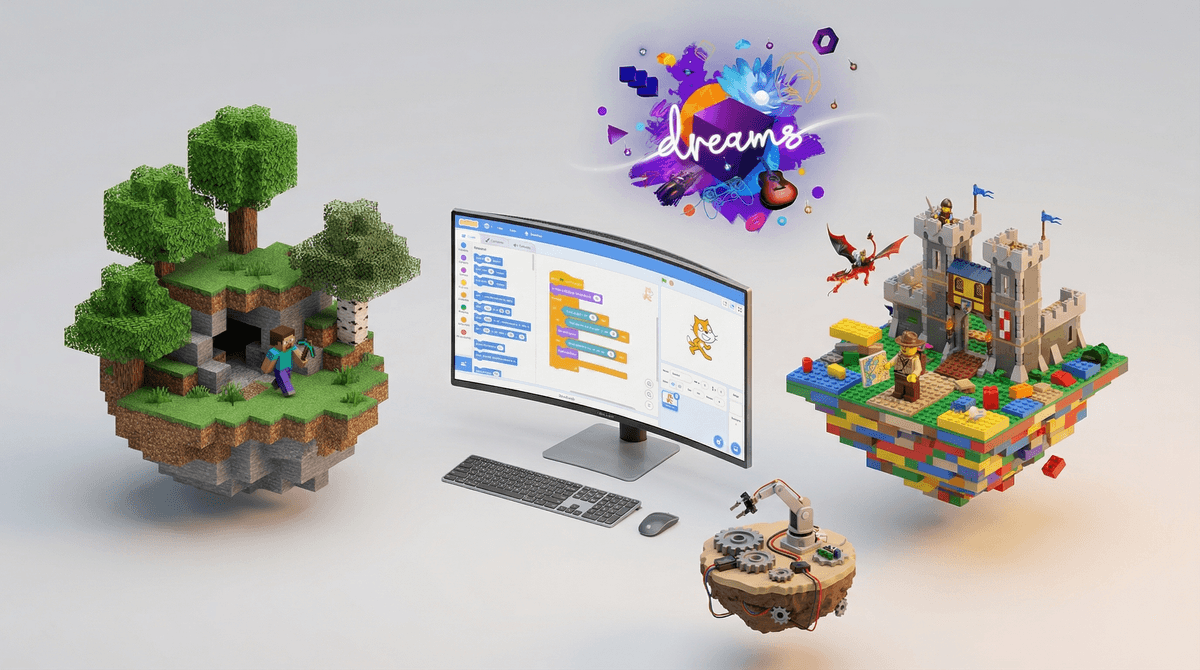
TL;DR: If you're looking to diversify beyond Roblox (or step away entirely), here are the best platforms that still scratch that creative itch:
- Minecraft - The OG creative sandbox, ages 7+
- Core - Like Roblox but with better moderation, ages 10+
- Dreams - PlayStation's artistic creation platform, ages 12+
- LEGO Worlds - Digital LEGO building, ages 7+
- Crayta - Collaborative game creation, ages 10+
- Tinkercad - 3D design for actual learning, ages 8+
- Scratch - MIT's coding platform, ages 8+
Screenwise Parents
See allLet's be clear: Roblox isn't inherently evil. It's genuinely impressive as a platform for user-generated content, and the entrepreneurial aspects are real. Some kids are learning actual game design principles and even making money.
But. The safety concerns are also real. The predator stories aren't just fear-mongering. The in-game purchases can spiral fast (learn more about how Robux works ). The content moderation is inconsistent at best. And honestly? A lot of the games are just... not that good. Low-effort cash grabs designed to extract Robux from kids who don't know better.
So whether you're looking to supplement Roblox with something else, or you're ready to make a clean break, here are platforms that offer similar creative freedom with better guardrails.
Ages 7+ | PC, Console, Mobile
Yeah, it's obvious. But Minecraft remains the gold standard for a reason. It's what Roblox wants to be when it grows up.
What makes it better: Single-player mode means your kid can create without any social pressure or stranger danger. When they do want multiplayer, you can set up private realms with known friends only. The modding community is massive but you control what gets installed. And the educational value is undeniable - redstone circuits teach actual logic, building teaches spatial reasoning, and the survival mode teaches resource management.
The catch: It's not a social platform in the same way. Your kid won't stumble onto 10,000 random games. But honestly? That's a feature, not a bug. Check out our guide to Minecraft parental controls to set it up right.
Cost: $26.95 one-time purchase (realms subscription optional at $7.99/month)
Ages 10+ | PC
If your kid specifically loves the "play random user-generated games" aspect of Roblox, Core is the closest alternative. It's built on Unreal Engine, so the graphics are significantly better, and the moderation is notably more robust.
What makes it better: The creator tools are more sophisticated, which means there's a higher barrier to entry - but also higher quality output. The community skews slightly older and more serious about game development. And the monetization is less predatory (though still exists).
The catch: It's PC only, and the system requirements are steeper than Roblox. Your kid needs a decent gaming computer. The smaller user base means fewer games to discover, but again, quality over quantity.
Cost: Free to play
Ages 12+ | PlayStation 4/5
This is the artsy, sophisticated older sibling of creation platforms. Made by Media Molecule (the LittleBigPlanet folks), Dreams is less about churning out games and more about genuine creative expression.
What makes it better: The creation tools are wild - kids can make games, music, animations, interactive art. It's genuinely educational in terms of game design principles. The community is smaller and more curated. And because it's PlayStation exclusive, there's an extra layer of platform-level moderation.
The catch: The learning curve is STEEP. This isn't "drag and drop some blocks and make an obby." Your kid needs patience and genuine interest in creation, not just consumption. Best for tweens and teens who are serious about digital art or game design.
Cost: $29.99 one-time purchase
Ages 7+ | PC, Console
Imagine Minecraft but everything is LEGO. That's it. That's the pitch.
What makes it better: The LEGO brand means built-in safety. It's designed for kids. The building mechanics are intuitive if your kid has ever touched actual LEGO. There's a structured adventure mode alongside free build. And multiplayer is limited to split-screen or private sessions.
The catch: It's not as robust as Minecraft, and development has basically stopped (last major update was 2017). Think of it as a stepping stone - great for younger kids (7-10) who aren't ready for Minecraft's complexity but want that creative freedom.
Cost: $29.99 one-time purchase (often on sale)
Ages 10+ | PC, Stadia
Another "make games and play games" platform, but with a focus on collaborative creation. Kids can build together in real-time, which is genuinely cool.
What makes it better: The real-time collaborative editing is unique - multiple kids can work on the same game simultaneously. The tutorials are excellent. And it's owned by Facebook Gaming, which means... okay, that's not necessarily better, but the moderation tools are decent.
The catch: Stadia is basically dead, so you're looking at PC only. The user base is small. And yes, it's Meta-adjacent, which gives some parents pause.
Cost: Free to play
Ages 8+ | Web Browser
Okay, this isn't a game platform. But if what you value about Roblox is the creation aspect, Tinkercad is incredible. It's Autodesk's free 3D design platform, and it's shockingly kid-friendly.
What makes it better: Your kid is learning actual CAD software. The designs can be 3D printed (if you have access to a printer). There's a whole curriculum built in. And it's completely single-player - no social features, no strangers, no chat.
The catch: It's not a game. There's no "playing" what you create (though there are circuits and code blocks for basic interactions). This is for the kid who genuinely wants to design, not just play.
Cost: Free
Ages 8+ | Web Browser
MIT's block-based coding platform. If your kid is interested in the game-making side of Roblox, Scratch teaches actual programming concepts in a visual, accessible way.
What makes it better: It's educational. Like, genuinely educational. Kids learn loops, conditionals, variables, and functions. The community is moderated by MIT. And there's a massive library of tutorials and projects to remix.
The catch: The games are simple. We're talking 2D, basic graphics, nothing flashy. But that's the point - your kid is learning the fundamentals. Many professional game developers started on Scratch.
Cost: Free
Ages 7-9: Start with Minecraft in creative mode or LEGO Worlds. Keep it single-player or local multiplayer only. Scratch is great if they show interest in how games work.
Ages 10-12: Core and Crayta become viable options. Minecraft with friends-only realms. Tinkercad for the design-minded kid.
Ages 13+: Dreams if they're serious about creation. All of the above with more freedom. Consider whether they're ready for actual game engines like Unity or Unreal (with supervision).
None of these are perfect replacements. Roblox's massive social network and endless content library is its primary draw. These alternatives trade that breadth for depth, safety, or educational value.
Your kid will probably complain at first. "But all my friends are on Roblox!" is a real concern. Consider a hybrid approach - maybe Roblox is allowed for 30 minutes of social time, but creative time happens in Minecraft or Scratch.
The "worse graphics" complaint is valid. Scratch looks basic because it is basic. LEGO Worlds is blocky because it's LEGO. Help your kid understand that limitations can breed creativity - some of the best games ever made had terrible graphics.
Creation takes time. Roblox lets kids instantly jump between hundreds of games. These platforms require patience and investment. That's actually good - it teaches delayed gratification and the satisfaction of building something yourself.
Roblox isn't going anywhere, and you don't necessarily need to ban it entirely. But diversifying your kid's digital diet is smart. These alternatives offer genuine creative outlets with better safety controls and often more educational value.
The best approach? Let your kid try a few of these. See what clicks. Maybe Minecraft becomes their main game and Roblox becomes the occasional social hangout. Maybe they discover a passion for 3D design through Tinkercad. Maybe Dreams unlocks a future career in game development.
The goal isn't to find a perfect Roblox clone. It's to find platforms that nurture creativity without the predatory monetization and safety concerns. These seven do exactly that.
Want more alternatives? Check out our guides to cozy games for kids or educational games that don't feel educational.