

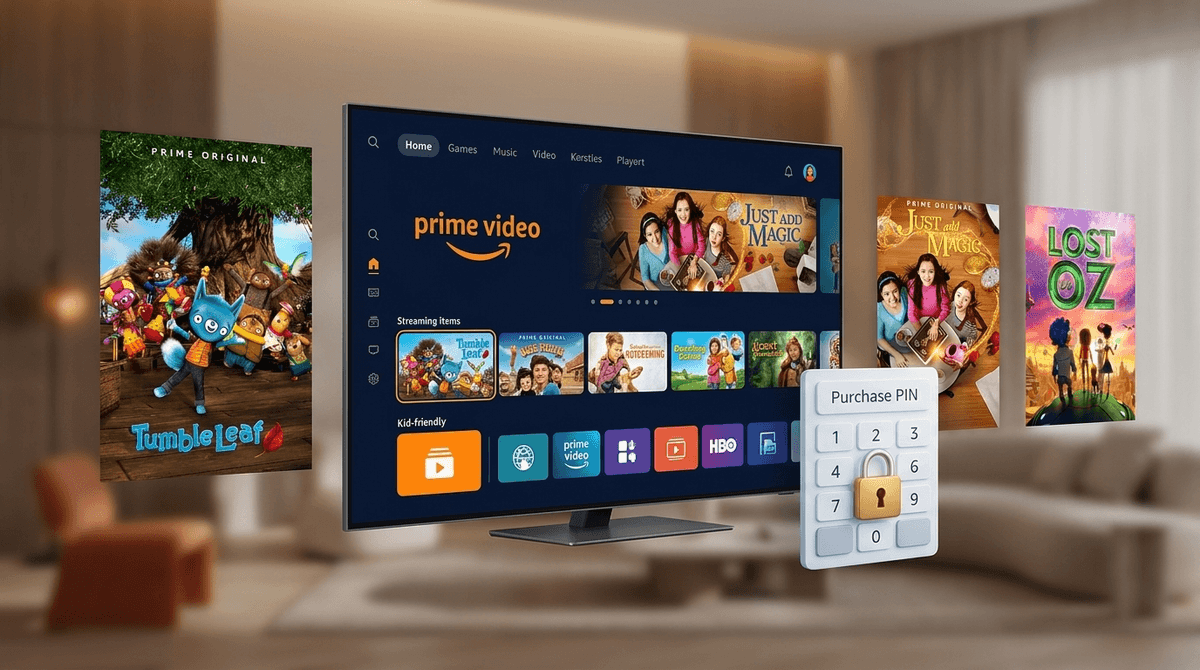
Amazon’s Prime Video is the digital equivalent of that one junk drawer in your kitchen—the one where a high-end flashlight is buried under three broken rubber bands and a handful of loose change. It is arguably the most cluttered, frustratingly designed streaming platform on the market, but because it’s bundled with your free shipping, it’s probably the one your kids use the most. To make it actually usable for a family, you have to navigate a minefield of $20 "Buy" buttons, a new $4.99-a-month "shakedown" to remove ads, and a UI that constantly tries to sell you a Paramount+ subscription you didn't ask for.
TL;DR: Prime Video is a powerhouse of high-quality originals like Tumble Leaf and Just Add Magic, but its interface is designed to trigger accidental spending. To keep your wallet safe, you must set a Purchase PIN immediately and decide if the $4.99/month ad-free "Ultra" upgrade is worth it for your sanity. For a cleaner experience, check out our best shows for kids list.
The biggest issue with Prime Video isn't the content—it's the context. Unlike Netflix or Disney+, which generally keep their "available to stream" and "available to buy" content in separate lanes, Amazon mashes them all together. Your kid might be scrolling through "Free for Me" and suddenly land on a $19.99 digital rental of a movie that looks like it’s part of the subscription.
Then there’s the "Freevee" situation. Amazon owns Freevee, an ad-supported service, and they’ve integrated that content directly into the Prime Video app. This means even if you’re a paying Prime member, your kid might click on a show and be met with unskippable ads for laundry detergent or horror movie trailers. It’s messy, it’s loud, and it requires a bit of "wallet-proofing" before you hand over the remote.
If you do one thing after reading this, let it be setting up a Purchase PIN. Amazon makes it dangerously easy to "One-Click" buy a season of a show.
- Go to your Account & Settings on the Prime Video website.
- Find the Parental Controls tab.
- Set a 5-digit Purchase PIN.
- Toggle "PIN on Purchase" to ON.
This doesn't just stop your toddler from buying Paw Patrol episodes; it stops you from accidentally clicking the wrong button when you're half-asleep. While you’re in there, you can also set "Viewing Restrictions" by age, which will require that same PIN to play anything rated above your chosen threshold (e.g., PG or 14+). It’s the only way to ensure they don't wander from The Stinky & Dirty Show into the ultra-violent world of The Boys.
In early 2024, Amazon made ads the default for all Prime Video users. If you want to go back to the ad-free experience you used to have, they want an extra $4.99 a month.
Is it a shakedown? Absolutely. Is it worth it for parents? Probably. Ads on Prime Video aren't just annoying; they’re often poorly targeted. Because Amazon’s data knows you (the adult) are the account holder, your kid might see ads for R-rated thrillers or products that have no business being in front of a six-year-old. If you use Prime Video as a primary source of entertainment, that five bucks is essentially a "peace of mind" tax. If you only use it occasionally, skip the upgrade and just be ready to hit the mute button.
Amazon has poured billions into original content, and while their adult stuff gets the headlines, their kids' slate is actually some of the most thoughtful in the business. They tend to favor "slow TV"—shows that aren't hyper-caffeinated or loud for the sake of being loud.
This is the gold standard of preschool programming. It’s stop-motion, it’s gorgeous, and it focuses on "figuring things out" through play and basic physics. It’s calm, it’s whimsical, and it won’t make you want to throw your TV out the window.
If your kid has aged out of the preschool stuff but isn't quite ready for the intensity of Stranger Things, this is a fantastic middle ground. It’s a modern, "magical-realism" take on the Oz story with great world-building and actual stakes.
Think of this as a "mystery-lite" show for the elementary set. Three friends find a magical cookbook and have to solve a multi-generational mystery. It’s smart, it avoids the "sassy kid" tropes found on other networks, and it’s genuinely fun to watch as a family. For more like this, see our digital guide for elementary school.
Based on the books by soccer star Alex Morgan, this is a solid, grounded live-action show about a girl moving to a new town and joining a struggling soccer team. It deals with teamwork and resilience without being overly "after-school special."
Prime Video has a feature called X-Ray, and it’s actually the best thing about the platform. Powered by IMDb, it shows you exactly which actors are on screen, what song is playing, and "trivia" facts in real-time.
If you have a kid who is constantly asking "Wait, where do I know that guy from?" or "How did they film that explosion?", X-Ray is a masterclass in media literacy. Use it to talk about how movies are made, who the creators are, and how different stories are connected. It turns passive viewing into an interactive deep dive.
The "Channels" trap is real. Amazon will frequently offer "99-cent for two months" deals for Paramount+, Max, or Discovery+. These are great deals if you remember to cancel them. If you don't, your $14.99 Prime membership can balloon to $60 a month before you notice. If you’re letting your kids browse the app, they will click on these "Add to your subscription" buttons. Refer back to the Purchase PIN section—it’s your only defense.
Q: Is Prime Video safe for kids to browse alone? Not really. Because Amazon mixes paid content, ad-supported Freevee content, and R-rated originals into the same UI, it’s very easy for a kid to end up somewhere they shouldn't be. Use a Purchase PIN and set up a specific "Kids" profile to minimize the chaos.
Q: How do I stop my kid from seeing ads on Prime Video? You have to pay the $4.99/month "Ad-Free" upgrade fee in your account settings. Content labeled as "Freevee" will still have ads regardless of whether you pay for the upgrade, as that is a separate service.
Q: What age is Prime Video appropriate for? The platform has content for everyone from toddlers to seniors. The "Kids" profile does a decent job of filtering for age-appropriateness, but the UI itself is complex enough that it's best suited for kids 8 and up to navigate solo.
Q: Can I download Prime Video shows for car trips? Yes, most Amazon Originals and many licensed titles are available for offline viewing on tablets and phones. This is one of Prime's best features for travel. For more travel ideas, check our best podcasts for kids list.
Prime Video is a "yes, but" platform. Yes, it has some of the best kids' programming available today, but you have to be willing to spend ten minutes in the settings menu to lock down your credit card and filter out the noise. It’s not a "set it and forget it" app like Disney+, but for families who want smart, high-production-value shows like Lost in Oz, it's worth the extra effort.
