

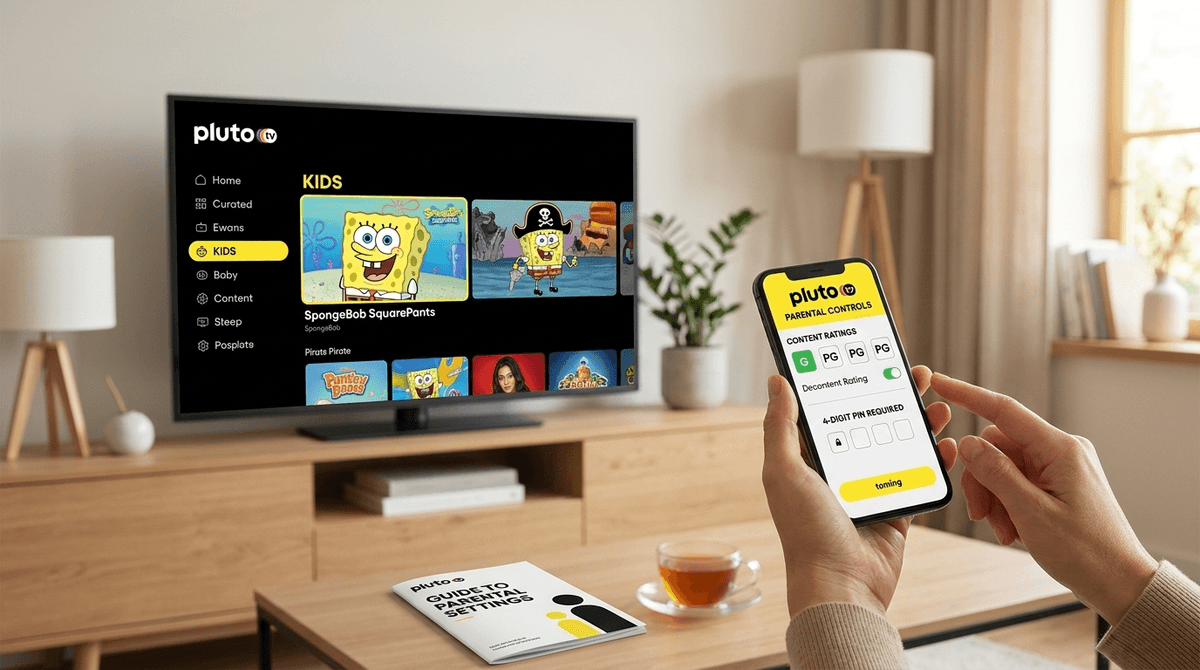
TL;DR: Pluto TV is the "Wild West" of free streaming—it’s great because it’s free, but it’s risky because it’s basically 90s cable with fewer filters. To keep it safe, you must use the Kids Mode and set up a PIN lock. If you’re looking for curated, "safe" hits, check out the SpongeBob SquarePants channel or Dora the Explorer, but stay vigilant about the ads.
Get a step-by-step guide to Pluto TV setup
If you haven't stumbled upon it yet, Pluto TV is what the industry calls a "FAST" service (Free Ad-supported Streaming TV). In plain English: it’s free cable. You don’t need a credit card, you don’t need a subscription, and you don’t even technically need an account to start watching.
It’s owned by Paramount, which is why you’ll see a ton of content from Nickelodeon, MTV, and Comedy Central. It works via "live" channels that are always running—just like old-school TV where you flip through and find something halfway finished—and a massive On-Demand library.
The catch? Ads. Lots of them. And because it’s free and "live," the barrier between a Paw Patrol episode and a "TV-MA" horror movie marathon is exactly one click of the remote.
Kids today are used to the Netflix or DisneyPlus experience where they have to choose a show. There’s a weird novelty in "linear" TV. My kids actually enjoy the lack of choice sometimes—they just want to "see what’s on" the LEGO Channel.
However, if you don't set boundaries, Pluto TV can get "Ohio" (internet speak for weird/cringe/chaotic) very quickly. One minute they’re watching Garfield, and if they lean on the channel-up button too long, they’re looking at a 24/7 Forensic Files marathon. It’s a lot of data for a young brain to process without a filter.
Pluto TV actually has some solid "walled gardens" within its ecosystem if you know where to point the remote. Here are the best channels and shows to look for:
There is a literal 24/7 SpongeBob channel. For kids ages 6-12, this is the ultimate "background noise" show. It’s classic, it’s mostly harmless, and it keeps them away from the weirder corners of YouTube.
Pluto often runs dedicated channels for the various iterations of the Turtles. Whether it's the 80s classic or the 2012 version, it’s solid action for the 8-12 crowd.
For the toddlers, there’s usually a dedicated Nick Jr. channel or a specific Blue’s Clues stream. This is one of the few things on Pluto I’d consider "safe-ish" for the preschool set, provided you are in the room to handle the ad breaks.
If your kids are obsessed with Ryan’s World, this channel aggregates that content. It’s basically YouTube on your TV, which can be a pro or a con depending on your stance on "kid-fluencers."
For the older kids (10+) or the nerdy teens, the Classic Doctor Who channel is a goldmine. It’s campy, low-budget sci-fi that actually encourages a bit of imagination compared to the high-gloss "brain rot" of modern TikTok-style editing.
Learn more about the best free educational channels on Pluto
Pluto TV is rated "Teen" in most app stores, and for good reason. Without parental controls, it is not appropriate for kids to use solo.
The Ad Problem
This is the biggest hurdle. Because the service is free, the ads are aggressive. While Pluto tries to keep ads on the Kids channels age-appropriate (toys, cereal, other kids' movies), the system isn't perfect. You might see a trailer for a PG-13 action movie during a break in The Fairly OddParents.
The "One Click" Danger
Unlike YouTube Kids, which is a separate app, Pluto TV’s kids' content lives inside the same app as The Walking Dead and CSI. If your kid knows how to hit the "Back" or "Guide" button, they can see everything.
Read our guide on the dangers of "unfiltered" free streaming
According to flashget.com, you can and should use the built-in parental controls to keep things from getting out of hand. Here is your battle plan:
- Create an Account: You can use Pluto without one, but you need an account to save parental control settings across devices.
- Toggle Kids Mode: There is a specific "Kids" section that filters the guide to only show G and PG rated content.
- Set a PIN Lock: This is the most critical step. You can set a 4-digit PIN that is required to exit Kids Mode or to watch anything rated TV-14 or higher. Do not skip this. Without a PIN, Kids Mode is just a suggestion that any 7-year-old can click out of in two seconds.
- Use the "On Demand" Section: If you’re worried about what might pop up on a "live" channel, steer your kids toward the On Demand library. It functions more like Netflix, where they pick a specific show and stay there.
Check out our full guide on setting up Pluto TV parental controls
We need to talk about the "Entrepreneurship" of free media. Sometimes we think that because a service is free, it's "cheaper" for our kids' brains. It’s actually the opposite. When the service is free, your kid’s attention is the product.
Pluto TV is designed to keep you scrolling. It’s designed to keep the TV on in the background for hours. If you have a kid who struggles with transitions or "screen addiction," the linear nature of Pluto (where the shows never end) can be a nightmare. There’s no "Are you still watching?" prompt that comes up as quickly as it does on other platforms.
Community Note: In our Screenwise surveys, we've seen that about 15% of families with elementary-aged kids use Pluto TV as a "secondary" streaming app—usually for the specific Nickelodeon nostalgia or when they’ve cut the cord on cable but miss the "live TV" feel.
Pluto TV is a fantastic tool for saving money, but it requires an "active" parenting style. It is not a "set it and forget it" app like PBS Kids.
If you’re going to use it:
- Ages 0-5: Only with a parent in the room. The ads are too unpredictable.
- Ages 6-11: Use Kids Mode with a PIN lock enabled. Stick to the dedicated Nick channels.
- Ages 12+: Good for "background" watching, but have a conversation about the types of ads they’re seeing.
- Open the Pluto TV app on your smart TV tonight.
- Go to Settings > Parental Controls.
- Set your PIN and limit the ratings to TV-G or TV-PG.
- Test it. Try to switch to a "Main" channel and make sure that PIN prompt pops up.