

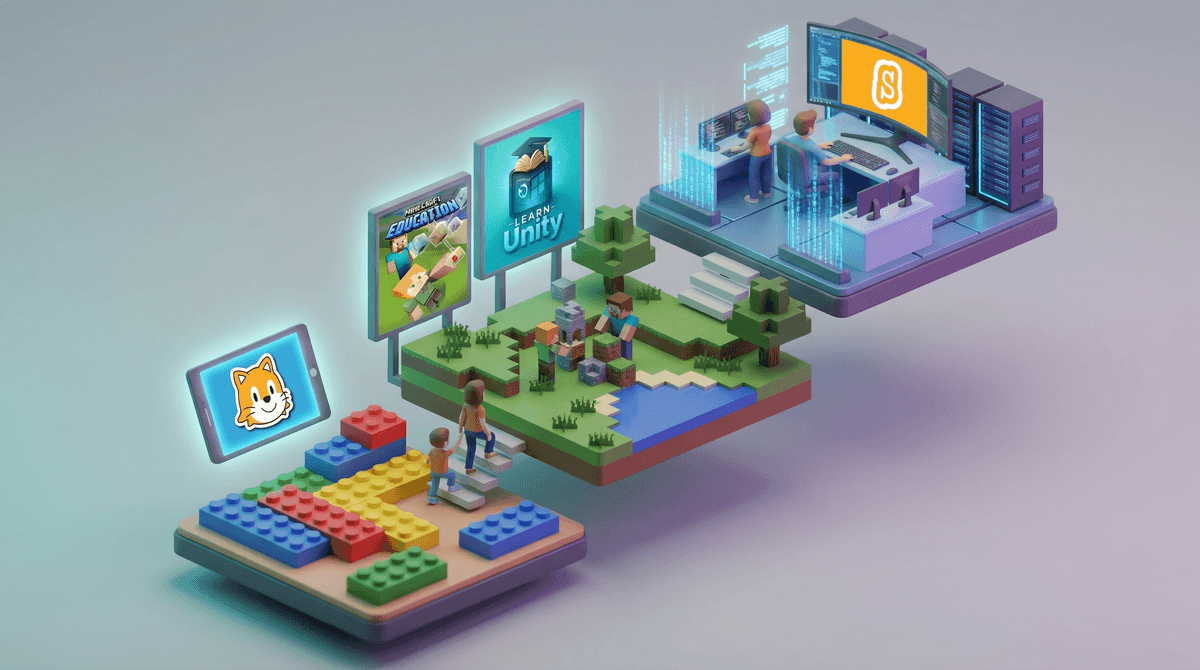
Coding apps for kids are platforms designed to teach programming concepts through games, puzzles, and creative projects. They range from visual block-based coding (think digital LEGO instructions) to actual text-based programming languages like Python and JavaScript.
The good ones make coding feel like play. The not-so-good ones are basically glorified flashcard apps with a "tech" wrapper that cost $12.99/month.
Here's the thing: not all coding apps are created equal, and the one that works for your 6-year-old probably won't cut it for your 12-year-old who's ready to build actual games. Also, some of these apps are legitimately teaching transferable skills, while others are... well, let's just say they're teaching kids to follow very specific instructions that won't translate anywhere else.
We're not here to say every kid needs to become a software engineer. But coding literacy is becoming as fundamental as understanding how to use a calculator or type on a keyboard. It teaches logical thinking, problem-solving, and—when done right—creative expression.
Plus, unlike a lot of screen time that's purely consumptive, coding is genuinely creative. Kids are building things, experimenting, and seeing immediate results from their efforts. That's the kind of screen time that actually feels good as a parent.
The challenge? The market is absolutely flooded with coding apps, many of which are mediocre at best. Some are too game-ified (kids just click through without learning), some are too rigid (one wrong move and you're stuck), and some are straight-up boring (looking at you, apps that are basically just typing tutorials with a robot mascot).
Ages 4-7: Visual Block Coding
At this age, you want apps that teach sequencing and basic logic without requiring reading skills. ScratchJr is the gold standard here—it's free, ad-free, and actually developed by MIT. Kids drag blocks to make characters move, jump, and dance. It's genuinely educational and doesn't require a subscription.
Kodable is another solid choice for this age range, though it does have a subscription model ($6.99/month after the free levels). The free version is generous enough to get a real sense of whether your kid enjoys it.
Avoid: Apps that are mostly just watching tutorials or following rigid step-by-step instructions with zero room for experimentation. If your kid can't mess around and try their own ideas, it's not really teaching coding—it's teaching following directions.
Ages 8-12: Bridge to Real Coding
This is where things get interesting. Kids are ready for more complex logic and can start transitioning to actual programming concepts.
Scratch (the full version, not Jr.) is phenomenal and completely free. Kids can create games, animations, and interactive stories. The community aspect is huge—they can remix other people's projects and share their own. Yes, you'll want to set up parental controls since it is a social platform, but it's generally well-moderated.
Tynker offers a more structured curriculum if your kid likes having clear goals and levels to complete. It's subscription-based ($10/month or $60/year), and honestly, it's worth it if your child responds well to gamified learning. If they don't, you're just burning money.
For Minecraft-obsessed kids: Minecraft Education Edition has coding built in, and there are also mods like ComputerCraft that teach Lua programming. If your kid is already spending hours in Minecraft, this can be a way to channel that interest into actual skill-building.
Ages 13+: Real Programming Languages
At this point, they're ready for the real deal. Block coding has served its purpose—time to learn actual syntax.
Python is the best first "real" programming language. It's readable, widely used, and powerful enough to do genuinely cool things. Codecademy has excellent Python courses (free tier is solid, Pro is $20/month). Replit is another fantastic option—it's a browser-based coding environment where kids can write actual programs and share them. The free version is generous.
For kids who want to make games specifically, Unity Learn teaches C# through game development. Fair warning: this is genuinely challenging and not for kids who give up easily.
The subscription trap is real. Many coding apps offer a "free trial" that auto-renews at $12.99/month. Set a calendar reminder or use a virtual card number if you're just testing things out. Most kids will lose interest after a few weeks, and that's totally normal—not every kid is going to be a programmer, and that's fine.
Screen time quality matters here. Twenty minutes of actually writing code and debugging problems is fundamentally different from 20 minutes of watching YouTube. If your kid is genuinely engaged in problem-solving, that's valuable screen time. If they're just mindlessly clicking through tutorials, it's not teaching them anything.
Community features can be good or sketchy. Platforms like Scratch and Replit have social components where kids can share projects and comment on others' work. This can be genuinely motivating and educational, but you'll want to check the privacy settings and make sure your kid understands basic online safety. Learn more about managing social features in coding apps .
.
The "coding teaches everything" hype is overblown. Yes, coding teaches problem-solving and logical thinking. No, it's not going to magically make your kid better at math or turn them into a disciplined genius. It's a useful skill, not a miracle cure for everything.
Start with free options—seriously, ScratchJr and Scratch are both excellent and cost nothing. If your kid genuinely enjoys it and sticks with it for more than a month, then consider paid options like Tynker or Codecademy.
The best coding app is the one your kid will actually use. A "perfect" curriculum they hate is worthless. A slightly less comprehensive app they're excited to open? That's the winner.
And remember: the goal isn't to raise the next Mark Zuckerberg (honestly, maybe that's not even a goal we want). The goal is to give them tools to understand and create with technology instead of just consuming it. If they learn that computers aren't magic black boxes but things they can control and build with? That's a win, regardless of whether they ever write another line of code after age 14.
Try this: Let your kid explore Scratch for free for two weeks. Don't hover, don't make it homework, just see if they naturally gravitate toward it. If they do, great—you've found something that clicks. If they don't, that's also valuable information. Not every kid needs to code, and forcing it will just make them hate it.
Want more specific recommendations based on your child's age and interests? Check out our personalized guide to finding the right coding platform.