

TL;DR
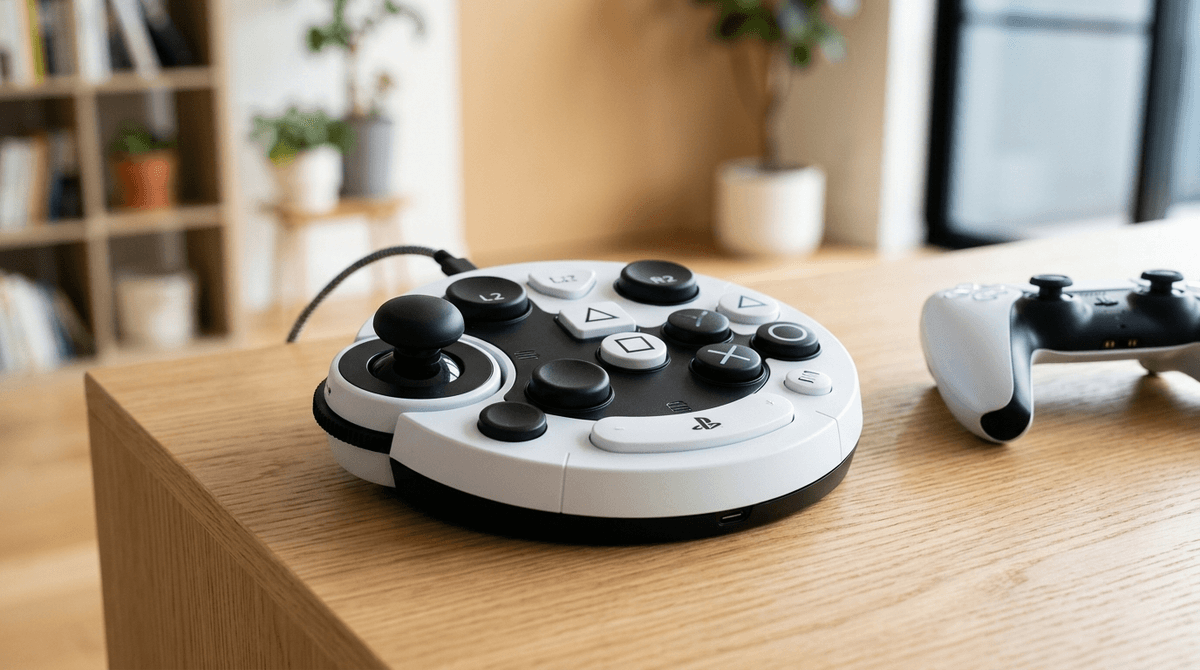
The PlayStation Access Controller is a highly customizable, circular "adaptive" controller kit designed to help players with physical disabilities play more comfortably and for longer. Instead of the standard DualSense that requires two hands and fine motor precision, this kit lets you swap buttons, adjust stick sensitivity, and plug in external switches to create a setup that works for your child’s specific needs.
Top games to pair with it:
- Ratchet & Clank: Rift Apart - Incredible accessibility presets.
- Spider-Man 2 - Allows for slowing down time to help with combat.
- Sackboy: A Big Adventure - Great for co-op play with a parent.
- The Last of Us Part II Remastered - The "gold standard" for accessibility settings.
If you’ve ever watched a kid try to play Minecraft while struggling to hold a heavy controller or hit those tiny "L2" and "R2" triggers on the back, you know how frustrating it is when the hardware becomes the hurdle.
The PlayStation Access Controller is Sony’s answer to that frustration. It’s a flat, circular device that looks a bit like a high-tech UFO. Unlike a standard controller, it doesn’t have to be held. It can sit on a desk, a wheelchair tray, or be mounted to a tripod.
The "magic" is in the customization. It comes with a box of different button caps—some are flat, some are curved, some are extra-large—that you can pop on and off like Lego pieces. You can also program every single button to do whatever you want. If your child can only use their palm to press a button, you can make the biggest button on the device "jump" or "attack."
We talk a lot about "screen time" as a negative, but for kids with physical disabilities, gaming is often the ultimate equalizer. When they are in a Roblox server or a Fortnite lobby, nobody knows they use a wheelchair or have limited mobility. They’re just the teammate who’s cracked at the game.
When a child can't keep up with their friends in FC 25 (formerly FIFA) because the controller is too difficult to manage, they aren't just losing a game—they're losing a social connection. They miss out on the "Ohio" jokes, the Skibidi Toilet memes shared in party chat, and the general camaraderie of the digital playground. The Access Controller isn't just a gadget; it's an invitation back into the group.
I’m going to be real with you: this isn't exactly "plug and play." You’re going to have to spend an hour or two being the "IT Department."
- Physical Setup: You’ll sit down with your child and figure out which button caps feel best. Do they need the "overhang" caps that are easier to pull? Or the "pillow" caps that are soft for clicking?
- Software Mapping: On the PS5, you’ll create a "profile." This is where you tell the console, "When my kid hits this big button on the left, make the character run."
- The "Buddy" System: One of the coolest features is that you can use the Access Controller at the same time as a standard DualSense or even a second Access Controller. This means you can "co-pilot." If your child wants to handle the movement and jumping, but struggles with the camera angles, you can hold the regular controller and help them out without taking the "lead" away from them.
Not every game is built the same when it comes to accessibility. Here are the ones that play beautifully with this kit:
Sony’s first-party games are leading the industry here. In Spider-Man 2, you can actually slow down the game speed to 30%, 50%, or 75%. This gives a child using an adaptive setup more time to react to prompts. It turns a high-stress combat scene into something manageable and fun.
This is a "Pixar-level" beautiful game that is very forgiving. It has "Auto-Fire" options so your child doesn't have to repeatedly mash a button to shoot, and "Toggle" settings so they don't have to hold a button down to aim. It’s perfect for kids (Ages 8+) who want an epic adventure without the hand cramps.
If you want a game to play with them, this is it. It’s a platformer (Ages 6+) that is incredibly charming. Because you can use the Access Controller alongside a regular controller, you can help them navigate the tricky jumps while they handle the fun stuff.
The GOAT of kid games. Minecraft on the PS5 works well with the Access Controller because the pace is largely determined by the player. If they want to just build a house in Creative Mode, there’s no "time limit" or "enemy" forcing them to move faster than they are able.
While the hardware itself is rated for everyone, there are a few things to keep in mind:
- Ages 6-10: They will almost certainly need you to do the initial mapping. At this age, the physical "swapping" of buttons is fun (like a toy), but the menu settings will be over their head.
- Ages 11+: This is a great opportunity for them to learn about their own ergonomics. Encourage them to "iterate"—play for 30 minutes, then ask, "Is your hand tired? Do we need to move the joystick further away?"
- Safety: The Access Controller has four 3.5mm expansion ports. These are for "industry standard" switches (like sip-and-puff devices or foot pedals). If your child uses other assistive tech, check if it’s compatible. Sony made this very "open" so it plays nice with 3rd party gear.
The PlayStation Access Controller retails for about $89.99. In the world of adaptive technology—where specialized wheelchairs or speech devices can cost thousands—this is actually a surprisingly "pro-consumer" price point from Sony.
However, remember that this is a PS5-only device. It won't work on your old PS4 or your Nintendo Switch. If your family is a "Nintendo household," you might want to look into the Xbox Adaptive Controller with a specialized adapter, though that gets much more complicated.
If you’re introducing this to a child who has been struggling with a standard controller, focus on empowerment, not "fixing" them.
You might say: "I noticed that the regular controller is kind of a pain to use because it's so small and heavy. I found this 'Pro' kit that lets us build a controller specifically for your hands, so you can beat those levels in Spider-Man without your thumbs getting tired."
It’s about giving them the tools to be a "gamer," full stop.
Learn more about the benefits of gaming for physical therapy
The PlayStation Access Controller is a rare example of a tech giant actually doing the right thing for a niche community. It isn't a "magic wand"—it takes some trial and error to get the layout perfect—but the payoff is seeing your kid play a game independently for the first time.
If your child has been "watching" from the sidelines because the hardware was too hard to hold, this is the bridge that gets them into the game.
Next Steps for Intentional Parents:
- Watch a Setup Video: Before you buy, watch a quick YouTube video of the "Access Controller UI" to see if you're comfortable navigating the menus.
- Audit Your Games: Check your library for games with "Accessibility" menus. Look for "Toggle" options instead of "Hold" options.
- Start Small: Don't try to map 12 buttons at once. Start with a simple game like Sackboy and just map the movement and one action button.