

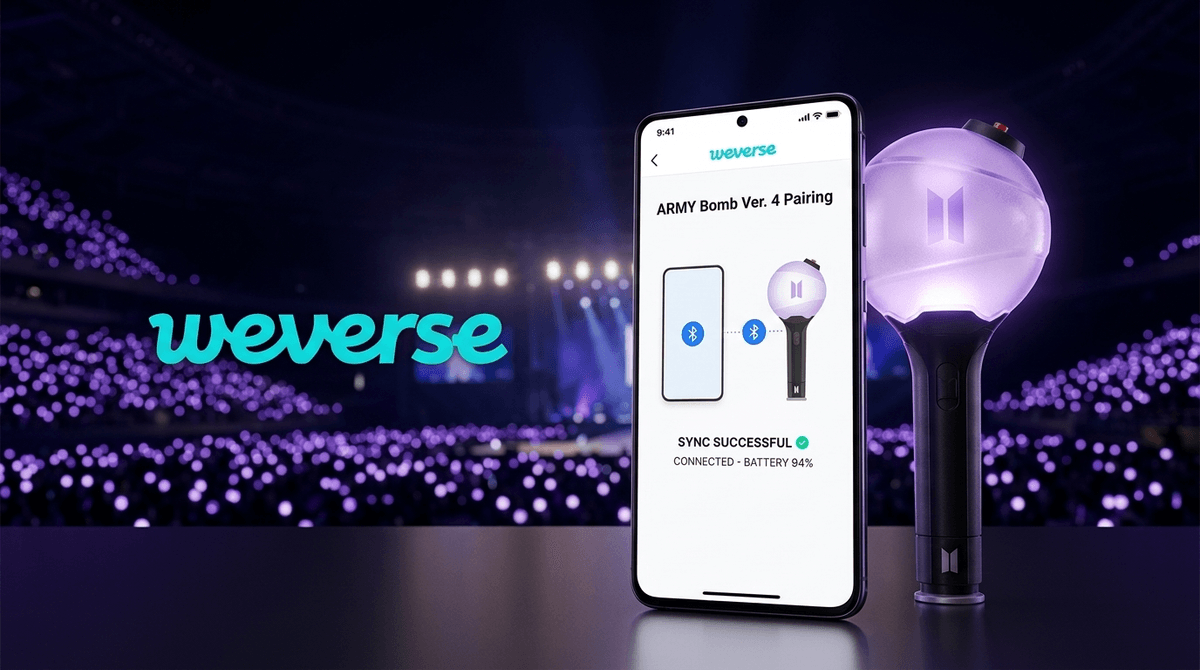
TL;DR: If your child is a BTS fan (known as ARMY), the 2026 World Tour is likely the biggest event of their year. To participate in the "ocean" of lights at the concert, they need the BTS Light Stick Version 4 (Special Edition/2026 Upgrade). Older versions (Ver 1-3) lack the updated Bluetooth firmware required for the new stadium synchronization technology. It’s an expensive piece of tech, but for fans, it’s the primary way they feel connected to the community during a show.
Learn more about K-pop fandom culture
If you’ve walked past your kid’s room and seen what looks like a high-tech plastic globe on a stick, you’ve met the ARMY Bomb. In the world of K-pop, light sticks are more than just glowing wands; they are a "fandom ID card." Each group has a unique design, and for BTS, it’s a sleek, bomb-shaped light that represents their name (Bangtan Sonyeondan, or Bulletproof Boy Scouts).
At a concert, these aren't just turned "on." They are centrally controlled by the venue’s production team via Bluetooth. This creates the "ARMY Bomb Ocean," where 50,000+ lights change color in perfect synchronization with the music, flash to the beat, and even form giant words or patterns across the stadium seats.
Here is the "no-BS" reality: K-pop is a masterclass in marketing and tech iteration. With the 2026 World Tour marking the group’s full reunion after military service, HYBE (their management company) has updated the concert synchronization protocols.
If your kid has a Version 2 or Version 3 light stick from years ago, it will still turn on and glow white at home. However, it will not sync with the centralized control at the 2026 shows. When the whole stadium turns purple, your kid’s light stick will stay white or flicker. For a teenager who has waited years for this tour, that "technical glitch" feels like a social catastrophe. The Version 4 (and the specific 2026 Special Edition) features an upgraded Bluetooth 5.0 chip and expanded LED color gamuts that the old hardware simply can't support.
To get the light stick ready, your child will likely need to use the Weverse app. This is the "everything" app for K-pop fans. Inside the app, there is a specific module for "Light Stick Sychronization."
How it works:
- Pairing: The light stick connects to the phone via Bluetooth.
- Seat Mapping: Before the concert, the fan enters their specific ticket information (Section, Row, Seat) into the app.
- The Sync: This tells the venue's computer exactly where that specific light stick is located in the stadium, allowing the light show to create "waves" of color that move through the crowd.
Parental Note: The Weverse app is a social media platform. While it's generally safer than X (formerly Twitter) or TikTok, it does have a feed where fans interact and artists post. It's a good idea to check our guide to the Weverse app to understand the privacy settings.
It’s easy to look at a $60 plastic stick and see "brain rot" or a waste of money. But let's look at the community aspect. For many kids, being part of the "ocean" is their first experience of collective belonging.
There’s also a surprising amount of tech literacy involved. They are managing firmware updates, troubleshooting Bluetooth pairing, and navigating international e-commerce. Some kids even use the light stick as a gateway to learning about LED tech or programming. If your kid is into tech, you might suggest they look into how the Arduino community hacks light sticks to create custom light patterns at home.
1. The "Fake" Market
Do not buy an ARMY Bomb from a random third-party seller on Amazon or eBay for $20. It will be a fake. Fake light sticks look identical but do not have the Bluetooth chip required to sync at the concert. Only buy from the official Weverse Shop or authorized retailers like Target or Barnes & Noble (who often carry official K-pop merch now).
2. Battery Drain
These things eat AAA batteries for breakfast. A set of three batteries will usually last through one 3-hour concert and then die. Pro-tip: Always remove the batteries after the concert. If you leave them in for months, they will leak and corrode the internals, turning that $60 investment into a paperweight.
3. Eye Safety
The LEDs in the Version 4 are incredibly bright. If you have a younger child (Ages 8-12), remind them not to stare directly into the LED or point it directly into others' eyes in the car on the way home.
4. The "Wand" Protocol
At concerts, there is an unspoken rule: don't hold your light stick above your head, as it blocks the view of the person behind you. It’s a great opportunity to talk to your kid about "digital etiquette" and being aware of their physical surroundings in a high-energy environment.
We’re talking about $60-$70 for the stick, plus shipping, plus batteries. In 2026, that’s a lot for a flashlight.
Many intentional parents use this as a "milestone" purchase. If they’ve kept their grades up, finished their chores, or shown responsibility with their Instagram usage, this is the "big" reward. It’s also a physical souvenir that holds its value; official BTS light sticks often become collector's items that can be resold later on platforms like Mercari.
Get guidance on teaching kids the value of money through collectibles
- Ages 8-12: They will need help with the Bluetooth syncing and the Weverse app. Keep the light stick in a "safe spot" between shows so it doesn't get dropped or lost.
- Ages 13-17: They can handle the tech themselves. This is a good time to discuss avoiding scams online and how to spot "bootleg" merchandise on TikTok Shop.
The BTS Light Stick Version 4 is the "entry ticket" to the full concert experience in 2026. While the planned obsolescence of the older versions is frustrating for the parental wallet, the light stick is a key component of the safety and community-building that makes K-pop concerts unique.
If your kid is heading to the tour, the "upgrade" is unfortunately mandatory if they want to be part of the show. Just make sure you buy it from an official source and buy a 12-pack of AAA batteries while you're at it.
- Check the version: If your kid already has one, look at the box. If it doesn't say "Special Edition" or "Ver 4," it likely won't sync for the 2026 tour.
- Download Weverse: Set up the account with them and look at the privacy settings together.
- Set a battery reminder: Put a sticky note on the box that says "Remove batteries after the show!"
Check out our guide on the best music apps for teens
If you're feeling overwhelmed by the 2026 "BTS-mania," you aren't alone. It’s a massive cultural moment. Being the parent who "gets" why the light stick matters—even if you think the price is ridiculous—goes a long way in building trust in your child's digital and cultural world.