

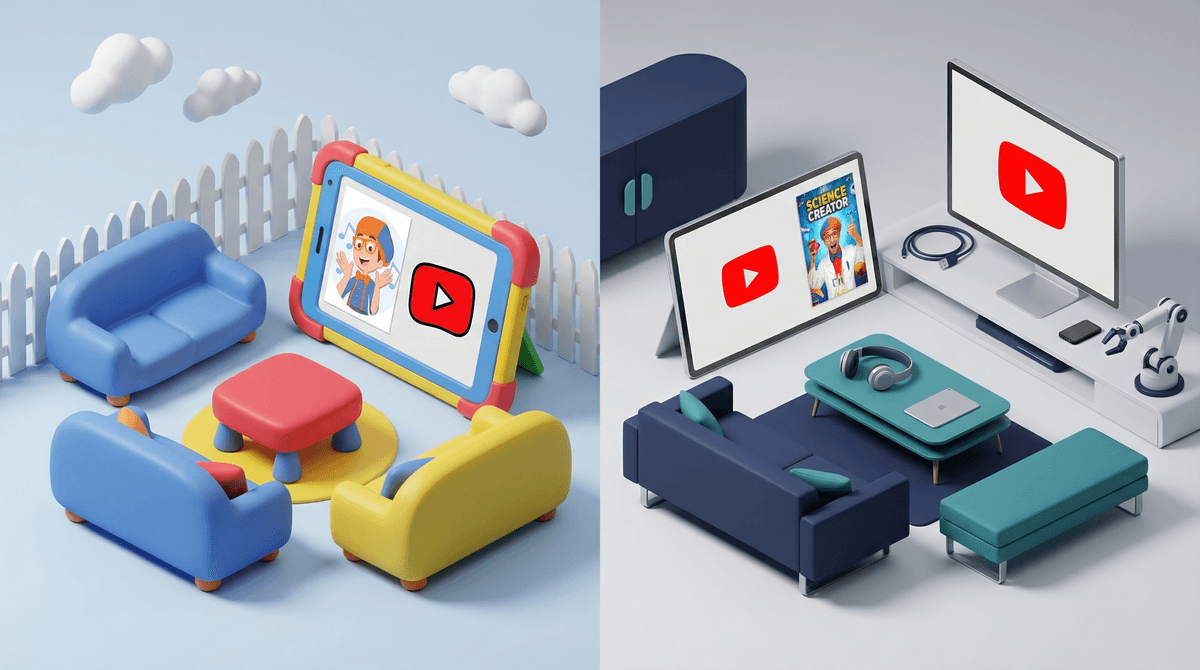
YouTube Kids vs Supervised YouTube: Which One Is Right for Your Child?
Google offers two different ways for kids to watch YouTube: YouTube Kids (a separate app) and Supervised YouTube (the regular app with parental controls). YouTube Kids is heavily filtered and designed for younger kids (under 8-9), while Supervised YouTube gives older kids access to more content with guardrails. Most families start with YouTube Kids and transition to supervised accounts around age 9-11, but it really depends on your kid's maturity and what you're comfortable with.
Quick decision framework:
- Ages 3-8: Start with YouTube Kids
- Ages 8-12: Consider Supervised YouTube (Explore mode)
- Ages 13+: Supervised YouTube or full access with conversations
Both options are from Google, both are free, but they work completely differently.
YouTube Kids is a separate app with its own interface designed for young children. Everything is filtered through algorithms and human reviewers to keep out inappropriate content. Think of it as a walled garden—only pre-approved content gets in.
Supervised YouTube is the regular YouTube app, but with parental controls activated through a Google Family Link account. Your kid gets a supervised Google account that you manage, and you choose what level of content they can access. It's more like giving them access to the real YouTube, but with training wheels.
The big philosophical difference: YouTube Kids tries to keep the bad stuff out. Supervised YouTube gives access to almost everything, but with filters and oversight.
What You Get
YouTube Kids shows only content that's been approved for children—either algorithmically filtered or from verified channels. The interface is colorful, simple, and designed for little kids to navigate.
Content categories:
- Preschool (ages 4 and under)
- Younger (ages 5-8)
- Older (ages 9-12)
You can also set it to "Approved Content Only" mode, where your kid can ONLY watch channels and videos you've specifically selected. This is the most restrictive option available anywhere on YouTube.
The Good Stuff
For younger kids (3-8), YouTube Kids genuinely works well. The content is age-appropriate, the interface is intuitive, and you can actually let a 5-year-old browse without constant supervision. Popular channels like Blippi, Ryan's World, and Sesame Street are all there.
The search function can be turned off completely, which is huge for preventing kids from going down weird rabbit holes. And the timer feature actually works—you can set it to automatically stop playing after 30 or 60 minutes.
The Problems
Here's where it gets real: YouTube Kids' algorithm isn't perfect. Weird, low-quality content still slips through. Remember "Elsagate"? That whole mess with disturbing videos disguised as kid content happened on YouTube Kids.
The bigger issue for older elementary kids: it's babyish. By age 8 or 9, most kids know YouTube Kids is the "little kid" version, and they want access to what their friends are watching—gaming videos, Minecraft tutorials, actual YouTubers they care about. A lot of that content doesn't make it into YouTube Kids, even though it's perfectly appropriate for tweens.
And let's be honest about the content quality. Even the "approved" stuff on YouTube Kids is often... not great. Lots of unboxing videos, toy reviews, and content that's essentially 10-minute ads. If you're trying to be intentional about screen time quality, YouTube Kids can feel like a junk food buffet.
Best For
- Ages 3-7 who are just starting to use devices independently
- Kids who need heavy guardrails and aren't ready for more open browsing
- Families who want the "Approved Content Only" option to curate every single channel
- Parents who want a simple, set-it-and-forget-it solution for younger kids
How It Works
Supervised YouTube requires setting up a Google account for your child through Google Family Link. You create and manage their account, and they log into regular YouTube with parental controls active.
Three content settings:
- Explore: Broad range of videos, generally appropriate for ages 9+. Includes vlogs, tutorials, gaming content, music videos, news. Excludes mature content.
- Explore More: Wider range, generally appropriate for ages 13+. Includes more mature topics but still filters out age-restricted content.
- Most of YouTube: Almost everything except age-restricted content (which requires signing in as 18+).
You can also see their watch history, pause watch/search history, and manage other settings through Family Link.
The Good Stuff
This is where kids can actually watch what their friends are watching. Popular gaming channels like DanTDM, Aphmau, educational content like Vsauce or Mark Rober, music videos, Minecraft tutorials—it's all available in Explore mode.
The interface is the real YouTube, which means better search, better recommendations, and access to the actual platform kids will eventually use anyway. You're teaching them to navigate the real internet with guardrails still in place.
And honestly? A lot of the content that gets filtered out of YouTube Kids is actually good for older elementary kids. Gaming content, DIY tutorials, science channels—this stuff is genuinely engaging and often educational, but it doesn't fit YouTube Kids' narrow criteria.
The Problems
The filters aren't perfect. Content can slip through that you might not want your 9-year-old watching. The algorithm tries to filter out mature content, but "mature" is subjective, and YouTube's definition might not match yours.
You can't block specific channels or videos in Supervised YouTube the way you can in YouTube Kids. You get broader content settings, but less granular control. Some parents find this frustrating when their kid discovers a channel they don't love.
And here's the real talk: Supervised YouTube requires more active parenting. You need to actually check in on what they're watching, have conversations about content, teach media literacy. It's not a set-it-and-forget-it solution.
Best For
- Ages 9-13 who are ready for more independence but still need oversight
- Kids who want to watch gaming content, DIY tutorials, and popular YouTubers that aren't on YouTube Kids
- Families ready to have ongoing conversations about online content and media literacy
- Parents comfortable with imperfect filters and willing to do some monitoring
This is where most families struggle with the decision. Your kid is too old for Blippi but maybe not quite ready for unsupervised YouTube access.
Signs your kid might be ready for Supervised YouTube:
- They're asking to watch specific YouTubers their friends talk about
- They're frustrated by YouTube Kids' limitations
- They can have conversations with you about what's appropriate vs. inappropriate online
- They come to you when they see something that makes them uncomfortable
- They're showing interest in specific hobbies (gaming, art, sports) where YouTube has great tutorial content
Signs they might need to stay on YouTube Kids longer:
- They're still clicking on whatever looks interesting without thinking
- They haven't shown they can self-regulate screen time
- They're not ready for conversations about online content
- You're not ready to do the active monitoring that Supervised YouTube requires
There's no shame in keeping an older kid on YouTube Kids if that's what works for your family. And there's also no shame in trying Supervised YouTube, deciding it's not working, and switching back.
Some parents skip both options and just let their kids use regular YouTube with conversations and check-ins. This is totally valid for families who prioritize teaching digital literacy over restriction.
The case for regular YouTube (with oversight):
- Teaches kids to navigate real internet with your guidance
- Avoids the "forbidden fruit" effect where restrictions make things more appealing
- Prepares them for eventual independent internet use
- Allows for teaching moments about algorithms, clickbait, and media literacy
The case against it:
- Kids WILL encounter inappropriate content eventually
- The recommendation algorithm is designed to maximize watch time, not child development
- Requires a lot of active parenting and conversation
- Easy for kids to end up in weird corners of YouTube
Most families find this approach works better for teens (13+) than younger kids, but every family is different.
For YouTube Kids:
- Download the YouTube Kids app (separate from regular YouTube)
- Choose age category or set to "Approved Content Only"
- Turn off search if you want maximum control
- Set a timer (seriously, use this feature)
- Regularly review what they're watching and block channels that feel off
For Supervised YouTube:
- Set up Google Family Link and create a supervised account for your child
- Choose content level (start with "Explore" for ages 9-12)
- Have your kid log into YouTube with their supervised account
- Set up watch history review so you can see what they're viewing
- Have regular check-ins about what they're watching and why they like it
Pro tip: Start more restrictive than you think you need to be, then loosen up. It's much easier to give more freedom than to take it away.
YouTube's autoplay is designed to keep kids watching. Both YouTube Kids and Supervised YouTube have autoplay features that will just keep serving up content. Turn this off or have clear rules about it.
The comments section is a nightmare. YouTube Kids doesn't have comments (good). Supervised YouTube does (not good). Talk to your kids about never reading comments and definitely never engaging with them.
Watch time adds up fast. What feels like "just a few videos" can easily become an hour. Use timers, set clear limits, and consider whether YouTube time counts differently than other screen time in your family.
Your kid will see ads. Both platforms have ads (unless you pay for YouTube Premium). Some of these ads are for toys, games, or other things your kid will immediately want. Prepare for "can we get this?" conversations.
The algorithm learns. Whatever your kid watches, they'll get more of. One Minecraft video becomes 50 Minecraft videos. One slime video becomes an endless slime tunnel. This isn't necessarily bad, but it's worth knowing.
Ages 3-6: YouTube Kids, Preschool or Younger setting, with approved content only if you want maximum control. Co-watch frequently. Keep sessions short (15-20 minutes).
Ages 7-9: YouTube Kids, Older setting, or transition to Supervised YouTube (Explore) if they're ready. Start teaching about making good choices with content. Monitor what they're watching regularly.
Ages 10-12: Supervised YouTube (Explore mode) for most kids. Have conversations about algorithms, clickbait, and how to evaluate content quality. Check in weekly about what they're watching.
Ages 13+: Supervised YouTube (Explore More or Most of YouTube) or regular YouTube with oversight. Focus on media literacy, critical thinking, and self-regulation. Shift from monitoring to mentoring.
Neither option is perfect. YouTube Kids is too restrictive for older kids but sometimes lets weird stuff through. Supervised YouTube gives more access but requires more parenting. There's no "set it and forget it" solution that keeps kids perfectly safe while giving them perfect content.
Your kid will eventually need to learn to navigate the real internet. Whether that's at age 9 or age 15 is up to you, but at some point, they need to develop the skills to make good choices online. Both YouTube Kids and Supervised YouTube are temporary solutions, not permanent ones.
What works for your friend's kid might not work for yours. Some 8-year-olds are ready for Supervised YouTube. Some 11-year-olds aren't. Some families are comfortable with more access, some want tighter controls. There's no one-size-fits-all answer.
The best filter is conversation. Whether you choose YouTube Kids or Supervised YouTube, the most important thing is talking to your kids about what they're watching, why they like it, and how to think critically about online content.
Start with YouTube Kids for younger kids (3-8), especially if you want a simple solution with heavy filtering. It's not perfect, but it's genuinely better than throwing a young kid into regular YouTube.
Transition to Supervised YouTube around ages 9-11 when your kid is ready for more content and you're ready for more active parenting. Start with Explore mode and see how it goes.
Use either option as a bridge, not a destination. The goal isn't to keep your kid in a filtered bubble forever—it's to teach them to navigate digital media thoughtfully. Both YouTube Kids and Supervised YouTube are tools to help you do that, not substitutes for parenting.
And remember: You can always change your mind. Try Supervised YouTube and switch back to YouTube Kids if it's not working. Start strict and loosen up. Give more freedom and pull back if needed. This isn't a one-time decision—it's an ongoing process of figuring out what works for your kid and your family.
- Decide which option matches your kid's age and maturity (not just their age—their actual readiness)
- Set it up this week while you're thinking about it
- Schedule a regular check-in (weekly or biweekly) to review what they're watching
- Have a conversation with your kid about why you're choosing this option and what your expectations are
- Connect with other parents about what's working for them—but remember their kid isn't your kid
Want to dig deeper? Check out our guides on setting up parental controls for YouTube, alternatives to YouTube for kids, and teaching media literacy to elementary-age kids.