

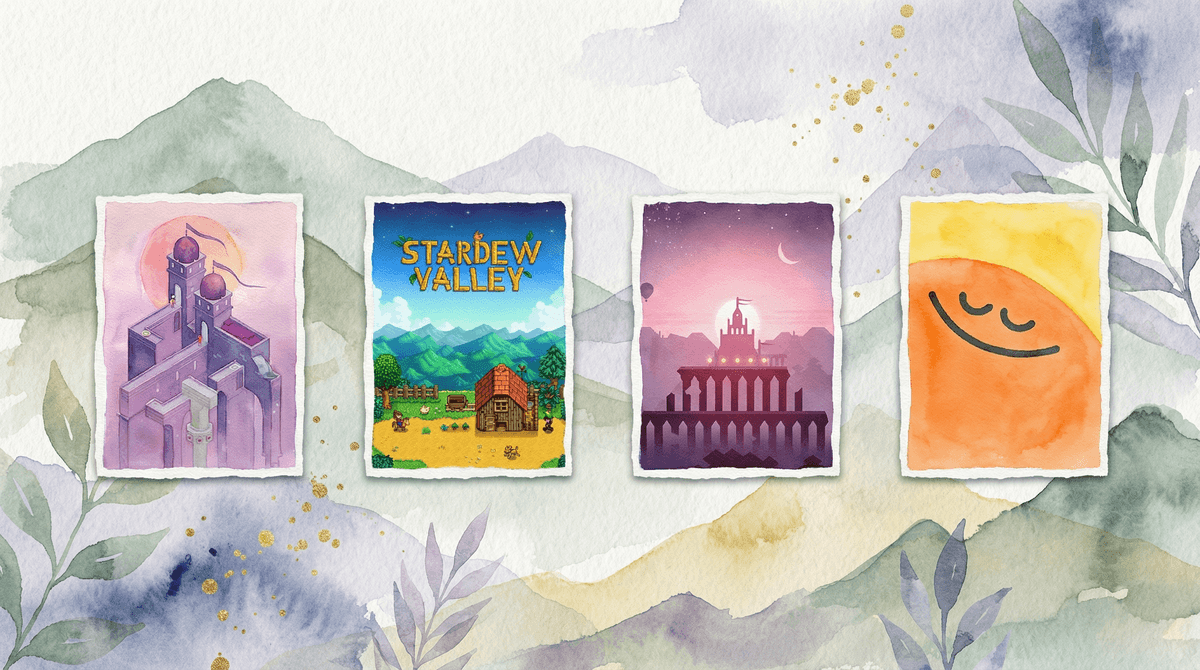
7 Games and Apps to Help Kids Navigate Overstimulation
Look, I get it. Sometimes screens are the problem — the flashing colors, the constant notifications, the autoplay that keeps serving up more and more content until your kid is basically vibrating. But sometimes? Screens can actually be part of the solution when you need to help a dysregulated kid find their center again.
The key is knowing which apps and games actually calm the nervous system instead of revving it up like they just chugged a Mountain Dew.
Overstimulation happens when a kid's sensory system gets overloaded — too much input, too fast, with not enough time to process it all. Think: loud noises, bright lights, chaotic environments, or yes, rapid-fire content designed to hijack attention.
For some kids, this looks like meltdowns. For others, it's zoning out or getting weirdly hyper. And here's the thing: not all screen time is created equal. A kid playing Subway Surfers while watching YouTube shorts while texting friends is in a completely different neurological state than a kid doing a guided breathing exercise on an app.
The games and apps on this list are specifically designed (or at least well-suited) to help kids downregulate — to move from that revved-up, overstimulated state back to something calmer and more grounded.
1. Headspace for Kids (Ages 5+)
This is the gold standard for kid-friendly meditation and mindfulness. The animations are gentle (not overstimulating), the voiceovers are soothing, and the exercises are short enough that kids won't bail halfway through. There are specific meditations for calming down, falling asleep, or dealing with big feelings.
Why it works: Guided breathing and body awareness exercises literally activate the parasympathetic nervous system — the "rest and digest" mode that counters the "fight or flight" response.
2. Calm (Ages 6+)
Similar vibe to Headspace, but Calm has some features that really shine for overstimulated kids: Sleep Stories (including ones read by celebrities that older kids might actually listen to), nature sounds, and really beautiful visual scenes. The app isn't specifically designed for kids, but the kids' section is excellent.
Pro tip: The "Breathe Bubble" visual is perfect for kids who need something to watch while they regulate their breathing.
3. Monument Valley and Monument Valley 2 (Ages 8+)
These are puzzle games, but they're the complete opposite of frenetic. The gameplay is slow, contemplative, and gorgeous. No timers, no pressure, no loud noises. Just beautiful impossible architecture and gentle problem-solving.
Why it works: Engaging the prefrontal cortex (the thinking, problem-solving part of the brain) can help pull kids out of emotional overwhelm. Plus, the aesthetic is genuinely calming — soft colors, ambient music, smooth animations.
4. Stardew Valley (Ages 10+)
Yes, this is a full farming sim game, but hear me out. Stardew Valley is the definition of a cozy game. You plant crops, fish, talk to villagers, and customize your farm. There's no real way to "lose," no time pressure (you can play at your own pace), and the pixel art style is gentle on the eyes.
The catch: This is better for kids who are starting to come down from overstimulation rather than kids who are in full meltdown mode. It requires some focus, but it's the kind of focus that's restorative rather than draining.
5. Flow Free (Ages 7+)
This is a simple puzzle game where you connect matching colors without crossing the lines. That's it. No story, no characters, no ads screaming at you (if you pay for the ad-free version). Just clean, minimalist puzzles that get progressively harder.
Why it works: Repetitive, low-stakes problem-solving can be incredibly soothing. It's like a fidget toy for your brain.
6. Smiling Mind (Ages 7+)
This is a free mindfulness app developed by psychologists and educators, specifically designed for kids and teens. It has programs organized by age group, and covers everything from managing stress to improving sleep to dealing with difficult emotions.
The bonus: It's completely free and has no ads, which is basically a unicorn in the app world.
7. Alto's Adventure and Alto's Odyssey (Ages 8+)
These are endless runner games, but they're zen endless runners. You snowboard (or sandboard) down beautiful, minimalist landscapes while collecting coins and doing tricks. The music is ambient, the visuals are calming, and while there is a "fail" state, it's gentle — you just start again.
Why it works: The rhythm of the gameplay can be almost meditative. It's engaging enough to hold attention but not so demanding that it ramps up stress.
These aren't magic bullets. If your kid is in full meltdown mode, an app probably isn't going to fix it — they might need movement, a snack, a hug, or just time. But these tools can be helpful for:
- Transitions — moving from high-energy activities to calmer ones
- Winding down before bed
- Self-regulation practice when kids are starting to feel overwhelmed but aren't totally dysregulated yet
- Alternatives when you need screen time but want to avoid the overstimulating stuff
Not all kids will respond to all of these. Some kids find meditation apps boring or frustrating. Some kids need more active engagement than Monument Valley provides. Pay attention to what actually helps your kid regulate, not what the internet says should work.
Consider the context. If your kid is overstimulated because they've been on screens for three hours, adding more screen time — even calm screen time — might not be the answer. Sometimes the best response to screen-induced overstimulation is... no screens.
The goal here isn't to add more apps to your kid's rotation just for the sake of it. It's to have some tools in your back pocket for those moments when you need to help your kid's nervous system downshift.
Think of these as the digital equivalent of a weighted blanket or a quiet corner with soft lighting — they're environmental supports that can help with regulation when used intentionally.
And here's the real talk: If you're finding that your kid is frequently overstimulated by their regular screen diet (Roblox, YouTube, TikTok, whatever), that's worth examining. These calming apps are great tools, but they shouldn't be the Band-Aid you're constantly applying to fix the same wound.
Try one this week. Pick the app or game that seems like the best fit for your kid's age and interests, download it, and introduce it during a calm moment — not in the middle of a meltdown.
Model it yourself. If you want your kid to use Headspace when they're stressed, they need to see you using it when you're stressed. Kids learn regulation by watching us regulate (or fail to regulate, let's be honest).
Create a "calm down" playlist. Whether it's these apps, certain music, specific YouTube videos, or whatever works for your family, having a go-to list of calming content makes it easier to access in the moment.
And if you're thinking "okay but what about all the other apps my kid is using that might be causing the overstimulation in the first place?" — yeah, let's talk about that .
.