

The Ultimate Guide to Disney+ Parental Controls
Look, Disney+ seems like it should be the safest streaming service out there, right? It's Disney. How bad could it get?
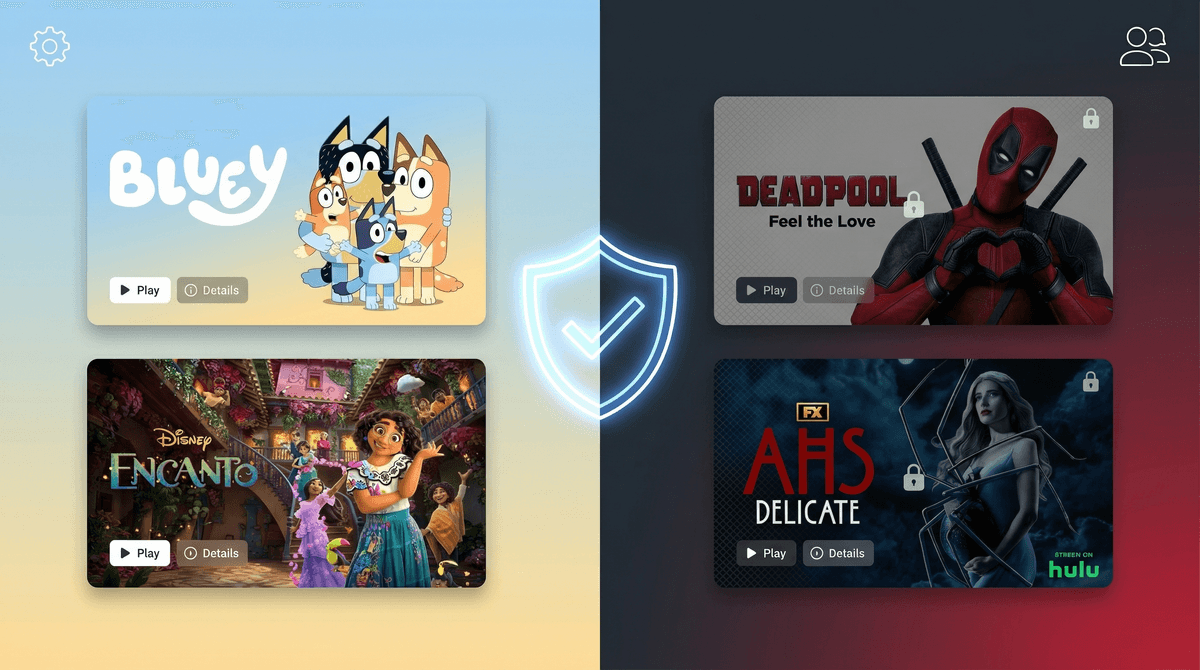
Well, here's the thing: Disney+ now includes everything from Pixar and Marvel to Star Wars, National Geographic, and (depending on your region) all the Fox/Hulu content that came with that acquisition. So yeah, you've got Bluey and Encanto sitting right next to Deadpool and American Horror Story.
The good news? Disney+ actually has pretty solid parental controls. The bad news? Most parents don't set them up properly (or at all), and then wonder why their 6-year-old stumbled onto The Walking Dead.
Let's fix that.
Disney+ parental controls let you create separate profiles for each family member with different content ratings and restrictions. Think of it like having different rooms in your house with different rules—your kid's profile shouldn't look like yours.
The main tools you have:
- Kids Profiles - Auto-filtered to age-appropriate content
- Content Ratings - Restrict by rating (G, PG, PG-13, etc.)
- Profile PINs - Lock your profile so kids can't just switch over
- Account PINs - Require a PIN to access mature content on any profile
Here's what I see happening: Parents set up Disney+ thinking "it's all family content," create one profile for everyone, and call it a day. Then their 8-year-old is browsing and sees a thumbnail for Logan or some intense Marvel show that's way too violent.
The reality: Disney+ now has content rated up to TV-MA and R. That's the same rating as anything on Netflix or HBO Max. The Disney brand doesn't mean everything is kid-friendly anymore.
And unlike Netflix where you might expect mature content, Disney+ catches parents off guard. Your kids aren't necessarily seeking out inappropriate stuff—they're just browsing what the algorithm serves up.
Step 1: Create Separate Profiles
First things first—everyone needs their own profile. Not "Kids Profile" that all three children share. Individual profiles.
How to do it:
- Log into Disney+ on your device
- Click on your profile icon
- Select "Add Profile"
- Name it (use your kid's actual name)
- Important: Toggle on "Kids Profile" for children under 12
When you enable Kids Profile, Disney+ automatically filters content to ratings of TV-7FV and G. That's it. No Marvel violence, no intense documentaries, just age-appropriate content.
Step 2: Set Content Ratings for Older Kids
If your kid is 10+ and you want them to access some PG-13 content but not everything, you'll want to use content rating restrictions instead of the basic Kids Profile.
How to do it:
- Go to your profile icon → "Edit Profiles"
- Select the kid's profile
- Under "Parental Controls," select "Content Rating"
- Choose the max rating you're comfortable with:
- 9+: Includes TV-PG and PG content
- 12+: Includes TV-PG and PG content
- 14+: Includes TV-14 and PG-13 content
- 16+: Includes TV-14 and PG-13 content
- 18+: All content including TV-MA and R-rated
Real talk: The jump from 12+ to 14+ is significant. At 14+, you're allowing PG-13 movies and TV-14 shows, which can include intense violence, scary themes, and some language. Know what you're signing up for.
Step 3: Lock Your Profile with a PIN
This is the step most parents skip, and it's honestly the most important one.
If you don't PIN-lock your profile, your kid can just... click on it. They'll have access to everything. All your watch history, all the mature content, everything.
How to do it:
- Go to your profile icon → "Edit Profiles"
- Select YOUR profile (the adult one)
- Toggle on "Profile PIN"
- Create a 4-digit PIN
- Do not make it 1234 or your kid's birthday
Do this for every adult profile in your household.
Step 4: Add a Content PIN (Optional but Recommended)
A content PIN requires anyone to enter a code before watching mature content, even on adult profiles. This is great if you have curious kids who might try to access your profile when you're not around, or if you want an extra layer of protection.
How to do it:
- Go to your profile icon → "Account"
- Under "Parental Controls," find "Content Rating PIN"
- Enable it and create a PIN
Now, even if someone gets into an adult profile, they'll need the PIN to watch anything rated above your threshold.
Ages 3-7: Use Kids Profile, no exceptions. The content is curated and safe. They'll have plenty to watch—Disney Junior shows, Pixar movies, classic Disney films.
Ages 8-11: Still use Kids Profile for most kids, but if you have a mature 10-11 year old who's ready for some PG content, consider the 9+ rating instead. Just know that this opens up movies like the live-action The Lion King and some Marvel content that might be intense.
Ages 12-14: This is where it gets tricky. Some 12-year-olds are ready for PG-13 Marvel movies; others aren't. The 14+ rating gives access to most Marvel content, Star Wars shows like The Mandalorian, and some National Geographic documentaries that can be intense (animal violence, survival situations). You can read more about Marvel content ratings here .
.
Ages 15+: At this point, you're probably negotiating what they can watch rather than using blanket restrictions. The 16+ and 18+ ratings include everything, so if you're using those, you're essentially saying "I trust you to make good choices."
The algorithm doesn't care about your values. Even with a Kids Profile, Disney+ will recommend content based on what's popular and what your kid watches. If they binge Star Wars: The Clone Wars, they'll get recommended more action content. The algorithm isn't trying to show them inappropriate stuff, but it's also not considering whether your family is okay with cartoon violence.
Profile switching is easy. If you don't use PINs, kids can switch profiles with one click. I've seen 6-year-olds figure this out in about 30 seconds.
Content ratings aren't perfect. A PG-13 Marvel movie and a PG-13 coming-of-age drama are very different things. Ratings tell you what might be in the content (violence, language, themes), but not the context or intensity. Read the parent reviews on Screenwise for specific titles you're unsure about.
International differences matter. If you're outside the US, your Disney+ might include "Star" content (basically Hulu's library). This means even MORE mature content. The parental controls work the same way, but you need to be extra vigilant about setting them up.
Mistake #1: Creating one "Kids" profile for all children. Your 5-year-old and 12-year-old shouldn't have the same content access. Make separate profiles.
Mistake #2: Not using PINs. This is like leaving your front door unlocked and hoping no one wanders in.
Mistake #3: Setting it up once and never revisiting. Your 10-year-old who needed a Kids Profile last year might be ready for 9+ or 12+ content now. Check in every 6-12 months.
Mistake #4: Assuming Disney = Safe. That brand trust is exactly why Disney+ can catch you off guard. They have R-rated content now. Treat it like any other streaming service.
Disney+ parental controls are actually pretty good—if you use them. The problem is most parents don't, either because they don't know they exist or because they trust the Disney brand too much.
Here's your action plan:
- Create individual profiles for each kid
- Enable Kids Profile for children under 12 (or use content ratings for older kids)
- PIN-lock all adult profiles
- Consider adding a content PIN for extra security
- Revisit these settings every 6-12 months as your kids grow
And look, even with all these controls in place, you should still talk to your kids about what they're watching. Ask them what shows they like, watch episodes together, and create a culture where they feel comfortable telling you if something scared them or made them uncomfortable.
Learn more about having conversations about screen content with your kids.
Technology can help, but it's not a substitute for being involved in your kid's digital life. Disney+ parental controls are a tool—a good one—but they work best when combined with actual parenting.
Now go set up those PINs. Your future self will thank you when your 7-year-old doesn't accidentally stumble onto Alien.