

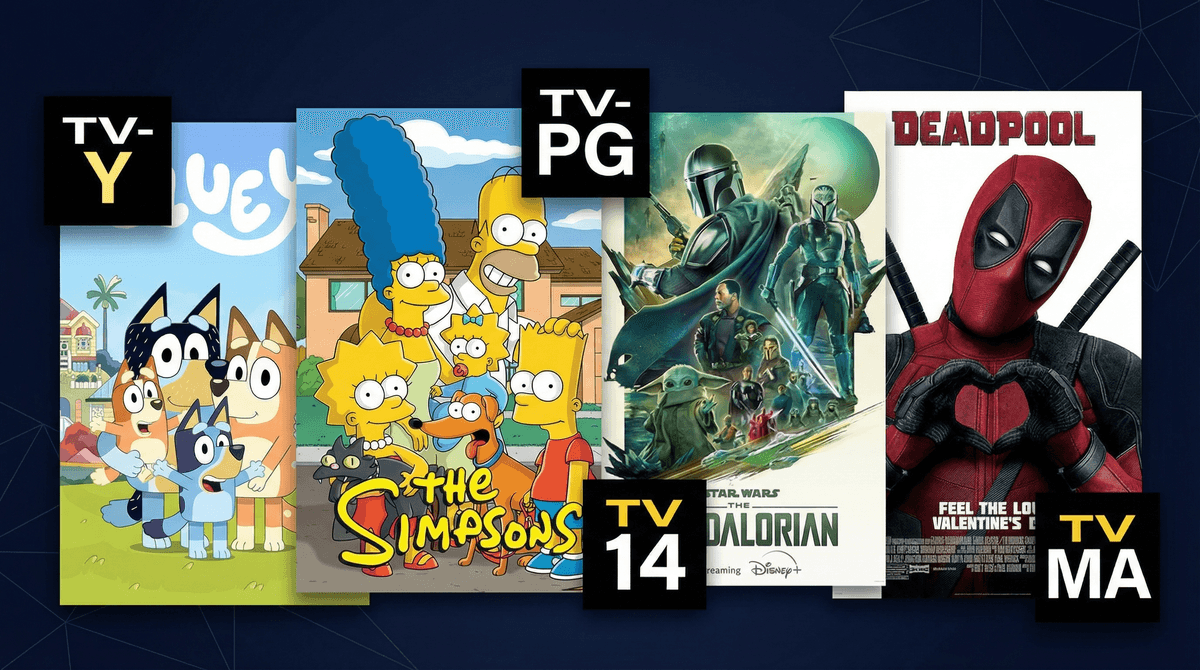
Disney+ uses a rating system that ranges from TV-Y (suitable for all children) to TV-MA (mature audiences only). But here's the thing: Disney+ isn't just Mickey Mouse anymore. When Disney acquired Fox, Hulu content, and basically half of Hollywood, suddenly the "family-friendly" platform started hosting everything from The Simpsons to Deadpool.
The platform uses standard TV and movie ratings (G, PG, PG-13, TV-Y, TV-Y7, TV-PG, TV-14, TV-MA), but unlike Netflix's simplistic age categories, Disney+ actually sticks to the official MPAA and TV Parental Guidelines systems. Which is great for consistency, but also means you need to actually understand what those ratings mean.
Here's what those letter combos actually tell you:
For Movies:
- G - General Audiences (truly all ages)
- PG - Parental Guidance Suggested (some material may not be suitable for children)
- PG-13 - Parents Strongly Cautioned (some material inappropriate for children under 13)
- R - Restricted (under 17 requires accompanying parent or guardian)
For TV Shows:
- TV-Y - All Children (ages 2-6)
- TV-Y7 - Directed to Older Children (ages 7+)
- TV-Y7-FV - Older Children with Fantasy Violence
- TV-G - General Audiences
- TV-PG - Parental Guidance Suggested
- TV-14 - Parents Strongly Cautioned
- TV-MA - Mature Audiences Only
The ratings creep on Disney+ has been real. When your kid opens the app expecting Bluey and the algorithm serves up a thumbnail from Family Guy, we have a problem.
And let's be honest: the ratings themselves are wildly inconsistent. A PG movie from 1985 might have content that would earn a PG-13 today. The original Star Wars trilogy is rated PG, but there's literally a scene where Luke's aunt and uncle are burned alive. Meanwhile, some TV-PG shows have more mature themes than PG-13 movies.
The other issue? Disney+ defaults to showing ALL content unless you actively set up profiles with restrictions. So if you're sharing a family account without proper controls, your 7-year-old can absolutely stumble into TV-14 territory.
Here's what catches parents off guard: Disney+ has a LOT of content that doesn't feel "Disney" at all. When they added the "Star" section (in some countries) or integrated Fox/Hulu libraries, suddenly you've got:
- Marvel shows with serious violence - The Punisher, Daredevil, and Jessica Jones are TV-MA for a reason
- Adult animated shows - Family Guy, American Dad, Bob's Burgers (which is actually pretty tame but still TV-14)
- R-rated movies - The Deadpool films, Logan, Alien franchise
- Documentary content - Some National Geographic docs cover mature topics like violence, death, and sexuality
The platform added a "content rating" feature in 2021 where you can restrict profiles to specific rating levels, but it's not enabled by default. Which means if you set up Disney+ when it launched and haven't revisited your settings, you might not have any guardrails in place.
Here's your actual action plan:
1. Create separate profiles for each kid Don't use a shared "Kids" profile. Individual profiles let you customize age restrictions per child and track what they're actually watching.
2. Set age ratings on each profile
- Go to your profile settings
- Select "Edit Profiles"
- Choose the kid's profile
- Under "Parental Controls," set the content rating limit
- For elementary kids: TV-Y7 or TV-G max
- For middle schoolers: TV-PG (with conversations about what they're watching)
- For high schoolers: TV-14 (and maybe PG-13 movies, depending on your family values)
3. Enable the Kids Profile option for younger children This creates a curated experience that only shows content rated TV-Y, TV-Y7, G, and PG. The interface is also simplified and more colorful. Great for kids under 8.
4. Use a PIN Set a PIN that's required to access profiles without restrictions. Otherwise, your kid will just switch to your profile when they want to watch something blocked on theirs. (Ask me how I know this.)
5. Review "Continue Watching" Check in periodically on what's showing up in their Continue Watching row. It's the easiest way to spot if they're accessing content you didn't intend, or if the algorithm is serving up questionable recommendations.
Ages 2-6: Stick to TV-Y and G At this age, use the Kids Profile exclusively. You're looking at classic Disney animation, Disney Junior shows, and early learning content. The algorithm here is actually pretty good at staying in lane.
Ages 7-10: TV-Y7 and selective TV-G/PG This is where you start needing to preview content. TV-Y7-FV (fantasy violence) can range from Pokemon battles to surprisingly intense superhero fights. Some PG movies from the 80s and 90s have content that feels more intense than modern PG-13 films. Read this guide about Marvel content on Disney+ if your kid is begging to watch the MCU films.
Ages 11-13: TV-PG with conversations Middle school is when peer pressure around media really kicks in. Your kid's friends are probably watching TV-14 content at home, and they'll want to keep up. TV-PG is a reasonable middle ground, but you'll want to watch some shows together and talk about what you're seeing. The Mandalorian is TV-PG but has some genuinely scary moments and violence.
Ages 14+: TV-14 and selective PG-13/R At this point, blanket restrictions become less effective than ongoing conversations. Many families start allowing TV-14 content and PG-13 movies, with case-by-case decisions on R-rated films. The Marvel Netflix shows (Daredevil, The Punisher) are TV-MA for graphic violence and should be treated like R-rated movies.
The ratings don't tell you WHY something earned its rating. A PG-13 movie could have that rating for violence, language, sexual content, drug use, or thematic elements. Disney+ doesn't provide content descriptors on the main screen (unlike Netflix's "fear, violence, language" tags), so you often need to dig deeper.
Common Sense Media is your friend. Before greenlighting a new show or movie, spend 60 seconds checking the Common Sense Media review. They break down exactly what content earned the rating and give age recommendations that are often more conservative (and more helpful) than official ratings.
The algorithm doesn't care about your parenting philosophy. Just because you let your kid watch The Simpsons doesn't mean you want Disney+ auto-playing Family Guy next. The recommendation engine will push content at the edge of whatever rating limit you've set, so you can't just set it and forget it.
International content has different standards. Some shows and movies on Disney+ come from international markets with different rating systems. What's considered appropriate for kids in one country might not align with your family's values.
Disney+ age ratings are more reliable than Netflix's vague categories, but they're not a substitute for actually knowing what your kids are watching. The platform has genuinely great content for every age, but it also has a lot of stuff that will absolutely not align with your family's values if you're not paying attention.
Set up those parental controls. Use separate profiles. Check in on what they're watching. And when in doubt, co-watch the first episode of any new show before you greenlight a binge session.
Right now:
- Open Disney+ and check your profile settings
- Set age-appropriate content ratings on each kid's profile
- Enable a PIN for unrestricted profiles
- Switch younger kids to the Kids Profile option
This week:
- Browse through your kid's Continue Watching and see what's been on their radar
- Preview the first episode of any new shows they want to watch
- Have a conversation about why certain content is restricted and when that might change
Ongoing:
- Check in monthly on their viewing history
- Revisit rating restrictions as they get older
- Keep the conversation open about what they're watching and why
Want to explore age-appropriate alternatives to specific shows? Or wondering if your kid is ready for Marvel content? The Screenwise chat can help you figure out what works for your family.