


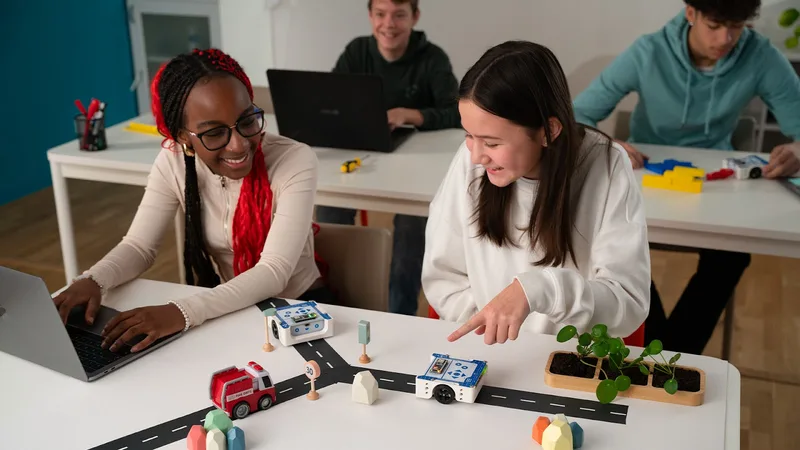

Robotics and making aren’t about preparing your kid for a job at a car factory in 2045; they’re about moving them from the "consumer" side of the screen to the "creator" side. Most kids spend their digital lives inside worlds someone else built; robotics is the moment they realize they can build the world themselves. You don't need a dedicated workshop or an engineering degree to start—you just need a kitchen table that you don't mind getting a little messy and the right entry point.
TL;DR: To start a maker habit, focus on high-engagement, low-friction tools. Makey Makey and Tinkering Labs are the best "zero-entry" starts for younger kids (ages 6-8). For those ready to understand how things actually work, Snap Circuits teaches the physics, while micro:bit is the perfect introduction to tangible coding.
The term "STEM" has been marketed into oblivion, but the core idea—making stuff—is still the most effective way to build a kid’s confidence. When a kid writes three lines of code and a physical light on their desk turns red, something clicks that a screen-only game can't match. It’s the difference between playing a guitar and playing Guitar Hero. We’re looking for tools that have a "low floor" (easy to start) and a "high ceiling" (they don't outgrow them in a week).
If you start with a 400-page manual on resistors, your kid will be back on YouTube within ten minutes. You want immediate results.
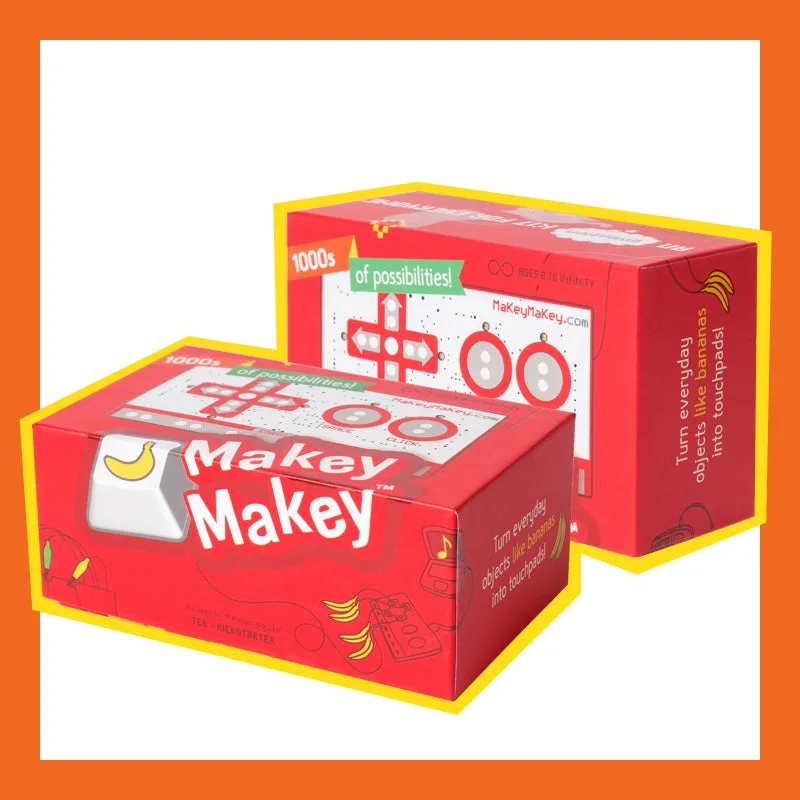
- Makey Makey: This is the ultimate "science is magic" kit. You plug it into a computer, clip an alligator lead to a banana and another to yourself, and suddenly the banana is a piano key. It works by turning anything that can conduct even a tiny bit of electricity (fruit, Play-Doh, pencil lead) into a keyboard key. It’s the perfect way to show a 6-to-10-year-old that the physical world can talk to the digital one. No coding is required to start, but if they want to get fancy, they can use it to control games they build in Scratch.
- Tinkering Labs: If your kid is the type who constantly takes things apart, give them this. It’s "MacGyver in a box." Unlike most kits that give you a step-by-step IKEA-style manual, this gives you a motor, some wood, some rubber bands, and a challenge (like "build a machine that draws circles"). It forces them to fail, iterate, and try again. It’s messy, it’s analog, and it’s brilliant for building actual problem-solving muscles.
Before kids can build a robot that follows a line or senses a wall, they need to understand how power actually moves.
- Snap Circuits: This is the gold standard for a reason. It replaces the frustration of tiny, loose wires and breadboards with satisfying plastic pieces that snap together like LEGOs. They’ll build FM radios, motion detectors, and flying fans. The "click" of the pieces is a great tactile feedback loop.
- Pro-tip: Don't just let them follow the diagrams. Once they build the "Space War Integrated Circuit," ask them why it stops working if you remove one specific blue piece. That’s where the actual learning happens.
Once they’ve played with the hardware, they’ll want to start "bossing it around." This is where microcontrollers come in.
- micro:bit: If you only buy one thing on this list, make it this. It’s a tiny, pocket-sized computer developed by the BBC. It has a built-in compass, accelerometer, and a grid of LEDs. It’s dirt cheap, and the coding interface is incredibly friendly. Kids can start with "Block" coding (dragging and dropping chunks of logic) and graduate to Python when they’re ready. It’s the best bridge from "I’m playing a game" to "I’m building an engine."
- Arduino: This is for the middle-schooler or teen who is ready for the big leagues. Arduino is the industry standard for DIY electronics. The Arduino website has a "For Kids" section that is surprisingly good, but be warned: this involves real C++ coding. One missing semicolon will break the whole project. It’s frustrating, but it’s the most "real-world" skill on the list. If they can master Arduino, they can build literally anything—from a smart plant-watering system to a drone.
Eventually, your kid will want specific parts—a bigger motor, a GPS sensor, or some "wearable" tech like LEDs that sew into a jacket.
- Adafruit: Think of this as the ultimate candy store for makers. Founded by an MIT engineer, it’s a site that treats kids like actual creators. Their Circuit Playground Express is a phenomenal alternative to the micro:bit, packed with even more sensors. Their tutorials are the best in the business—clear, funny, and deeply technical without being boring.
The biggest mistake parents make is buying a kit, dropping it on the table, and walking away. Robotics is a social hobby.
- Do the first project together. You don't need to be the expert—in fact, it's better if you aren't. Let them see you struggle with a wiring diagram. Show them how to look up the answer when you're stuck.
- Focus on the "Why." If a project fails, that’s the most valuable moment. Ask, "Where do you think the power is getting stuck?"
- The Semicolon Trap. If they're coding, remind them that computers are very fast but very stupid. They only do exactly what you tell them. A single typo isn't a failure of their brain; it's just a typo.
The "Disaster Zone" factor: If you are the kind of person who needs a pristine kitchen table at all times, robotics will test you. Making involves wood scraps, wire clippings, and half-finished "inventions" that can't be moved because the glue is drying. The move: Get a large plastic tray or a dedicated "project board" (even a piece of cardboard works). When it's time for dinner, the whole project can be slid onto a shelf without being destroyed.
Q: What age is best to start robotics? You can start as early as 5 or 6 with tactile kits like Tinkering Labs or Makey Makey. The "sweet spot" for actual coding and circuits is usually around 8 to 10. By 12, they should be looking at Arduino or Adafruit for more complex builds.
Q: Do I need to know how to code to help my kid? Not at all. Most of these tools use "Block-based" coding, which is basically logic puzzles. If you can understand "If [this happens], then [do that]," you can help your kid. In many cases, your kid will surpass your technical knowledge within a month—and that’s a win.
Q: Is robotics expensive? It can be, but it doesn't have to be. A micro:bit is usually under $25. The "hidden" cost is often batteries and specialized sensors. Start small with one kit and only buy more parts once they’ve exhausted what’s in the box.
Q: Is it safe for kids to do this alone? Most beginner kits are low-voltage (AA batteries or USB power), so there’s no risk of a dangerous shock. However, Arduino and Adafruit projects eventually involve soldering irons (which get very hot) and small components that are a choking hazard for younger siblings. Always check the "Safety" section of the manual.
Robotics is about turning "I don't know how that works" into "I can figure that out." Start with Makey Makey for the fun, move to Snap Circuits for the fundamentals, and land on micro:bit for the logic. Your kitchen table might never be the same, but your kid’s confidence will be.
- For more ways to build a creator habit, check out our best apps for kids list (filter for "coding").
- If they love the hardware side, see our digital guide for elementary school.
- Find more maker projects for a 10-year-old