


If your kid is constantly doodling on napkins or humming made-up tunes, the tablet in your house is either a wasted opportunity or your best friend. Most "creative" apps for kids are actually just digital coloring books—low-effort, high-dopamine tap-fests that don't actually teach a kid how to make anything. But the right tools turn a screen into a legitimate studio where a kid can build real skills that last until they're filing taxes.
TL;DR: The best creative apps for kids prioritize "creation over consumption" by providing professional-grade tools in an accessible way. For drawing, Procreate is the gold standard for iPad users, while Autodesk Sketchbook offers a distraction-free alternative. For music, Bandimal is the perfect intuitive entry point for younger kids, while GarageBand offers a recording studio that grows with them into adulthood.
If you're tired of finding crayon marks on the baseboards, digital art is a godsend. But more than that, it introduces kids to the concept of layers, undo buttons (the ultimate confidence builder), and infinite brushes.
This is the app professionals use to illustrate movie posters and children's books, yet it’s intuitive enough for an eight-year-old to figure out in an afternoon. It’s a one-time purchase of about £13, which is cheaper than a decent set of markers and won't run out of ink. The "Watch for" here is the hardware: it’s iPad-only, and to really get the value, you need an Apple Pencil. Without the stylus, it’s just finger painting; with it, it’s a career path.
If Procreate feels a bit too "pro" or you aren't on an iPad, this is your move. It’s incredibly clean. The interface literally disappears while you’re drawing, which is great for kids who get distracted by too many buttons. It features "predictive stroke"—a fancy way of saying it helps smooth out shaky lines—which is a huge win for kids still developing their fine motor skills.

Music apps often fall into two camps: "press a button to hear a song" or "here is a complex piano interface that requires five years of lessons." These two picks find the middle ground.
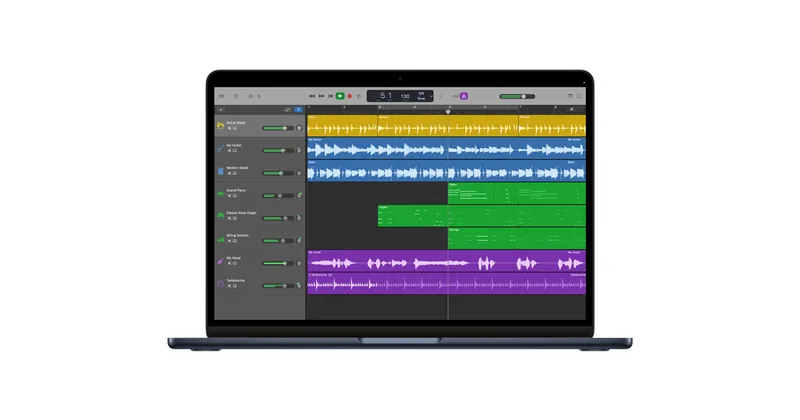
This is the ultimate digital sandbox. It’s free on Apple devices and it’s a full-blown recording studio. The "Smart Instruments" are the secret sauce here; they allow a kid to play a guitar or piano in a specific key so they literally cannot play a "wrong" note. It turns music theory into a game of exploration. Be warned: it eats storage space for breakfast. If your kid starts recording 32-track masterpieces, you’ll be deleting old photos of your dog to make room.
For the 4-to-9 crowd, GarageBand can be a lot. Bandimal is the "entry drug." Instead of waveforms and sliders, kids use a llama, a jellyfish, and a panda to compose beats. It’s brilliant because it uses a pentatonic scale—meaning everything they compose sounds like a real song. It builds the "ear" for rhythm and melody without the frustration of traditional practice. The only bummer? You can't easily export the songs to show off to Grandma.
If you have a toddler or a preschooler, you know most "creative" apps for that age are loud, flashy, and designed to keep them clicking. Pok Pok is the opposite. It’s a Montessori-inspired digital playroom. There are no levels, no points, and no "you win!" screens. It’s just open-ended toys. It’s the digital equivalent of a bucket of wooden blocks. It requires a subscription, but for parents who want a low-stimulation option that doesn't fry a kid's attention span, it’s worth the monthly fee.
The biggest hurdle for creative apps isn't the cost—it's the onboarding. Most kids will open Procreate or GarageBand, scribble for five minutes, get overwhelmed by the menus, and go back to watching YouTube.
The pro-tip: Sit with them for the first 20 minutes. Don't teach them everything; just show them how to open a new canvas, how to undo a mistake, and how to change a brush color. Once they realize they have "god mode" over their art, they’ll take it from there.
Q: Do I really need an Apple Pencil for these drawing apps? For Procreate and Autodesk Sketchbook, yes. Using a finger is fine for scribbling, but a pressure-sensitive stylus is what makes it feel like "real" art. It’s the difference between painting with a brush and painting with a marshmallow.
Q: Are there any hidden costs in these creative apps? Procreate is a one-time purchase. GarageBand and Sketchbook are free (though Sketchbook has a "Pro" version). Pok Pok is the only one on this list that requires a recurring subscription. None of these have "predatory" in-app purchases or ads.
Q: My kid isn't "musical." Will they still like GarageBand? Actually, GarageBand is often better for kids who aren't classically trained. The "Live Loops" feature lets them act like a DJ, triggering pre-made sounds to build a track. It’s about building confidence and understanding how sounds fit together, not reading sheet music.
If you're going to give your kid a screen, give them one that asks them to do something. Moving from a YouTube scroll to a Procreate canvas or a GarageBand session is the ultimate upgrade in digital intentionality.
- For the full age-by-age breakdown of tools, see our best apps for kids list.
- If your kid is still in the preschool stage, check out our digital guide for preschoolers.
- Looking for more ways to build skills? See our best games for kids list for titles that focus on problem-solving and logic.